Showing posts with label Cloud Applications. Show all posts

Wednesday, 19 January 2022

Chaos Engineering by Azure

Azure Chaos Studio - Chaos engineering experimentation | Microsoft Azure 


Chaos is a part of everyday life. Giving a mathematical twist to the subject “Chaos describes a situation where typical solutions (or orbits) of a differential equation (or typical evolutions of some other model describing deterministic evolution) do not converge to a stationary or periodic function (of time) but continue to exhibit a seemingly unpredictable behavior” .  The key word here is unpredictable behavior.

The IT systems are no stranger to unpredictable behavior the probability of unpredictable behavior becomes higher when cloud is added to the equation. There a long laundry list of items which can fail in a cloud architecture. Most architect now also have begun to add another dimension to there discussion is resiliency or chaos engineering.

What is Chaos engineering?

Chaos engineering is a methodology that helps developers attain reliability by hardening services against failures in production. 

How is it done?

Deliberating injecting faults that causes the system to fail. For instance taking dependencies offline (stopping API apps, shutting down VMs, restricting access, introducing slowness in services and many more. This can help in identifying if the applications architecture is indeed resilient to failure.

Of course resiliency also can be measured which is a different topic of discussion.

Introducing Azure Chaos

Azure Chaos is a service which can help in improving the resiliency by method of experiments. At a simplest level an experiment is a plan to introduce controlled faults into the systems.

To start with Azure Chaos has a good list of faults given below.


What does AWS have in the same space?

AWS has Fault Injection Simulator, which is a fully managed service for running fault injection experiments on AWS that makes it easier to improve an application’s performance, observability, and resiliency


Does Azure Chaos support custom faults?

For faults which are not supported the option is go with agent based fault, which requires setup and installation of the chaos agent, unlike a service-direct fault, which runs directly against an Azure resource without any need for instrumentation.

Does it have any limitation?

Find the limitations here

Parting word…

Architect should start looking at all architecture from a chaos engineering stand point of view, especially when cost of downtime on business can be very high.  

Thursday, 17 April 2014

Azure RMS (Rights Management Service)


With growing need data protection and compliance, Data security is always a key concern for any organization. Documents carry sensitive data. The data availability on multiple devices is critical to the business, and equally important is securing this data. Data at rest and transit both need to secure.

Almost a decade ago MSFT released it Rights Management Service for Windows 2003, later came AD RMS with 2008, 2012. In the past 1 year we have seen Azure take up the brigade of RMS , assuming there is Azure Active Directory.

With buzz around HIPAA compliance and Azure, still no clear directive on whether Azure is fully compliant

What most customers want is to implement a robust security solution to protect the organization’s data available in file servers, desktops via rights protecting the data, and make this data available via secure access. The data security and data-access control will help in enabling sharing of sensitive data in a secure and HIPAA compliant manner, and ensure confidentiality, integrity and authorized access to its data.

Microsoft Azure cloud service based Rights Management (RMS is the answer. This solution concept uses Azure Rights Management Service (RMS) as the basic building block for securing data and documents / files. The devices used for data access may or may not be connected to the organization network. (Devices are assumed to be organization locked and HIPAA compliant).

image

Azure RMS will serve as a basic building block for encryption / decryption of documents / files with-in the client’s organization. Windows Server 2012 File Classification Infrastructure (FCI) will assist in automating the process of applying rights to documents. Most of the files to be accessed within the organization will be stored on the Windows File Server which has File Classification Infrastructure Service installed.

Azure RMS protection comes with 3 basic type content protection

  • Native RMS Microsoft formats– Office files
  • Non MSFT formats- Native PDF, Image files (bmp, jpeg…) txt. These will work only with P-Viewer tool for consumption and FoxIT for PDF.  One can write additional plugins if required.
  • Container level protections-  P-file container which imposed encryption/ decryption at a container level. The important point to note is once the files is out the container its unencrypted and has no rights management and is not secured. Container can have any files types.

Windows Server File classification Infrastructure (FCI) feature will identify sensitive files and encrypt them with RMS. FCI crawls file shares for files meeting certain criteria and tag them based on the results. Tags will be stored in the file attributes and persist even after moving files to another NTFS storage. Once files are tagged, they will be automatically applicable for "RMS Encryption" based on certain tags with RMS templates.

The RMS templates will be defined are organization-wide. With FCI one can perform different actions on files you identify as sensitive. One of them is to use the in-box RMS protection capability and there can be custom tasks for supporting other types of files trough two options:

· Putting files in encrypted container using Rights Protected Folder Explorer (RPFe)

· Triggering specific RMS protectors for certain types of files, such as PDF, CAD or images, supported with partner solutions

RPEe as a better option for protecting other file types. File Classification Infrastructure (FCI) provides insight into the data by automating classification processes. Rights Protected Folder Explorer (RPFe) is a Windows based application that allows you to protect files and folders.

A Rights Protected Folder is similar to a file folder in that it contains files and folders. However, a Rights Protected Folder controls access to the files that it contains, no matter where the Rights Protected Folder is located. By using Rights Protected Folder Explorer, one can securely store or send files to authorized users and control which users will be able to access those files while they are in the Rights Protected Folder.

Have implemented Azure RMS for more than 2 customers. So far so good.

Saturday, 16 March 2013

Failsafe Computing in Cloud


Origins of the Cloud Computing Platform are closely linked to Service Oriented Architecture. In the cloud we think of everything as Service. These services have SLO’s ( Service Level Objective) very similar to SLA’s.

Why Failsafe Computing in Cloud?

With more and more organization increasing adopting the cloud platform, the perils of the same are many. We have seen amazon go down a couple of times in the 2012,2013 http://www.slashgear.com/amazon-com-is-down-its-not-just-you-update-back-in-business-31267671/ & Azure Outage http://www.zdnet.com/microsofts-december-azure-outage-what-went-wrong-7000010021/. The need for Failsafe Computing in Cloud is Now.

Failsafe Computing in Cloud is not an after thought like any other architecture discipline its one of the non functional requirement which has found its rightful place.

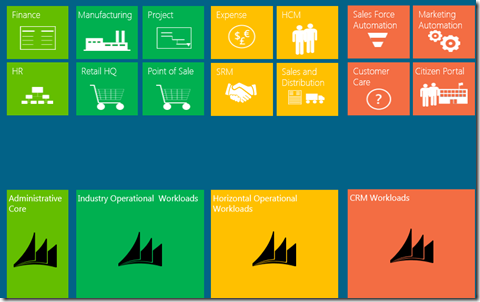
Any application build for cloud is structured around services. These services have workload associated with them. Services can be as generic as Sales Force Automation or Retail as an overarching services which can comprise of many other services to make it happen. The workload is a more broader concept example below.
image

What Failsafe Services really mean?

We architect the cloud platform on the guidelines of SOA, We define Service as basic unit of deployment of course it starts from conceptual architecture. For example a retail service is an independent functionality in the cloud going about doing its regular business. We’d expect this service to have defined SLO. The high level attributes of FailSafe Services are

  • Software into Service: In the cloud platform everything is in term of Services. The delivery of cloud projects are in terms of services with defined SLO’s (availability …..)
  • Services not Servers: In the cloud world we have our services deployed on logical vm and have the option of scale out. We no more think in terms of Servers.
  • Decomposition by Workload:Cloud computing provides a layer of abstraction where the physical infrastructure, and even the appearance of physical infrastructure, has less of an impact on the overall application architecture. So instead of an application being required to run on a server, it can be decomposed into a set of loosely coupled services that have the freedom to run in the most appropriate fashion. This is the foundation of the workload model because what may be considered an appropriate way to run for one part of an application may be wildly different for another, hence the need to separate out the different parts of an application so that they can be dealt with separately. An example for workload is “Consider an example of an e-commerce application and the two distinct features of catalogue search and order placement. Even though these features are used by the same user (consumer) their underlying requirements differ. Ordering requires more data rigour and security, whereas search needs to optimally scale. A search being slightly incorrect is tolerable, whereas an incorrect order is not. In this example, the single use case of searching for and ordering a product can be decomposed into two different workloads, and a third if we count the back-end integration with the order fulfilment process.”
  • Utilize Scale Units: Design by Scale Units is around how to define a capacity block for the Service. The model of the capacity of the block addresses unit of scalability, availability for that services. One may argue that adding more vm promotes elastic but on the contrary a scale unit could be a set of vm which can added or removed on the fly.
  • Design for Operations:Every services which runs on cloud has to satisfy some operational asks”. For example all services have to emit a basic level of telemetry like logging on health, issues, exception.

What does a service comprise of?

A service can comprise a number of web or worker role or persistent vm roles and storage (tables, queues, blob or sql azure) and is dependent on other services as well. The services can have inter or intra service dependencies.

image

What are the SLA’s around services availability?

The 9’s around services are dependent on the cloud platform which 99.9, but there is strong dependence on the code which one writes in those services, for example dependency on external services. Below is what Azure Platform provides as a SLA.

image


What has throttling got to do with Services?

The services hosting in the cloud have to fulfil a certain request and run on the resources provided to it, there are chances when these resources run into been scarce or unavailable. One may end up using queues and also setting the Maximum number of messages beyond which it may not accept new messages. Throttling is a standard pattern noticed on shared resources. Throttling is an area which needs to be dealt at the time of architecture for ex: If Service A throttles after 5k request/sec use multiple accounts in your architecture. Another classical example is Facebook maintains a 99.99% avail but it has lot more constraints in the fine print like if you pound the site with over x request/second we will throttle you.

More on Decomposition by Workload?

Taking off where the earlier question on workload.

Decomposition is essentially an Architectural Pattern [POSA].

When architecting for the cloud, we don't create all of these decomposed services just because the platform allows it. After all, it does increase the complexity and require more effort to build. In the context of cloud computing, this architectural pattern has, amongst others, the following benefits:

  • Availability — well-separated services create fault isolation zones, so that a failure of one part of the application will not bring everything down.
  • Increased scalability — where parts of the application that require high scalability are not held back by those that do not.
  • Continuous release and maintainability — different parts of the application can be upgraded without application-wide downtime.
  • Operational responsiveness — operators can monitor, plan and respond better to different events.

The workload model requires that features be decomposed into discrete workloads that are identifiable, well named, and can be referenced. These workloads form the basis of the services that will deliver the required functionality. The workloads are also used in other ALM models to establish the architectural boundaries of services as they apply to specific models.

Decomposing Workloads

There are no easy rules for decomposing workloads which is why it should only be tackled by an experienced architect. An architect with little cloud computing experience will probably err on the side of not enough decomposition. The challenge is identifying the workloads for your particular application. Some are obvious, while others less so, and too much decomposition can create unnecessary complexity. Workloads can be decomposed by use case, features, data models, releases, security, and so on.

As the architect works through the functionality, some key workloads may become clear early on. For example:

  • Separating the front-end workloads (where an immediate request response is required) can be easily distinguished from back-end workloads (where processing can be offloaded to an asynchronous process).
  • Scheduled jobs, such as ETL, need to be kicked off at a particular time of day.
  • Integration with legacy systems.
  • Low load internal administrative features, such as account administration.

Indicators of differing workloads

Determining how to decompose workloads is the responsibility of the architect, and experienced architects should take to it quite easily. The following indicators of differing workloads are only a guide, as the particular application and environment may have differing indicators.

Feature roll-out

The separation of features into sets that are rolled-out over time are often indicators of separate workloads. For example, an e-commerce application may have the viewing of product browsing history in the first release, with viewing of product recommendations based on browsing history in a subsequent release. This indicates that product recommendations can be in a separate workload to simple browsing history.

Use case

A single user, in a single session, may access different features that appear seamless to the user but are separate use cases. The separate use cases may indicate separate workloads. For example, the primary use case on Twitter of viewing your timeline and tweeting is separate from the searching use case. Searching is a separate workload, which is implemented on Twitter as a completely separate service.

User wait times

Some features require that the service provides a quick response, while others have a longer time that the user is prepared to wait. For example, a user expects that items can be removed from a shopping basket immediately, but are prepared to wait for order confirmations to be e-mailed through. This difference in wait time indicates that there are separate workloads for basket features and order confirmation.

Model differences

The importance of workload decomposition in the design phase is because all other models that need to be developed in design (such as the data model, security model, operational model, and so on) are influenced by the various workloads. Using our e-commerce example, without identifying search and ordering as separate workloads, we would get stuck when developing the security model as we would either end up with too much security for search (which is essentially public data, and has low security) by lumping it together with the higher security requirements for orders, or the reverse, where we are exposed to hacking because orders are insecure.

In the process of working through the models, a clue that workloads are incorrectly defined is when a model doesn't seem to fit cleanly with the workload. This may indicate that there are two workloads that need to be separated out. Whilst it is better to clearly define the workloads early on, it is possible that some will emerge later in the design, or indeed as requirements change during development. The problem, of course, is that when new workloads are identified they need to be reviewed against models that have already been developed, as at least one model would have changed.

Below are some examples where a difference in a model indicates the possibility that the feature is composed of two different workloads:

  • Availability model — When developing the availability model, if one feature has higher availability requirements than another, then it may indicate that there are separate workloads. For example, the Twitter API (as used by all Twitter clients) needs to be far more available than search.

image

  • Lifecycle model — The lifecycle model may show that a particular feature is subject to spiky traffic or high load. In order to be able to scale that feature, it should be in a separate workload to those that have flatter usage patterns. For example, hotel holiday bookings may be spiky because of promotions, seasons or other influences, but the reviewing of hotels by guests may be a lot flatter. So, hotel reviews may be in a separate workload.

image

  • Data model — The data model separates data into schemas that may be based on workloads, so getting the workload model and the data model aligned is important. Features that use different data stores indicate possible workload separation. For example, the product catalogue may be in a search optimised data store, such as SOLR, whereas the rest of the application stores data in SQL. This may indicate that search is a distinct and separate workload.
  • Security model — Features or data that have different security requirements can indicate separate workloads. For example, in question and answer applications the reading of questions may be public, but asking and answering questions requires a login. This may indicate that viewing and editing are separate workloads.
  • Integration model — Different integration points often require separate workloads. While some integration may require immediate data, such as a stock availability lookup and will be in the same workload as other functionality, the overnight updating of stock on-hand may be a separate workload.
  • Deployment model — Some functionality may be subject to frequent changes while others remain static, indicating the possibility of separate workloads. For example, the consumer-facing part of an application may update frequently as features are added and defects fixed, whereas the admin user interface stays unchanged for longer periods. The need to deploy one set of functionality without having to worry about others can be helped by separating the workloads.

Implementing workloads as services

Workloads are a logical construct, and the decision about what workloads to put into what services remains an implementation decision. Ultimately, many workloads will be grouped into the single services, but this should not impact the logical separation of the workloads. For example, the web application service may contain many front-end workloads because they work better together as a single service. Another example is the common pattern to have a single worker role processing messages from multiple queues, resulting in a number of workloads being handled by a single role.

The decision to group workloads together should happen late in the development cycle, after most of the ALM models have been completed, as the differences across models may be significant enough to warrant separate implemented services.

Identified workloads

The primary output of the workload model is a list of workloads, with some of their characteristics, so that they can be used and referenced in other ALM models. For each identified workload:

  1. Name the workload.
  2. Provide a contextual description of the workload. Bias the description towards the business requirement so that all stakeholders can understand it.
  3. Briefly highlight relevant technical aspects of the workload that may influence the model. For example, the workload may have special latency requirements, or need to interface with an external system. These aspects should be quick and easy to read through for all workloads when developing the models.


How do we look at failure points?

Most applications today by design handle failure points very inefficiently, what does this mean for example “one could go to an internet site referring back to e-commerce example trying to place an order and bang gets error message failed to connect to x order service with some cryptic stack trace.Most of errors written today are not meant for operations folks its for the developer. A failure point is place in the code which has an external dependency example opening a database connection, access a configuration file, so the typical error message the operation team would be expecting “this <action> open of this <artefact> database failed  or did not work due this probable <reason> a timeout”. The other classical case the try and catch block where an exception gets thrown from the lowest most level to the highest level which itself is expensive without proper messaging.


image

Failure Mode Analysis(FMA)

A predictable root cause if the outage that occurs at a Failure Point. Failure Mode is the various condition can experienced on a Failure Point.

Failure Point is an external condition most of the time, failure modes identify the root cause of an outage of a failure point. The art which the developer needs to be vary of here “how much of the failure can be fixed by a simple retry or reported out”. The retry go far beyond just database connection it can service opening, connecting to the service bus etc…”.

Failure Mode Example

image

Failure Mode Modelling is as important as Threat Modelling and should be part of the overall project lifecycle.

What is a Scale Unit in Cloud World?

Unit of Scale is associated with a service, a workload and is the null unit of deployment in case of a scale up or down.  A Unit of Scale has the following

  • Workloads – Messaging, Collaboration, Productivity.
  • Resources- 4 – Web Roles ( 8 CPU)
  • Storage : 100 GB Database, 10 GB Blob Storage
  • Demands it can meet: 10k Active Users, 1K Concurrent Users, < 2 seconds response time.

image


Fault and Upgrade Domains.

The architecture or design is cloud strongest as its weakest component. A failed component can’t take down service. Make sure there are dual domain or “minimum of 2 instances”. Upgrade Domain is another areas. Both these areas are an inherent part of Windows Azure more information can be found here.

 What are consideration one needs to give in Applications?

Following are the recommendations

  • Default to asynchronous
  • Handle Transient Faults
  • Circuit Breaker Pattern:  Services in cloud architecture generally have an avail of 99.99% ,  with 2 instances the avail can be increased further and adding up geo we can achieve much more.Throttling in case overhauling client calls or other failure condition requires the clients to write the code in such as manner where by retries to the service can happen in a safe manner i.e when the service is up. Developing enterprise-level applications, we often need to call external services and resources.  One method of attempting to overcome a service failure is to queue requests and retry periodically. This allows us to continue processing requests until the service becomes available again. However, if a service is experiencing problems, hammering it with retry attempts will not help the service to recover, especially if it is under increased load. Such a pounding can cause even more damage and interruption to services. If we know there could potentially be a problem with a service, we can help take some of the strain by implementing a Circuit Breaker pattern on the client application.
  • Automate All the Things

Embrace Open Standards – This is bit of Prescriptive Guidance which can help

  • OData – Use OData as standard data protocol
  • OAuth- Identity standards
  • Open Graph-

image

These standards are discussed in a Fail Safe because there is no need to reinvent the wheel around data, identity and social arena as this promotes easy interoperability.

Data Decomposition

In the cloud world its key to understood reading and writing from the single storage has its limitation, there is no defined limit on the number of concurrent connection to sql azure but there is high chance too many connection can lead to throttle. Most architect tend to give too much importance on the application and service layer from a scale unit stand point of view but kind of forget database also many need some kind of partitioning i.e horizontal, vertical etc..

Apply functional composition to database layer too.

  • Don’t force partitioning for the sake of partitioning this will impact manageability.
  • Partition where when required to reduce dependency, independent management and scale,

Reduce logic in SQL Database

  • CRUD is acceptable.

Latency Shifts

Latency is cuts across 2 areas internal server to server OR device to service.  Latency has to be built into design.


References

1.http://www.windowsazure.com/en-us/develop/net/architecture/


Saturday, 16 June 2012

Windows Azure–Session–Starter Series

Considering a lot of folks have asked to host the sessions on Windows Azure, here I start with the first session. The volume is slightly low ,works fine on headphones.
Broken down in to  Windows Azure Part 1, Part 2 for size consideration. This session have be done last year Oct 2011. Windows Azure 2.0 is already out this is older session good to have an understanding from a beginners stand point of view. The subsequent sessions will be in line with Azure 2.0.
-

Part 2

Saturday, 5 May 2012

PaaS (Platform as a Service)–The Choice for New Applications on Cloud

PaaS or Platform as a service as a concept has been well received, however one really needs to understand when is it likely to hit the mainstream. In this post I will start with the the basics of PaaS and IaaS, dig deeper into PaaS,  notes on Windows Azure PaaS programming model & lastly what’s the roadmap of Windows Azure really looking like. As usual a disclaimer “ this post is my personal views I don’t write for MSFT”. Humble request to the readers would really love have some feedback. Happy reading…

Cloud platform technologies are broadly divided into 2 categories PaaS & IaaS. Amazon Web Services(AWS) Elastic Cloud (EC2) first hit the market in IaaS segment. PaaS is something we are given to believe is expected to hit  the mainstream soon, the question is when & with the new developments I see the timeline just stretching.

The key point is that IaaS is dominant in the market, its about 10 times the market share of PaaS (courtesy:Gartner Inc.). It sounds little disruptive but Azure is adding true IaaS support by the end of this year.

If we look into Windows Azure today which is purely PaaS what exists as of current in the Azure Platform is

  • Web/Worker roles
  • Persistent VM roles expected to hit the market later this year. (VM Roles already exist as of current and are not very useful). Persistent VM Role is true IaaS functionality.
  • Web Sites expected to hit the market later this year.


Getting Definitions right….

Understanding IaaS:  Understanding IaaS from a scenario per say. 

image

From an example standpoint of explaining IaaS , a developer is running a multi tier application and has to deploy this application on a cloud would include the following steps

  • Choose a pre installed VM which included the OS & the database.
  • Choose a pre installed VM which included the OS and Application support such as IIS
  • Provision database and create the tables and add data
  • Install application
  • Configure the load balancer
  • From time to time manage the VM’s and DBMS from a patch management point of view.


Understanding PaaS

If one needs to deploy the same application on the PaaS platform, it would look some what like below. The PaaS platform come pre installed with the Database, Application and load balancer

image

The steps involved in deploying the application are only 2

    • Provision database and create the tables and add data
    • Deploy the application

From the abovementioned scenarios PaaS seems much simpler and this simplicity will drive the usage of PaaS in the future.

Benefits of PaaS 

  • PaaS is faster
    • Reason: Theirs is less work for developers to do
    • Benefit: Applications can from idea to availability more quickly.
  • PaaS is Cheaper
    • Reason: There’s less administrative work to do
    • Benefit: Organizations spend less supporting applications
  • PaaS is lower risk
    • Reason: Platform gives so much predefined , the window of error is reduced
    • Benefit:Creating and running applications gets more reliable.

* With all these benefits IaaS is 10 times more popular the question how come? The answer is fairly complex and will explain in the remaining of the post

Drawbacks of PaaS

  • Unfamiliar for developers
    • Its harder to adopt because they much learn the PaaS platform
  • Developer have less control
    • They must work within the constraints of the PaaS technology. Each PaaS technology is different from another comparing Azure from AWS quite different. There is no standardization so moving across PaaS platforms can become very difficult
  • PaaS isn’t identical to an existing on premise environment
    • This can raise fears of vendor lock in , example is Salesforce.com PaaS is completely different and building an application on that can mean married to the same for life.
    • Moving existing on premise application to PaaS can be hard. There can be a considerable amount of rewrite on moving existing applications to PaaS.
  • PaaS supports fewer useful scenarios  than IaaS . IaaS in its current form is much more flexible to allow on premise application to move to cloud.Lets take a quick comparison from scenario standpoint between PaaS & IaaS


Scenarios IaaS PaaS
Running New Cloud Native Application Yes Yes
High Performance Computing and Big Data Yes Probably
Running a Standard Database Yes No
VM’s for a Dev/Test Lab Yes No
Running existing Web App/Sites Yes Maybe
Running Standard Packaged Apps Yes No
Virtual Data Center (VM;s for on Demand Use) Yes No
Disaster / Recovery similar to the on Premises world Yes No
  • Running New Cloud Native Application works fine on PaaS as long one does have issues with the vendor lock.
  • HPC and Big Data very apparent in IaaS world, in the PaaS still getting there, again moving an existing HPC on premise to PaaS may not be possible
  • Running a Standard Database such as Sql Server or Oracle is not supported by PaaS as of current.
  • VM’s for Dev/Test Lab not possible on PaaS
  • Running existing Web App/Sites on PaaS not possible as of today
  • Running Standard Packaged Application such as SAP, SharePoint on PaaS not possible.
  • Virtual Data Center a fantastic offering from IaaS not possible on PaaS
  • Disaster Recovery , IaaS can be a good foundation which replicates the on premise world on cloud. PaaS however cannot do that.

IaaS addresses a lot more scenarios than PaaS. On the contrary there is still an argument i.e cost of operation Vs. abstraction.

Cost of Operation Vs. Abstraction

From a cost of operation standpoint the physical machines are the most costly and least level abstraction, then came virtual machines which brought down the cost further and increased the level of abstraction.Subsequent to this we see the IaaS which reduced cost of operation further and increased the level of abstraction further. Finally came PaaS which reduces the cost of operation further and increased level of abstractions. How long will it take for the enterprise take to move into PaaS no correct answer?


Benefits of PaaS – A Closer Look

Dwelling into the benefits of PaaS the platform on which the conclusion are drawn is Windows Azure. Looking at following key parameters

  • Application Design
  • Application Development
  • Application Test
  • Application Deployment
  • Storage
  • Administration & Management


Application Design

  • The starting point on Application Design on PaaS is at much higher level from a design point of view there are lesser things to do.
  • Virtualized Images which is important in IaaS one doesn’t need to bother in PaaS. So in way one need not look at security too much in depth when designing for PaaS
  • Designing for redundancy at a VM level is not required as PaaS manages it internally


Application Development

  • PaaS provides a lot more services than IaaS a developer needs to write lesser code.
  • PaaS hides most of the configuration related stuff and developer has to do very little. In scenario where you have teams working globally integration problems stemming from diverse environment are reduced as there is very little for configuration and the environment is one (Azure).


Application Testing

  • As there is lesser code to write apparently there is lesser code to test
  • Azure provides single environment to test
    • Teams don’t need their own test platform
    • Test teams don’t need to understand and track configuration changes

Application Deployment

  • One key thing in PaaS as a developer one gives the tested code to the PaaS platform (assuming the role level segregation) and PaaS is responsible for deploying, so the timeline for deployment comes down in contrast to this IaaS is the same as on premise deployment.
  • Another important feature of PaaS is “in place update without downtime”. Updated applications can be deployed in place without any downtime. Again this is a platform feature.
  • Caching and Storage is inbuilt feature of PaaS , developer can use this in their code without really bothering about the setup or configuration related details.

Storage

  • Considering one is using on cloud storage there is zero administration.
  • HA comes in automatically
  • Data is replicated automatically: Doing backup solely for recovery failure is less necessary.


Administration and Management

  • No need for administrators
  • No need to management team


*In my next post I will be publishing a comparison of the actual data on timeline for building an on-premise application vs. on a PaaS platform & the complexities associated with the same


 Getting Into Windows Azure Programming Model

Why is there a need to create a new programming model?

The PaaS platform comes with a lot of pre canned features and in order to effectively use it one has to follow a certain discipline which eventually is a new programming model.

PaaS sets in some ground rules… they are

  • Role Segregation: PaaS ideally segregates the applications into roles ex: web role, worker
    • Web Role which accepts request from users (Web Role synonymous to IIS)
    • Worker Role: Runs code
  • Multiple Instances: PaaS application runs multiple instances of each role. PaaS has an SLA of 24X7 availability so the bare bone requirement of this is 2 instance to manage HA. Its not mandatory to have 2 instances of each role and function without HA.
  • Application Behavior: If one of roles (which the application is hosted) fails the applications should behave correctly.  Its required that Application have to survive failure of any instance. This is a hard rule. What does it mean
    • Storage must be external to Web/ Worker role instance. An instance shouldn’t store data locally.  It should use Sql Azure , Tables or blobs to store the state. Most of us many think of the lines of components been stateless. Stateless is a confusing term.
    • Interaction between Roles should be generic: In other words Web/Worker role should not care which instance of another role it interacts with. Example a Web role instance in time may open a tcp/ip connection to a specific worker role and hope that the worker role continues to live in the bigger scheme of things. Understanding the basic premises that communications across roles also needs to be loosely coupled and the expectation that next time the web role is going to connect to the same worker role is not appropriate as “The worker role may been recycled and all the state is lost. Go with the basic assumption that any role can fail any time and that’s way the PaaS platform wants you to build.
    • No Sticky Sessions in PAAS:  A client shouldn’t assume that all of its request will be handled by the same Web Role Instance.

There are constraints around how you build the application which needs to run PaaS there is a rationale as to why these constraints have come into existence.

Fabric Controller – A Background

Most PaaS implementation has this component called the Fabric Controller and all the machines in a particular data center are its ownership.

  • It creates and monitors role instances on those machines.
  • It starts new instances when – a new application is deployed or an running application fails or when it needs to update system software in an instance virtual or physical machine.
  • The FC is smart enough not to assign the same roles of the application on the same physical machine.

Fabric Controller 101….

Lets say we have a set of computers to be exact 40 of them each with 4 cores. We have a total of 160 cores at our disposal. There is a need to run a variety of applications on these cores. So architecturally speaking I would need a central software which we call is a Controller and I would need Agents installed on all the computers.

1.An application run request would come to the Controller. The controller has a complete inventory which computer and which core is been assigned to what application.

2.The controller finds the appropriate computer passes the application binaries to agent (computer) which in turn has running virtual instances of Windows Server 2008 .

3.The agent picks up one of the virtual instances and hands them over the binaries.

4.The application binaries are scanned for the type of role if it’s a web role the binaries are copied to c:\inetpub\wwwroot\ creates a virtual directory & application sends the endpoint back to the agent.

5.The agent in turn sends the physical endpoint to the controller.

6.The controller registers the endpoint into some kind of registry. The logical endpoint is something which is given to the end-user.

7. The FC can kill any of running instance at any point of time.

Somewhere in the description one will soon realize there is an service bus also initially called the internet service bus.


Microsoft’s Fabric Controller

Microsoft’s data center stores all the data of Windows Azure storage and all Windows Azure applications. Windows Azure Fabric Controller controls manages the servers, the set of machines which are dedicated to Windows Azure and the software that runs on the Microsoft Data Center. Windows Azure Fabric Controller is a distributed applications that is replicated among a group of machines.It has its own of resources in its own environment like computers, load balancers, switches etc. Windows Azure Fabric Controller can communicate with the fabric agent on each machine. It keeps track of all Windows azure application in the fabric.

image

This helps the Windows Azure Fabric Controller to perform useful activities like monitoring all the running applications. The Windows Azure fabric controller decides where new applications will run and also selects the physical server so that hardware is utilized optimally. This is achieved using the configuration information which is uploaded with each Windows Azure application. The FC controller achieves this using the configuration information which is uploaded with each application on Windows Azure. The configuration file is an XML file which explains the various instance of the application, the number of virtual machines to be created for the applications/

Because of this understanding the FC does a number of things like monitoring all running application, decides where a new application should run , optimize hardware utilization by choosing the physical server.

OpenStack Compute fabric controller is called Nova.

Windows Azure is a 1 million core machine and I’m assuming the FC in itself is Server Farms locally and distributed.


Interacting with the Operating System

In PaaS at any given point of time your code will never interact with the operating system directly , the FC own the OS. It updates each’s OS when necessary. Any changes made must be applied each time an instance starts. Any changes made from a configuration stand point have to reapplied each time an instance starts. In case there is a requirement to have software which is not already there at the platform level what does do.  This can be done in more than one ways lets say you need to have telerik support on your web role you need install this every time the role starts up. In case there are too many things to be installed the “time to get started will be too long” and this solution may not look feasible.

This is scenario we can use current VM role provided by Azure where the developer gets to supply the image but any changes to VM are lost at every restart this is a problem hence MSFT will be including persistent VM Role where the state is stored in the blob.

Summarizing- PAAS Programming Model

  • Application are more available and cheaper to run on PaaS
  • What it offers
    • Protection against hardware failures
    • Protection against software failures
    • No downtime application updates
      • With a single step update called the whipsaw
      • With a rolling update using update domain
    • No downtime system software updates
    • No administrative efforts

Moving Applications to Windows Azure PaaS

  • An ASP.NET application with multiple load balanced instance that share state stored in Sql Server
    • An easy move
    • Perfect fit for PaaS platform
  • An ASP.NET application that runs multiple instances that maintain per instance state and relies on sticky session
    • Requires some work
  • A client accessing WCF services running in a middle tier
    • If the service don’t maintain per client state between calls , an easy move
    • Otherwise some redesigning effort is required
  • An application with a single instance running on Windows Server that maintains state on its own machine
    • Some redesign needed
    • This application might run well in Persistent VM role.


Innovative Business Idea: Writing a Migration Tool for on premise windows application to Azure….

Introduces Web Sites in Azure

PaaS & IaaS are cloud platform technologies. Cloud computing and hosting which were 2 different worlds  years are no longer separate. Customers can now buy a wide range of platforms offering from various service providers which include IaaS & PaaS or could be buying hosting servers by the month.

Cloud categorization has predominantly understood as IaaS, PaaS & SaaS a more cleaner way to look is SaaS, IaaS, cloud Platforms like Azure, AWS & Private Cloud.

Hosting - Common Technology options today

image

Difference Between Hosting to Cloud Computing

image

Hosting & Cloud Computing- Categorizing options

image


Azure is likely offer monthly pricing for Persistent VM Role & Websites which are actually a part Windows Azure. Microsoft will also make WebSite software for service providers.

Windows Azure WebSites- Provides shared hosting for WebSites- Application can also access other Windows Azure roles.

WebSites are different from Web/Worker Roles on following accounts

  • Web Sites provides a standard IIS Web environment it supports sticky session. Web Role are stateless low admin application.
  • Web Sites will help in running existing Web Application unchanged on Azure as compared to Web Role which mandates a change depending on how the application is written
  • WebSites are shared on the same virtual instance on contrast Web Role which is dedicated to a virtual instance.
  • Web Sites are best suited for new and existing small to medium Web Sites/ app on contrary Web Role are meant for large cloud apps.
  • Application deployment for WebSites its liking a creating a new site on an existing VM on Web Role it’s a new VM Role
  • WebSites allow deployment of updates without downtime same as Web Role


Web Sites in Azure will help bring customer onto Azure with lesser effort this is a well thought out strategy for the long term.

Windows Azure provides multiple choices for the customer to move to cloud & it is worth the effort in terms of reduced costs.


Thursday, 15 March 2012

Talk over coffee- Hybrid Cloud Intro series….


A walk into an organization IT department & we find a large number of applications which support the business of the organization and are critical by nature & the  not so critical ones, we often get into this debate with the customer I’m really not ready to move the complete stack into cloud I’d prefer a fair mix or private & public cloud. The customer may come back telling I only want to use the compute of the public cloud in certain peak situations. This discussion is acceptable as this is a real problem and so what we have as a solution the hybrid cloud. Hybrid cloud is a mix of both we yet have to get to clear boundaries of how much is the mix.

Getting Definition of Hybrid Cloud hopefully Correct….

So by definition what do I mean by hybrid cloud? As defined by NIST…

Hybrid cloud. The cloud infrastructure is a composition of two or more distinct cloud infrastructures (private, community, or public) that remain unique entities, but are bound together by standardized or proprietary technology that enables data and application portability (e.g., cloud bursting for load balancing between clouds).

Some real disruptive thinking………………………

Using two sets of criteria to define cloud deployment models roots inconsistency and ambiguity.

As defined in SP 800-145, a hybrid cloud is a composition of infrastructures, yet at the same time a private cloud and a public cloud are defined according to their intended audiences. The change of criteria in classifying a hybrid cloud roots inconsistency and ambiguity in the deployment models presented in SP 800-145. Forming a concept with two sets of criteria is simply a confusing way to describe an already very confusing subject like cloud computing.

"Hybrid cloud" is an ambiguous, confusing, and frequently misused term.

A hybrid cloud is a composition of two or more distinct cloud infrastructures (private, community, or public) as stated in SP 800-145. That is to say that a hybrid cloud can be a composition of private/private, private/community, private/public, etc. From a consumer’s point of view, they are in essence a private cloud, a private cloud, and a public or private cloud respectively. Regardless how a hybrid cloud is constructed, if it is intended for public consumption it is a public cloud, and if for a particular group of people it is then a private cloud according to SP 800-145. Essentially the composition of clouds is still a cloud and it is an either public or private cloud, and cannot be both at the same time.

For many enterprises IT professionals, a hybrid cloud means an on-premise private cloud connected with some off-premise resources. Notice these off-premise resources are not necessary in reality a cloud. In such case, it is simply a private cloud with some extended boundaries. A cloud is a set of capabilities and must be referenced in the context of the delivered application. Just placing a VM in the cloud or referencing a database placed in the cloud does not make the VM or the database itself a public cloud application.

The key is that a hybrid cloud is a derived concept of clouds. Namely, a hybrid can be integrations, modifications, extensions, or a combination of all of cloud infrastructures. A hybrid is nevertheless not a new concept or a different deployment model and should not be classified as a unique deployment model in addition to the two essential ones, i.e. the public and private cloud models. A cloud is either public or private and there isn’t a third kind of cloud deployment model based on the intended users.

“Hybrid cloud” is perhaps a great catchy marketing term. For many, a hybrid seems to suggest it is advanced, leading edge, and magical, and therefore better and preferred. The truth is "hybrid cloud" is an ambiguous, confusing, and frequently misused term. It confuses people, interjects noises into a conversation, and only to further confirm the state of confusion and inability to clearly understand what cloud computing is.


Hybrid Cloud 101….

Needed a basic 101 on hybrid , this a hybrid cloud video by VMWare , not that it mandates  VMWare knowledge the idea is get the concept clear

.

Cloud like any other IT trends needs a long term vision and short term adaptive strategy which changes based on the market requirements, not to mention the long term vision continues to guide the overall direction. The hybrid cloud is a reality and does fit into the long term vision however the short term strategy for the same is skewed with each using the hybrid space as a sales pitch example MSFT , Amazon & VMWare.


Understanding the Hybrid Cloud Play……

image

  Referring to the diagram above most organization start of there Private Cloud experiment with virtualization and first step is virtualized data center, next to come into the Private Cloud is the line of business application and finally data storage.

Community Cloud is sharing of private cloud within /between organizations.

The Public Cloud pretty much breathes the NIST guidelines wont get too much into that what we are trying to focus on the strategy of hybrid and the public cloud picture is drawn in retrospect to the same. The key element in the Public Cloud is the business strategy (in conjunction with hybrid cloud only).

Hybrid Cloud is the entire picture inclusive of the public & the private cloud.


Precision Questioning for the Hybrid Cloud…

Getting past the definition & 101 phase the next question pops up what and when to use Hybrid Cloud.  Precision questioning can help you navigate the Hybrid Cloud discussion better.

1. What are the New Non Mission Critical Functionality that are planned to be built in next 2 years:  This is a very good candidate for the cloud its new functionality required can be a candidate for PAAS or SAAS depending on the nature of the workload.This is typically a low risk low returns item can be tackled very easily. Driving the value proposition in this query is not difficult.

2. Can some applications directly benefits by virtualization? This can be a quick turn around for the question “maximizing the use of the resources”, However this does not bring down the overall cost of operation whether public or private. This typically is a low hanger.

3.. What are the New Mission Critical Functionality/Accessing Private Data that are planned to be built in next 2 years? ex: Payroll System. This conversation can be fragile and this will must probably be driven into the private cloud of the organization. This is high return and low risk if ported on private cloud as most of the phobic queries are directly addressed “we are in private cloud”.

4. Do you see any of your application which may need to scale on an event or some specific time period of the year? ex: tax filing applications.  The idea here is use the cloud to scale the existing workload.

5. Refactoring Existing Functionality , this is where the existing ESB is taken and made cloud ready. This is a difficult conversation to have with the customer it completely depends of ESB’s state of readiness to move to cloud.  Depending on how the discussion with customer goes this most probably will turn out to be a low priority.

6. They Final Key Question “How much of existing private data would want to be moved to the cloud”. This is high risk and very high return item. What is max which can work here is a private cloud.

7.  “Migration of Existing Functionality i.e existing line of business application to the cloud”.

image

Architecting Solutions that span Private & Public Clouds

  • On Premises IT with Off Premises Cloud.
  • On Premise IT with Multiple Off Premises Cloud
  • Cloud Striping
  • Distributing Community Cloud
  • Lift and Shift
  • Batch at Scale/ Bursting
  • Images in CDN
  • Adding Odata
  • Shopping Cart
  • Compliance
  • Partner + PaaS
  • Cloud + Optimized
  • Outsourcing
  • Synchronization
  • Scaling and Caching
  • Pull back
  • Big Data
  • Consumerization

Research Speak……

NIST & Gartner have come out with some models on the hybrid cloud. NIST seems to be well defined and easily understand in terms of what they mean Hybrid.

Below is the NIST definition represented.

image

The Gartner definition revolves around what they call is Hybrid IT which acts a broker and switches between internal and external cloud.

image

The Gartner Definition is very sketchy and no clear guidelines.  The IT organization acting as a broker is a very noble concept but putting into practice the actual implementation will call for a very different conversation as we look at the overall Hybrid IT strategy from an true implementation point of view.

The Gartner report can be found here https://skydrive.live.com/redir.aspx?cid=b4c4034e55e4a63f&resid=B4C4034E55E4A63F!598&parid=root.


Implementation excerpt from the Gartner Report…..

Hybrid IT is likely to rely on hybrid clouds. Hybrid clouds are a connection or integration between two clouds — usually between an internal private cloud and an external public cloud. Hybrid clouds are constructed by using software or hardware appliances that enable applications and data to more easily migrate among connected clouds. For example, many applications are dependent on identity management systems to authenticate users or to consume terabytes of data, or they have
deterministic input/output (I/O) latency requirements. These dependencies often prevent applications from migrating to the external cloud. Hybrid cloud solutions solve each of these dependencies in unique ways.
Essentially, two types of hybrid clouds exist:
■ Service interface-based: The service interface-based hybrid cloud utilizes an appliance to present a list of cloud services to the end user (i.e., the cloud consumer). When the user selects a cloud service, the appliance redirects the user to an internal or external cloud service based on the consumer's identity.
■ Infrastructure-based: The infrastructure-based hybrid cloud is essentially a software or appliance bridge designed to augment internal IT resources and integrate two clouds by connecting the back-end infrastructure of an internal cloud to one or more external cloud services.

Closing Comments…….

By definition no one has built a pure hybrid cloud component, taking an example of large multinational what they have an on premise and off premise kind of IT infrastructure which kind of complements the Gartner story revisiting the definition this what comes to my mind.

“An integrated infrastructure whose unique assets, although separated by well defined boundaries are connected via a standardized proprietary technology to broker data and application interoperability in order to optimize computing resources, increase shareholder values and reduce risks”. 

Hybrid Cloud More detailed post coming next …… Applying cloud attributes based on NIST for Hybrid Cloud is something what I plan to write next.