Showing posts with label Cloud Basics. Show all posts

Wednesday, 6 November 2013

Azure SDK 2.2 Features & Migration


Brief Synopsis

The SDK 2.2 is not major upgrade it has brought more features around remote debugging in cloud which was a big ask till now & Windows Azure Management Libraries from a Developer per say. The Windows Azure Service Bus partition queue and topics multiple message broker will help in better availability, as each queue or topic is assigned to one message broker which is single point of failure, now with the new feature of multiple message broker assigned to a queue or topic. Please read the Q&A at the end to know the nuances with the same & the approach to move to Azure SDK 2.2 from generic project stand point of view

High Level following are the new features

  • Visual Studio 2013 Support
  • Integrated Windows Azure Sign-In support within Visual Studio
  • Remote Debugging Cloud Services with Visual Studio – Very Relevant to  Developers
  • Firewall Management support within Visual Studio for SQL Databases
  • Visual Studio 2013 RTM VM Images for MSDN Subscribers
  • Windows Azure Management Libraries for .NET – Very Relevant to  Deployment Team
  • Updated Windows Azure PowerShell Cmdlets and ScriptCenter
  • Topology Blast – Relevant to Deployment Team
  • Windows Azure Service Bus – partition queues and topics across multiple message brokers – Relevant to  Developers. All Service Bus based projects have to move ASAP.

Below covered are only the highlighted areas.

Remote Debugging Cloud Resources within Visual Studio

Today’s Windows Azure SDK 2.2 release adds support for remote debugging many types of Windows Azure resources. With live, remote debugging support from within Visual Studio, you are now able to have more visibility than ever before into how your code is operating live in Windows Azure.  Let’s walkthrough how to enable remote debugging for a Cloud Service:

Remote Debugging of Cloud Services

Note: To debug the web or worker role should be on Azure SDK 2.2

To enable remote debugging for your cloud service, select Debug as the Build Configuration on the Common Settings tab of your Cloud Service’s publish dialog wizard:

clip_image001

Then click the Advanced Settings tab and check the Enable Remote Debugging for all roles checkbox:
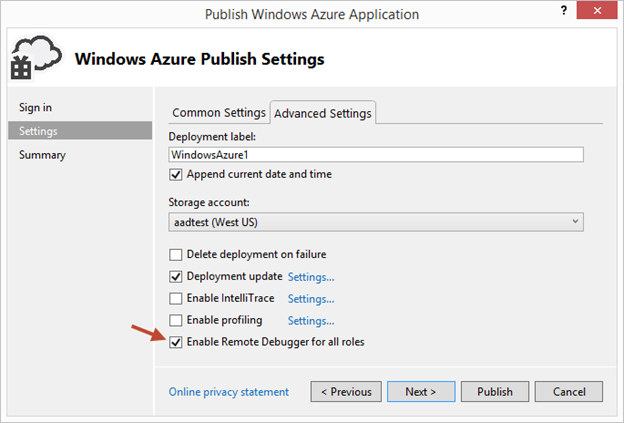
clip_image002

Once your cloud service is published and running live in the cloud, simply set a breakpoint in your local source code:

clip_image003

Then use Visual Studio’s Server Explorer to select the Cloud Service instance deployed in the cloud, and then use the Attach Debugger context menu on the role or to a specific VM instance of it:
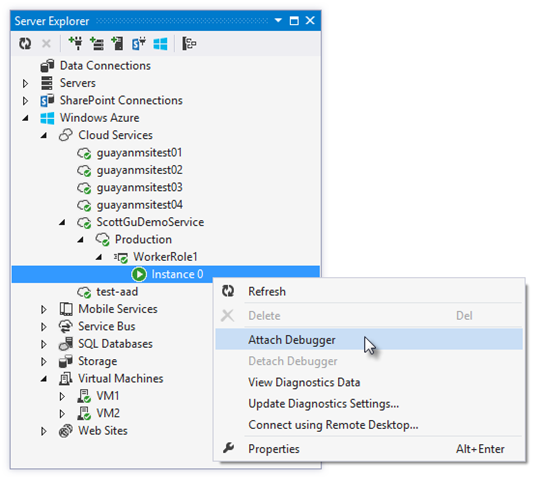
clip_image004

Once the debugger attaches to the Cloud Service, and a breakpoint is hit, you’ll be able to use the rich debugging capabilities of Visual Studio to debug the cloud instance remotely, in real-time, and see exactly how your app is running in the cloud.
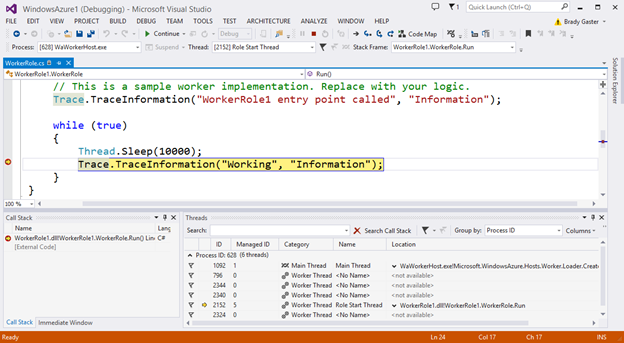
clip_image005

Today’s remote debugging support is super powerful, and makes it much easier to develop and test applications for the cloud.  Support for remote debugging Cloud Services is available as of today, and we’ll also enable support for remote debugging Web Sites shortly.

Windows Azure Management Libraries for .NET (Preview)- Automating PowerShell

Windows Azure Management Libraries are in Preview!

What do Azure Management Libraries provide, the control of creation, deployment and tear down resources which previously has been at a PowerShell level now will be available in the code.

Having the ability to automate the creation, deployment, and tear down of resources is a key requirement for applications running in the cloud.  It also helps immensely when running dev/test scenarios and coded UI tests against pre-production environments.

These new libraries make it easy to automate tasks using any .NET language (e.g. C#, VB, F#, etc).  Previously this automation capability was only available through the Windows Azure PowerShell Cmdlets or to developers who were willing to write their own wrappers for the Windows Azure Service Management REST API.

Modern .NET Developer Experience

We’ve worked to design easy-to-understand .NET APIs that still map well to the underlying REST endpoints, making sure to use and expose the modern .NET functionality that developers expect today:

  • Portable Class Library (PCL) support targeting applications built for any .NET Platform (no platform restriction)
  • Shipped as a set of focused NuGet packages with minimal dependencies to simplify versioning
  • Support async/await task based asynchrony (with easy sync overloads)
  • Shared infrastructure for common error handling, tracing, configuration, HTTP pipeline manipulation, etc.
  • Factored for easy testability and mocking
  • Built on top of popular libraries like HttpClient and Json.NET

Below is a list of a few of the management client classes that are shipping with today’s initial preview release:

.NET Class Name

Supports Operations for these Assets (and potentially more)

ManagementClient

Locations
Credentials
Subscriptions
Certificates

ComputeManagementClient

Hosted Services

Deployments

Virtual Machines

Virtual Machine Images & Disks

StorageManagementClient

Storage Accounts

WebSiteManagementClient

Web Sites

Web Site Publish Profiles

Usage Metrics

Repositories

VirtualNetworkManagementClient

Networks

Gateways

Automating Creating a Virtual Machine using .NET

Let’s walkthrough an example of how we can use the new Windows Azure Management Libraries for .NET to fully automate creating a Virtual Machine. I’m deliberately showing a scenario with a lot of custom options configured – including VHD image gallery enumeration, attaching data drives, network endpoints + firewall rules setup - to show off the full power and richness of what the new library provides.

We’ll begin with some code that demonstrates how to enumerate through the built-in Windows images within the standard Windows Azure VM Gallery.  We’ll search for the first VM image that has the word “Windows” in it and use that as our base image to build the VM from.  We’ll then create a cloud service container in the West US region to host it within:

clip_image006

We can then customize some options on it such as setting up a computer name, admin username/password, and hostname.  We’ll also open up a remote desktop (RDP) endpoint through its security firewall:
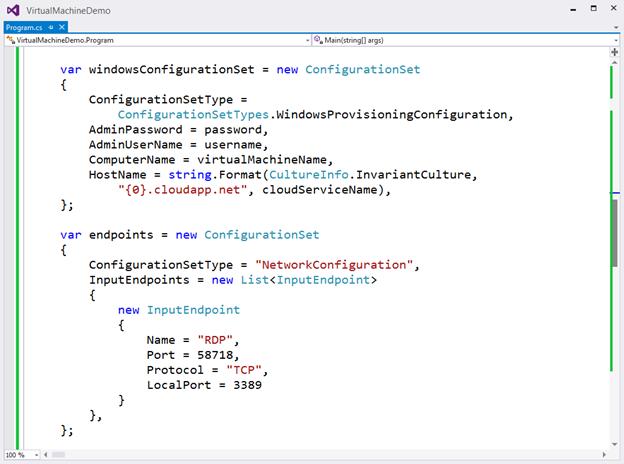
clip_image007

We’ll then specify the VHD host and data drives that we want to mount on the Virtual Machine, and specify the size of the VM we want to run it in:
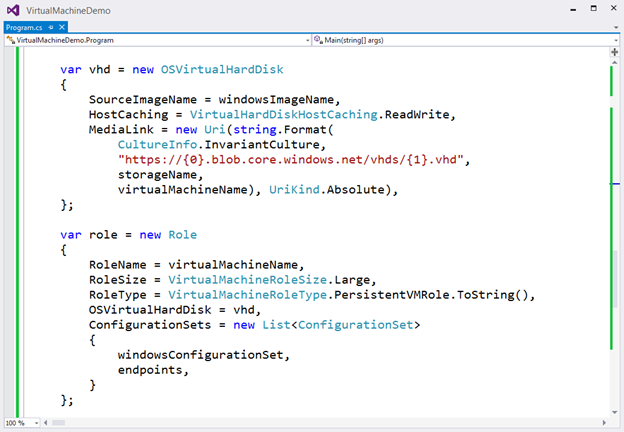
clip_image008

Once everything has been set up the call to create the virtual machine is executed asynchronously

clip_image009

In a few minutes we’ll then have a completely deployed VM running on Windows Azure with all of the settings (hard drives, VM size, machine name, username/password, network endpoints + firewall settings) fully configured and ready for us to use:

clip_image010

TopologyBlast

This new functionality will allow Windows Azure to communicate topology changes to all instances of a service at one time instead of walking upgrade domains. This feature is exposed via the topologyChangeDiscovery setting in the Service Definition (.csdef) file and the Simultaneous* events and classes in the Service Runtime library.

Windows Azure Service Bus – partition queues and topics across multiple message brokers

Service Bus employs multiple message brokers to process and store messages. Each queue or topic is assigned to one message broker. This mapping has the following drawbacks:

· The message throughput of a queue or topic is limited to the messaging load a single message broker can handle.

· If a message broker becomes temporarily unavailable or overloaded, all entities that are assigned to that message broker are unavailable or experience low throughput.

Q&A

Q. Can I use Azure SDK 2.2 to debug Web Role , Worker Role using earlier SDK.

A. No, you need to have your roles migrated to SDK 2.2. For older role you can only get the diagnostic information out of Visual Studio if installed 2.2.

clip_image011

Q. What are typical issues while migrating from 1.8 to 2.2?

Worker Roles and Web Role Recycling

I have 3 worker roles and a web role in my project and I upgraded it to the new 2.2 SDK (required in VS2013). Ever since the upgrade, all of the worker roles are failing and they instantly recycle as soon as they're started.

Post can be found here- http://stackoverflow.com/questions/19717215/upgrade-to-azure-2-2-sdk-is-causing-roles-to-fail

Not able to update the Role after upgrading

I recently worked on an issue where the following error was being thrown while deploying the upgraded role to Windows Azure.  You just upgraded the SDK to 2.1 or 2.2 and you start getting the following error while deploying the role.

Link to the post http://blogs.msdn.com/b/cie/archive/2013/10/31/not-able-to-upload-role-after-upgrading-the-sdk.aspx

Q. Steps to Migrate to Azure SDK 2.2

A. Open the Azure project in Visual Studio 2012,

  1. For upgrading your project is via the Properties windows of the Cloud Project. You will see the following screenshot.
  2. clip_image013
  3. Follow through the upgrade process fix the errors,
  4. Run the Project locally to see if any errors fix the same.
  5. Check In the code post all fixes
  6. Test the same in Dev. environment to see if this breaking. There is potential chance of breaking due to dependencies.

Note: The web & worker role tend go into inconsistent state due library dependency mismatch. This will have to fixed

Generic Migration to Azure SDK 2.2- High Level Approach

The suggested approach is to start with one component, one web role and one worker role WCF Rest and see the impact in terms of issues and then decide then timelines for others. The POC will be done in 1 Sprint, the candidate are the following

  • Component – Reusable Component
  • Web Role – Portal Web
  • Worker Role – Portal Worker


Links

· Installation of Azure SDK 2.2 - http://www.windowsazure.com/en-us/downloads/archive-net-downloads/

Saturday, 25 August 2012

Windows Azure Service Bus- Messaging Features


The Service Bus is single most important component be it an Enterprise Integration scenario or a cloud (which by the way happens to be mass scale integration of massive number of applications). The expectation from Service Bus in the cloud are very many, when compared to an Enterprise scenario the Enterprise Service Bus does cater to a bare minimum of the following features

  • Messaging Services: 
  • Management Services
  • Security Services
  • Metadata Services
  • Mediation Services
  • Interface Service

ESB is a messaging expert not to get into history of Traditional EAI, EAI broker, MOM architecture. Messaging is a feature which has seen significant improvement in past 2 decades in ESB. This post I’m specifically concentrating on Windows Azure Service Bus – Messaging capabilities and compare it with what is the standard ESB implementation. Before dwelling into the details of the Azure Service Bus Messaging setting the context on Messaging features on a standard ESB.


ESB – Messaging features – What to expect


The Message: A message is typically composed of 3 basic parts: the header, the properties and the message payload. The header is used by the messaging system and application developer to provide information such as the destination, reply to destination, message type & message expiration time. Properties section is generally a name-value pair. These properties are essentially a part of the message payload or body that get promoted to a special section of the message so that filtering can be applied to the message by consumer or specialized routers. The format of the message payload can vary across messaging implementation example plain text, binary or xml.

ESB is a messaging expert so that it can manage whatever type of messaging you can throw at it.  The types of messaging which can potentially be exchanged in mid sized organization between different business and support application can be very many and cloud scale can be a very different playground. Obvious to the fact there will a standard set of messaging which will be supported by an ESB below are the following

  • Point to point Messaging :  P2P messages can also be marked as persistent or non-persistent
  • Point to point request/response: Request/ Response Messaging Pattern for most ESB is synchronous , asynchronous in nature. Applications and services in fire and forget mode which allows an application to go about its business once a message is asynchronously delivered. A variant of this is the Reply Forward Pattern where by response of the message is send to another destination. 
  • Broadcast message
  • Broadcast request/response
  • Publish subscribe: Pub Sub is self explanatory a common misconception regarding Pub Sub is lightweight compared to point to point. A pub sub message can be delivered just as reliably as a point to point message can. A message delivered on a point to point queue can be delivered with little additional overhead if it is not marked persistent. A reliable pub sub message is delivered using a combination of persistent message and durable subscriptions. When an application register to receiving message of a specific topic it can specify that the subscription is durable. A durable subscription will survive is the subscribing client fails. This means that if that intended receiver of a message becomes unavailable for any reason, the message server will continue to store the messages on behalf of the receiver until the receiver becomes available again.

image

  • Store and forward: ESB provides message queuing and guaranteed delivery semantics which ensure that “unavailable” application will get their data queued and delivered at a later time. The message delivery semantics can cover a range of options from exactly-once delivery to at-least once to at most once delivery. Message when marked as persistent will utilize store and forward mechanism.

image

In a ESB the concept of store and forward should be capable of being repeated across multiple servers that are chained together.  In this scenario each message server uses store and forward and message acknowledgements to get the message to the next server in the chain. Each server to server handoff maintains minimum reliability and the QoS that are specified by the sender.  It would be interesting to understand how Azure really manages this internally. MSFT has not given out the details on the same.  This is were the idea of dynamic routing  comes into play.

Transacted Messages  an important aspect of messaging in simpler words “transactional messaging”. ESB is predominantly built around “loose coupled architecture”, introducing an idea of producers and consumers of message participate in one global transaction is defeating the purpose of purpose of loosely coupled architecture.  What is effective in the ESB scenario is local transaction. The local transaction is in context of an individual sender or an individual receiver where multiple operations are grouped as a single transaction. An example is the grouping together of multiple messages in all or nothing fashion. The transaction follows the convention of separating send and receive operations.  From a sender’s perspective the message are held by the message server until a commit command is issued in which case the messages are sent to the receiver. In case of a rollback the messages are discarded.

image

There are specific situation where sending or receiving of a local transaction with the update of another transactional resource, such as a database or transactional completion of workflow code. This typically involves an underlying transaction manager that takes care of coordinating the prepare commit or rollback operation, each resource participating in the transaction. ESB in general provides interfaces for accomplishing this, allowing a message producer or a consumer to participate in a transaction with any other resource that is compliant with the XOpen/ XA two phased commit transactional protocol. This ideally becomes a distributed transaction.

Having covered enough on standard ESB messaging dwelling into what Azure Service Bus has to offer is next.

Azure Service Bus Messaging

Azure Service Bus consist of a bare minimum of following features. The focus of this post is Service Bus Messaging

image


On July 16, 2012 Microsoft released the beta of Microsoft Service Bus 1.0 for Windows Server. This release has been tightly kept under wraps for several months and my team was fortunate enough to have the opportunity to evaluate the early bits and help shape this release. A separate blog post on the same will out soon.


The service bus server component mentioned above is clear replacement to MSMQ.


Azure Service Bus supports the following Messaging Patterns, not getting too overwhelmed with earlier discussion of messaging types , there is a direct comparison of the same towards the end of this post.

At a high level Azure Service supports the following types of Messaging Patterns

  • Relayed Messaging:  Message Session Relay Protocol used in the computer networking world is a protocol for transmitting a series of related messages in the context of a communications session. MSRP messages can also be transmitted by using intermediaries. Relay Messaging Pattern is similar in many ways to MSRP . Service Bus in Windows Azure provides a highly load balanced relay service that supports a variety of transport protocols and WS standards. This includes SOAP, WS-* and even REST.  The relay service supports the following messaging types


  • One way messaging
  • Request/ Response
  • Point to Point
  • Publish / Subscribe scenarios
  • Bidirectional socket communication for increased point to point efficiency.


In a relay messaging pattern an on premise service connects to the relay service  through an outbound port and creates a bidirectional socket for communication tied to a particular rendezvous address. The client can then communicate to the on premise service by sending messages to the relay service targeting the rendezvous address. The relay service will relay messages to the on premise service through the bidirectional socket already in place. The client does not need a direct connection to the on premise service nor is it required to know where the service resides and the on premise service does not need any inbound ports open on the firewall. To support this at a code level the .NET framework WCF supports relay bindings.  Relay Service require a server and client components to be online at the same time. So essentially the persistent and durable messaging is not something which the relay can outright support in its vanilla form. Looking the Jan 2012 release of Azure “it supported only relay messaging” which in my personal opinion was “half baked ESB messaging”. HTTP style communications in which the requests may not be typically long lived, the clients that connect only occasionally , such as browsers, mobile applications don’t fit the bill for relay messaging.

Does relay messaging  only support synchronous behavior is something which needs more discussion?

July 2012 MSFT decided correct the mistake with introduction of brokered messaging.


Brokered Messaging

Brokered message is the asynchronous option for messaging or temporal decoupled. Producers(senders) and consumers(receivers) do not have to be online at the same time. The messaging infrastructure reliably stores messages until the consuming party is ready to receive. This allows the components of distributed applications to be disconnected, and connect whenever desired and download the messages. The core components of Service Bus brokered infrastructure are Queues, Topics, Subscription. These components enable new asynchronous messaging scenarios such s

  • Temporal decoupling
  • Publish/Subscribe.

Brokered Messaging essentially filled the gap for persistent durable messaging.

Service Bus Queues

Service Bus Queues are decoupled messaging construct. In the service bus they have the following characteristics

FIFO- delivery of messages to one of more consumers in a sequenced order.

Load leveling is a perceived benefit which is standard benefits of using a queue. Since the sender and receivers are decoupled the message sending and consumption strategies can be many offline receive. Fan out receivers in case of messages in the queue are too many. 

Note: Rolling out more receivers instances on Windows Azure will take the order to 10 minutes.

At a feature level Queue has the following functionality

Receive and Delete- allows the options for the receivers to receive and message and later issue a delete.

PeekLock- receive operation is two stage which makes it possible to support application that cannot tolerate missing messages. When Service Bus receives the request it finds the next message to be consumed, locks it to prevent other consumer from receiving it and then returns it to the application. After the application is finishes processing the message it completes the second stage of receive process by calling Complete on the received message, this will mark the message as being consumed. In cases where the application is unable process the message it can call abandon the Service Bus will unlock the message and make it available to be received by other applications. Usually a timeout is associated with PeekLock beyond which the Service Bus unlocks the message.

In case of  message being read and no Complete issued the Service Bus considers this as Abandon situation. Going back the standard implementation of Store and Forward it supports all At Least Once.

If the scenario cannot tolerate duplicate processing, then additional logic is required in the application to detect duplicates which can be achieved based upon the MessageId property of the message which will remain constant across delivery attempts. This is known as Exactly Once processing.


Topics & Subscription

A deliberate move to support Publish Subscribe in more structured manner topics had been introduced.  In normal queue based communication we see a single sender and a single receivers, Topics and subscription provide one to many communication in a pure pub sub manner. Useful for scaling to very large numbers recipients, each published message is made available to each subscription registered within the topic. Messages are sent to a topic and delivered to one or more associated subscription depending on the filter rules that can be set on a per subscription basis. The subscription can use additional filters to restrict that they want to receive. Message are sent to topic the same manner as the queue apparently received from subscription.

image


While the topics receives all the messages , each subscription picks a subset of the messages based on the subscription need. There is still a requirement filter the messages coming down to the subscription. The volumes of the messages can be large so filters ideally give you another chance to apply a where cause and have more targeted messaging. The filter expression is where clause on one of the properties and based on Sql 92 standards example given below

namespaceManager.CreateSubscription(("Dashboard", new SqlFilter("StoreName = 'Store1'");


image


Important notes


  • Filters are SQL 92 expressions , Correlation filter & Tagging Filter
  • Support for 2000 rules per subscription.
  • Each matched rule yields a message copy

What is additional overhead of having subscription and filter from a compute standpoint is something which one needs to understand?


Partitioning is one more targeted messaging construct which allows an additional rule to the filter by which the incoming message can be logically sub divided.


Example below


image


Composite Patterns of Messaging on Service Bus

CQRS have written about this in one of earlier post , In relation to messaging it makes perfect sense what they call it in the Messaging World is “Update Read Separation”.


  • · Reads on partitioned stores
  • · All writes through messages
  • · Distribution via fan-out
  • · Trades timeliness and instant feedback for robustness and scale


Diagnostics and Statistics


In the cloud world diagnostics and statistics is pretty much at a reset with new tools and new challenges. If one were to use messaging in service bus “diagnostic” deserve a special mention where the messaging can be some assistance.


The strategy for this could be to have


  • Flow diagnostics events from backend services to the diagnostic queues.
  • Vary the TTL by the severity, verbose errors short lived, fatal error reports long lived.
  • Filter by severity or needs of different audience

image


Correlation Pattern


If there is need to set the reply paths between a sender and receiver.  A sender needs to receive back a response on a different queue. The Sender sends in a correlation id with the Queue Name (Response Queue) where it wishes to receive the response. The receivers queue which receives the message gets picked up by an application which in turn post processing sends a responds to senders correlated information queue.


3 correlation models supported in Service Bus are


  • Message Correlation
  • Subscription Correlation
  • Session Correlation

image


N to 1 Correlation : This is a scenario where multiple Senders will send in the same correlation id or queue. What this ideally means multiple senders and the response to that needs to go back to a single response queue.


N to M Correlation : This is a scenario where multiple Senders will send in the different correlation id or queue. What this ideally means multiple senders and the response to that needs to go back to a multiple response queue.


Correlation in Service Bus


Message Correlation (Queues)


  • Originator sets Message or CorrelationId, Receiver copies to the reply
  • Reply sent to Originator owned Queue indicated by ReplyTo
  • Originator receives and dispatches on CorrelationId

Subscription Correlation (Topics)


  • Originator sets Message or CorrelationId, Receiver copies to the reply
  • Originator has Subscription on shared reply Topic  w/ rule covering Id
  • Originator receives and dispatches on CorrelationId

Session Correlation


  • Originator sets some SessionId, on outbound session
  • Receivers reuses SessionId for reply session
  • Originator filters on known SessionId using session receiver.


Additional features


  • Local Transaction support exists in Service Bus Messaging
  • Message Scheduling
  • Dead Lettering
  • Duplicate Detection
  • Prefetching


Summary


In principle the Service Bus Messaging supports pretty much all messaging type via relay or brokered messaging. In addition to it has lot more. Next Post comparing Azure Queues to Azure Service Bus Queue.


Codebase for All Supported Messaging on Services Bus can be found at my github here – still working - https://github.com/ajayso/Azure-Service-Bus---Messaging-Samples.git

Saturday, 16 June 2012

Windows Azure–Session–Starter Series

Considering a lot of folks have asked to host the sessions on Windows Azure, here I start with the first session. The volume is slightly low ,works fine on headphones.
Broken down in to  Windows Azure Part 1, Part 2 for size consideration. This session have be done last year Oct 2011. Windows Azure 2.0 is already out this is older session good to have an understanding from a beginners stand point of view. The subsequent sessions will be in line with Azure 2.0.
-

Part 2

Saturday, 5 May 2012

PaaS (Platform as a Service)–The Choice for New Applications on Cloud

PaaS or Platform as a service as a concept has been well received, however one really needs to understand when is it likely to hit the mainstream. In this post I will start with the the basics of PaaS and IaaS, dig deeper into PaaS,  notes on Windows Azure PaaS programming model & lastly what’s the roadmap of Windows Azure really looking like. As usual a disclaimer “ this post is my personal views I don’t write for MSFT”. Humble request to the readers would really love have some feedback. Happy reading…

Cloud platform technologies are broadly divided into 2 categories PaaS & IaaS. Amazon Web Services(AWS) Elastic Cloud (EC2) first hit the market in IaaS segment. PaaS is something we are given to believe is expected to hit  the mainstream soon, the question is when & with the new developments I see the timeline just stretching.

The key point is that IaaS is dominant in the market, its about 10 times the market share of PaaS (courtesy:Gartner Inc.). It sounds little disruptive but Azure is adding true IaaS support by the end of this year.

If we look into Windows Azure today which is purely PaaS what exists as of current in the Azure Platform is

  • Web/Worker roles
  • Persistent VM roles expected to hit the market later this year. (VM Roles already exist as of current and are not very useful). Persistent VM Role is true IaaS functionality.
  • Web Sites expected to hit the market later this year.


Getting Definitions right….

Understanding IaaS:  Understanding IaaS from a scenario per say. 

image

From an example standpoint of explaining IaaS , a developer is running a multi tier application and has to deploy this application on a cloud would include the following steps

  • Choose a pre installed VM which included the OS & the database.
  • Choose a pre installed VM which included the OS and Application support such as IIS
  • Provision database and create the tables and add data
  • Install application
  • Configure the load balancer
  • From time to time manage the VM’s and DBMS from a patch management point of view.


Understanding PaaS

If one needs to deploy the same application on the PaaS platform, it would look some what like below. The PaaS platform come pre installed with the Database, Application and load balancer

image

The steps involved in deploying the application are only 2

    • Provision database and create the tables and add data
    • Deploy the application

From the abovementioned scenarios PaaS seems much simpler and this simplicity will drive the usage of PaaS in the future.

Benefits of PaaS 

  • PaaS is faster
    • Reason: Theirs is less work for developers to do
    • Benefit: Applications can from idea to availability more quickly.
  • PaaS is Cheaper
    • Reason: There’s less administrative work to do
    • Benefit: Organizations spend less supporting applications
  • PaaS is lower risk
    • Reason: Platform gives so much predefined , the window of error is reduced
    • Benefit:Creating and running applications gets more reliable.

* With all these benefits IaaS is 10 times more popular the question how come? The answer is fairly complex and will explain in the remaining of the post

Drawbacks of PaaS

  • Unfamiliar for developers
    • Its harder to adopt because they much learn the PaaS platform
  • Developer have less control
    • They must work within the constraints of the PaaS technology. Each PaaS technology is different from another comparing Azure from AWS quite different. There is no standardization so moving across PaaS platforms can become very difficult
  • PaaS isn’t identical to an existing on premise environment
    • This can raise fears of vendor lock in , example is Salesforce.com PaaS is completely different and building an application on that can mean married to the same for life.
    • Moving existing on premise application to PaaS can be hard. There can be a considerable amount of rewrite on moving existing applications to PaaS.
  • PaaS supports fewer useful scenarios  than IaaS . IaaS in its current form is much more flexible to allow on premise application to move to cloud.Lets take a quick comparison from scenario standpoint between PaaS & IaaS


Scenarios IaaS PaaS
Running New Cloud Native Application Yes Yes
High Performance Computing and Big Data Yes Probably
Running a Standard Database Yes No
VM’s for a Dev/Test Lab Yes No
Running existing Web App/Sites Yes Maybe
Running Standard Packaged Apps Yes No
Virtual Data Center (VM;s for on Demand Use) Yes No
Disaster / Recovery similar to the on Premises world Yes No
  • Running New Cloud Native Application works fine on PaaS as long one does have issues with the vendor lock.
  • HPC and Big Data very apparent in IaaS world, in the PaaS still getting there, again moving an existing HPC on premise to PaaS may not be possible
  • Running a Standard Database such as Sql Server or Oracle is not supported by PaaS as of current.
  • VM’s for Dev/Test Lab not possible on PaaS
  • Running existing Web App/Sites on PaaS not possible as of today
  • Running Standard Packaged Application such as SAP, SharePoint on PaaS not possible.
  • Virtual Data Center a fantastic offering from IaaS not possible on PaaS
  • Disaster Recovery , IaaS can be a good foundation which replicates the on premise world on cloud. PaaS however cannot do that.

IaaS addresses a lot more scenarios than PaaS. On the contrary there is still an argument i.e cost of operation Vs. abstraction.

Cost of Operation Vs. Abstraction

From a cost of operation standpoint the physical machines are the most costly and least level abstraction, then came virtual machines which brought down the cost further and increased the level of abstraction.Subsequent to this we see the IaaS which reduced cost of operation further and increased the level of abstraction further. Finally came PaaS which reduces the cost of operation further and increased level of abstractions. How long will it take for the enterprise take to move into PaaS no correct answer?


Benefits of PaaS – A Closer Look

Dwelling into the benefits of PaaS the platform on which the conclusion are drawn is Windows Azure. Looking at following key parameters

  • Application Design
  • Application Development
  • Application Test
  • Application Deployment
  • Storage
  • Administration & Management


Application Design

  • The starting point on Application Design on PaaS is at much higher level from a design point of view there are lesser things to do.
  • Virtualized Images which is important in IaaS one doesn’t need to bother in PaaS. So in way one need not look at security too much in depth when designing for PaaS
  • Designing for redundancy at a VM level is not required as PaaS manages it internally


Application Development

  • PaaS provides a lot more services than IaaS a developer needs to write lesser code.
  • PaaS hides most of the configuration related stuff and developer has to do very little. In scenario where you have teams working globally integration problems stemming from diverse environment are reduced as there is very little for configuration and the environment is one (Azure).


Application Testing

  • As there is lesser code to write apparently there is lesser code to test
  • Azure provides single environment to test
    • Teams don’t need their own test platform
    • Test teams don’t need to understand and track configuration changes

Application Deployment

  • One key thing in PaaS as a developer one gives the tested code to the PaaS platform (assuming the role level segregation) and PaaS is responsible for deploying, so the timeline for deployment comes down in contrast to this IaaS is the same as on premise deployment.
  • Another important feature of PaaS is “in place update without downtime”. Updated applications can be deployed in place without any downtime. Again this is a platform feature.
  • Caching and Storage is inbuilt feature of PaaS , developer can use this in their code without really bothering about the setup or configuration related details.

Storage

  • Considering one is using on cloud storage there is zero administration.
  • HA comes in automatically
  • Data is replicated automatically: Doing backup solely for recovery failure is less necessary.


Administration and Management

  • No need for administrators
  • No need to management team


*In my next post I will be publishing a comparison of the actual data on timeline for building an on-premise application vs. on a PaaS platform & the complexities associated with the same


 Getting Into Windows Azure Programming Model

Why is there a need to create a new programming model?

The PaaS platform comes with a lot of pre canned features and in order to effectively use it one has to follow a certain discipline which eventually is a new programming model.

PaaS sets in some ground rules… they are

  • Role Segregation: PaaS ideally segregates the applications into roles ex: web role, worker
    • Web Role which accepts request from users (Web Role synonymous to IIS)
    • Worker Role: Runs code
  • Multiple Instances: PaaS application runs multiple instances of each role. PaaS has an SLA of 24X7 availability so the bare bone requirement of this is 2 instance to manage HA. Its not mandatory to have 2 instances of each role and function without HA.
  • Application Behavior: If one of roles (which the application is hosted) fails the applications should behave correctly.  Its required that Application have to survive failure of any instance. This is a hard rule. What does it mean
    • Storage must be external to Web/ Worker role instance. An instance shouldn’t store data locally.  It should use Sql Azure , Tables or blobs to store the state. Most of us many think of the lines of components been stateless. Stateless is a confusing term.
    • Interaction between Roles should be generic: In other words Web/Worker role should not care which instance of another role it interacts with. Example a Web role instance in time may open a tcp/ip connection to a specific worker role and hope that the worker role continues to live in the bigger scheme of things. Understanding the basic premises that communications across roles also needs to be loosely coupled and the expectation that next time the web role is going to connect to the same worker role is not appropriate as “The worker role may been recycled and all the state is lost. Go with the basic assumption that any role can fail any time and that’s way the PaaS platform wants you to build.
    • No Sticky Sessions in PAAS:  A client shouldn’t assume that all of its request will be handled by the same Web Role Instance.

There are constraints around how you build the application which needs to run PaaS there is a rationale as to why these constraints have come into existence.

Fabric Controller – A Background

Most PaaS implementation has this component called the Fabric Controller and all the machines in a particular data center are its ownership.

  • It creates and monitors role instances on those machines.
  • It starts new instances when – a new application is deployed or an running application fails or when it needs to update system software in an instance virtual or physical machine.
  • The FC is smart enough not to assign the same roles of the application on the same physical machine.

Fabric Controller 101….

Lets say we have a set of computers to be exact 40 of them each with 4 cores. We have a total of 160 cores at our disposal. There is a need to run a variety of applications on these cores. So architecturally speaking I would need a central software which we call is a Controller and I would need Agents installed on all the computers.

1.An application run request would come to the Controller. The controller has a complete inventory which computer and which core is been assigned to what application.

2.The controller finds the appropriate computer passes the application binaries to agent (computer) which in turn has running virtual instances of Windows Server 2008 .

3.The agent picks up one of the virtual instances and hands them over the binaries.

4.The application binaries are scanned for the type of role if it’s a web role the binaries are copied to c:\inetpub\wwwroot\ creates a virtual directory & application sends the endpoint back to the agent.

5.The agent in turn sends the physical endpoint to the controller.

6.The controller registers the endpoint into some kind of registry. The logical endpoint is something which is given to the end-user.

7. The FC can kill any of running instance at any point of time.

Somewhere in the description one will soon realize there is an service bus also initially called the internet service bus.


Microsoft’s Fabric Controller

Microsoft’s data center stores all the data of Windows Azure storage and all Windows Azure applications. Windows Azure Fabric Controller controls manages the servers, the set of machines which are dedicated to Windows Azure and the software that runs on the Microsoft Data Center. Windows Azure Fabric Controller is a distributed applications that is replicated among a group of machines.It has its own of resources in its own environment like computers, load balancers, switches etc. Windows Azure Fabric Controller can communicate with the fabric agent on each machine. It keeps track of all Windows azure application in the fabric.

image

This helps the Windows Azure Fabric Controller to perform useful activities like monitoring all the running applications. The Windows Azure fabric controller decides where new applications will run and also selects the physical server so that hardware is utilized optimally. This is achieved using the configuration information which is uploaded with each Windows Azure application. The FC controller achieves this using the configuration information which is uploaded with each application on Windows Azure. The configuration file is an XML file which explains the various instance of the application, the number of virtual machines to be created for the applications/

Because of this understanding the FC does a number of things like monitoring all running application, decides where a new application should run , optimize hardware utilization by choosing the physical server.

OpenStack Compute fabric controller is called Nova.

Windows Azure is a 1 million core machine and I’m assuming the FC in itself is Server Farms locally and distributed.


Interacting with the Operating System

In PaaS at any given point of time your code will never interact with the operating system directly , the FC own the OS. It updates each’s OS when necessary. Any changes made must be applied each time an instance starts. Any changes made from a configuration stand point have to reapplied each time an instance starts. In case there is a requirement to have software which is not already there at the platform level what does do.  This can be done in more than one ways lets say you need to have telerik support on your web role you need install this every time the role starts up. In case there are too many things to be installed the “time to get started will be too long” and this solution may not look feasible.

This is scenario we can use current VM role provided by Azure where the developer gets to supply the image but any changes to VM are lost at every restart this is a problem hence MSFT will be including persistent VM Role where the state is stored in the blob.

Summarizing- PAAS Programming Model

  • Application are more available and cheaper to run on PaaS
  • What it offers
    • Protection against hardware failures
    • Protection against software failures
    • No downtime application updates
      • With a single step update called the whipsaw
      • With a rolling update using update domain
    • No downtime system software updates
    • No administrative efforts

Moving Applications to Windows Azure PaaS

  • An ASP.NET application with multiple load balanced instance that share state stored in Sql Server
    • An easy move
    • Perfect fit for PaaS platform
  • An ASP.NET application that runs multiple instances that maintain per instance state and relies on sticky session
    • Requires some work
  • A client accessing WCF services running in a middle tier
    • If the service don’t maintain per client state between calls , an easy move
    • Otherwise some redesigning effort is required
  • An application with a single instance running on Windows Server that maintains state on its own machine
    • Some redesign needed
    • This application might run well in Persistent VM role.


Innovative Business Idea: Writing a Migration Tool for on premise windows application to Azure….

Introduces Web Sites in Azure

PaaS & IaaS are cloud platform technologies. Cloud computing and hosting which were 2 different worlds  years are no longer separate. Customers can now buy a wide range of platforms offering from various service providers which include IaaS & PaaS or could be buying hosting servers by the month.

Cloud categorization has predominantly understood as IaaS, PaaS & SaaS a more cleaner way to look is SaaS, IaaS, cloud Platforms like Azure, AWS & Private Cloud.

Hosting - Common Technology options today

image

Difference Between Hosting to Cloud Computing

image

Hosting & Cloud Computing- Categorizing options

image


Azure is likely offer monthly pricing for Persistent VM Role & Websites which are actually a part Windows Azure. Microsoft will also make WebSite software for service providers.

Windows Azure WebSites- Provides shared hosting for WebSites- Application can also access other Windows Azure roles.

WebSites are different from Web/Worker Roles on following accounts

  • Web Sites provides a standard IIS Web environment it supports sticky session. Web Role are stateless low admin application.
  • Web Sites will help in running existing Web Application unchanged on Azure as compared to Web Role which mandates a change depending on how the application is written
  • WebSites are shared on the same virtual instance on contrast Web Role which is dedicated to a virtual instance.
  • Web Sites are best suited for new and existing small to medium Web Sites/ app on contrary Web Role are meant for large cloud apps.
  • Application deployment for WebSites its liking a creating a new site on an existing VM on Web Role it’s a new VM Role
  • WebSites allow deployment of updates without downtime same as Web Role


Web Sites in Azure will help bring customer onto Azure with lesser effort this is a well thought out strategy for the long term.

Windows Azure provides multiple choices for the customer to move to cloud & it is worth the effort in terms of reduced costs.


Thursday, 15 March 2012

Talk over coffee- Hybrid Cloud Intro series….


A walk into an organization IT department & we find a large number of applications which support the business of the organization and are critical by nature & the  not so critical ones, we often get into this debate with the customer I’m really not ready to move the complete stack into cloud I’d prefer a fair mix or private & public cloud. The customer may come back telling I only want to use the compute of the public cloud in certain peak situations. This discussion is acceptable as this is a real problem and so what we have as a solution the hybrid cloud. Hybrid cloud is a mix of both we yet have to get to clear boundaries of how much is the mix.

Getting Definition of Hybrid Cloud hopefully Correct….

So by definition what do I mean by hybrid cloud? As defined by NIST…

Hybrid cloud. The cloud infrastructure is a composition of two or more distinct cloud infrastructures (private, community, or public) that remain unique entities, but are bound together by standardized or proprietary technology that enables data and application portability (e.g., cloud bursting for load balancing between clouds).

Some real disruptive thinking………………………

Using two sets of criteria to define cloud deployment models roots inconsistency and ambiguity.

As defined in SP 800-145, a hybrid cloud is a composition of infrastructures, yet at the same time a private cloud and a public cloud are defined according to their intended audiences. The change of criteria in classifying a hybrid cloud roots inconsistency and ambiguity in the deployment models presented in SP 800-145. Forming a concept with two sets of criteria is simply a confusing way to describe an already very confusing subject like cloud computing.

"Hybrid cloud" is an ambiguous, confusing, and frequently misused term.

A hybrid cloud is a composition of two or more distinct cloud infrastructures (private, community, or public) as stated in SP 800-145. That is to say that a hybrid cloud can be a composition of private/private, private/community, private/public, etc. From a consumer’s point of view, they are in essence a private cloud, a private cloud, and a public or private cloud respectively. Regardless how a hybrid cloud is constructed, if it is intended for public consumption it is a public cloud, and if for a particular group of people it is then a private cloud according to SP 800-145. Essentially the composition of clouds is still a cloud and it is an either public or private cloud, and cannot be both at the same time.

For many enterprises IT professionals, a hybrid cloud means an on-premise private cloud connected with some off-premise resources. Notice these off-premise resources are not necessary in reality a cloud. In such case, it is simply a private cloud with some extended boundaries. A cloud is a set of capabilities and must be referenced in the context of the delivered application. Just placing a VM in the cloud or referencing a database placed in the cloud does not make the VM or the database itself a public cloud application.

The key is that a hybrid cloud is a derived concept of clouds. Namely, a hybrid can be integrations, modifications, extensions, or a combination of all of cloud infrastructures. A hybrid is nevertheless not a new concept or a different deployment model and should not be classified as a unique deployment model in addition to the two essential ones, i.e. the public and private cloud models. A cloud is either public or private and there isn’t a third kind of cloud deployment model based on the intended users.

“Hybrid cloud” is perhaps a great catchy marketing term. For many, a hybrid seems to suggest it is advanced, leading edge, and magical, and therefore better and preferred. The truth is "hybrid cloud" is an ambiguous, confusing, and frequently misused term. It confuses people, interjects noises into a conversation, and only to further confirm the state of confusion and inability to clearly understand what cloud computing is.


Hybrid Cloud 101….

Needed a basic 101 on hybrid , this a hybrid cloud video by VMWare , not that it mandates  VMWare knowledge the idea is get the concept clear

.

Cloud like any other IT trends needs a long term vision and short term adaptive strategy which changes based on the market requirements, not to mention the long term vision continues to guide the overall direction. The hybrid cloud is a reality and does fit into the long term vision however the short term strategy for the same is skewed with each using the hybrid space as a sales pitch example MSFT , Amazon & VMWare.


Understanding the Hybrid Cloud Play……

image

  Referring to the diagram above most organization start of there Private Cloud experiment with virtualization and first step is virtualized data center, next to come into the Private Cloud is the line of business application and finally data storage.

Community Cloud is sharing of private cloud within /between organizations.

The Public Cloud pretty much breathes the NIST guidelines wont get too much into that what we are trying to focus on the strategy of hybrid and the public cloud picture is drawn in retrospect to the same. The key element in the Public Cloud is the business strategy (in conjunction with hybrid cloud only).

Hybrid Cloud is the entire picture inclusive of the public & the private cloud.


Precision Questioning for the Hybrid Cloud…

Getting past the definition & 101 phase the next question pops up what and when to use Hybrid Cloud.  Precision questioning can help you navigate the Hybrid Cloud discussion better.

1. What are the New Non Mission Critical Functionality that are planned to be built in next 2 years:  This is a very good candidate for the cloud its new functionality required can be a candidate for PAAS or SAAS depending on the nature of the workload.This is typically a low risk low returns item can be tackled very easily. Driving the value proposition in this query is not difficult.

2. Can some applications directly benefits by virtualization? This can be a quick turn around for the question “maximizing the use of the resources”, However this does not bring down the overall cost of operation whether public or private. This typically is a low hanger.

3.. What are the New Mission Critical Functionality/Accessing Private Data that are planned to be built in next 2 years? ex: Payroll System. This conversation can be fragile and this will must probably be driven into the private cloud of the organization. This is high return and low risk if ported on private cloud as most of the phobic queries are directly addressed “we are in private cloud”.

4. Do you see any of your application which may need to scale on an event or some specific time period of the year? ex: tax filing applications.  The idea here is use the cloud to scale the existing workload.

5. Refactoring Existing Functionality , this is where the existing ESB is taken and made cloud ready. This is a difficult conversation to have with the customer it completely depends of ESB’s state of readiness to move to cloud.  Depending on how the discussion with customer goes this most probably will turn out to be a low priority.

6. They Final Key Question “How much of existing private data would want to be moved to the cloud”. This is high risk and very high return item. What is max which can work here is a private cloud.

7.  “Migration of Existing Functionality i.e existing line of business application to the cloud”.

image

Architecting Solutions that span Private & Public Clouds

  • On Premises IT with Off Premises Cloud.
  • On Premise IT with Multiple Off Premises Cloud
  • Cloud Striping
  • Distributing Community Cloud
  • Lift and Shift
  • Batch at Scale/ Bursting
  • Images in CDN
  • Adding Odata
  • Shopping Cart
  • Compliance
  • Partner + PaaS
  • Cloud + Optimized
  • Outsourcing
  • Synchronization
  • Scaling and Caching
  • Pull back
  • Big Data
  • Consumerization

Research Speak……

NIST & Gartner have come out with some models on the hybrid cloud. NIST seems to be well defined and easily understand in terms of what they mean Hybrid.

Below is the NIST definition represented.

image

The Gartner definition revolves around what they call is Hybrid IT which acts a broker and switches between internal and external cloud.

image

The Gartner Definition is very sketchy and no clear guidelines.  The IT organization acting as a broker is a very noble concept but putting into practice the actual implementation will call for a very different conversation as we look at the overall Hybrid IT strategy from an true implementation point of view.

The Gartner report can be found here https://skydrive.live.com/redir.aspx?cid=b4c4034e55e4a63f&resid=B4C4034E55E4A63F!598&parid=root.


Implementation excerpt from the Gartner Report…..

Hybrid IT is likely to rely on hybrid clouds. Hybrid clouds are a connection or integration between two clouds — usually between an internal private cloud and an external public cloud. Hybrid clouds are constructed by using software or hardware appliances that enable applications and data to more easily migrate among connected clouds. For example, many applications are dependent on identity management systems to authenticate users or to consume terabytes of data, or they have
deterministic input/output (I/O) latency requirements. These dependencies often prevent applications from migrating to the external cloud. Hybrid cloud solutions solve each of these dependencies in unique ways.
Essentially, two types of hybrid clouds exist:
■ Service interface-based: The service interface-based hybrid cloud utilizes an appliance to present a list of cloud services to the end user (i.e., the cloud consumer). When the user selects a cloud service, the appliance redirects the user to an internal or external cloud service based on the consumer's identity.
■ Infrastructure-based: The infrastructure-based hybrid cloud is essentially a software or appliance bridge designed to augment internal IT resources and integrate two clouds by connecting the back-end infrastructure of an internal cloud to one or more external cloud services.

Closing Comments…….

By definition no one has built a pure hybrid cloud component, taking an example of large multinational what they have an on premise and off premise kind of IT infrastructure which kind of complements the Gartner story revisiting the definition this what comes to my mind.

“An integrated infrastructure whose unique assets, although separated by well defined boundaries are connected via a standardized proprietary technology to broker data and application interoperability in order to optimize computing resources, increase shareholder values and reduce risks”. 

Hybrid Cloud More detailed post coming next …… Applying cloud attributes based on NIST for Hybrid Cloud is something what I plan to write next.