Showing posts with label Cloud Architecture. Show all posts

Tuesday, 13 May 2014

Azure API Management


image


The Apiphany buy out of Microsoft sometime around Mid Oct 2013 is made it into the Azure Stack as API Management in a very short while.
Here is complete  You Tube - video on Azure API Management.

API is no more an after thought for most architectures, its right there in front staring right into architects face. API Facade can make or break any architectures from improving integration, developer productivity to high business returns. There are many platforms in the market for API’s. 
Azure API Management is direct port of APIPhany into Azure. In this post we will explore the Azure API Management and towards the end a comparison with the leading API platforms.
The Azure API has managed to pull through a lot of features into Azure in very short period of time
API Management Administrators Portal
The starting point for any API Management platform is a good enough Administrator Portal.  The Administrator Portal is essentially the place where one can manage the API.  Below is the snapshot of the same.
image
The Administrator Portal for API Management covers the following  at a high level.
  • Dashboard – Quick Snapshot view of the all the API’s and there health graphs, products, applications
  • API –  Managing API’s there associated operations, settings etc..
  • Products- This essentially is a container of API’s and the access management around the same.
  • Policies – This is a key feature for API’s.  The consumer’s of API are initially developers and in production its going to be the applications. There many generic constructs which are required by the API for example
    • Quota Management: Number of times a consumer can call the API’s
    • Format Changes: One may need to change parameter/output value before invoking/return value from the actual API or probably change the format ex json,xml
    • Allow cross domain calls
    • CORS
    • Data Changes – Replace certain values inbound/outbound.
    • Restrict caller IP’s
    • Store to Cache
There are additional constructs which can be applied. 
Note: Most good API platforms have ability to add workflow constructs to inbound and outbound flow of the API’s. For every call made to the api , one would want to call other services based on the data. As of current there are no workflow constructs in Azure API , one can expect the same.
  •  Analytics:  The core objective for any API platform is the health management of the API, Analytics includes the health management information, graphs etc..
image
  • Developers: Considering a decent population of the API consumers are going to be developers, the management around the same is important. This is fairly basic as of current.
  • Security: Support for 3rd party identity for developer sign –up.
  • Developer Portal: This is content management piece of the API portal which includes the API’s, documentation around the same, the products and issue reporting.
In a nut shell the Azure API Management is much awaited piece in the Azure stack and off to a flying start.

Wednesday, 6 November 2013

Azure SDK 2.2 Features & Migration


Brief Synopsis

The SDK 2.2 is not major upgrade it has brought more features around remote debugging in cloud which was a big ask till now & Windows Azure Management Libraries from a Developer per say. The Windows Azure Service Bus partition queue and topics multiple message broker will help in better availability, as each queue or topic is assigned to one message broker which is single point of failure, now with the new feature of multiple message broker assigned to a queue or topic. Please read the Q&A at the end to know the nuances with the same & the approach to move to Azure SDK 2.2 from generic project stand point of view

High Level following are the new features

  • Visual Studio 2013 Support
  • Integrated Windows Azure Sign-In support within Visual Studio
  • Remote Debugging Cloud Services with Visual Studio – Very Relevant to  Developers
  • Firewall Management support within Visual Studio for SQL Databases
  • Visual Studio 2013 RTM VM Images for MSDN Subscribers
  • Windows Azure Management Libraries for .NET – Very Relevant to  Deployment Team
  • Updated Windows Azure PowerShell Cmdlets and ScriptCenter
  • Topology Blast – Relevant to Deployment Team
  • Windows Azure Service Bus – partition queues and topics across multiple message brokers – Relevant to  Developers. All Service Bus based projects have to move ASAP.

Below covered are only the highlighted areas.

Remote Debugging Cloud Resources within Visual Studio

Today’s Windows Azure SDK 2.2 release adds support for remote debugging many types of Windows Azure resources. With live, remote debugging support from within Visual Studio, you are now able to have more visibility than ever before into how your code is operating live in Windows Azure.  Let’s walkthrough how to enable remote debugging for a Cloud Service:

Remote Debugging of Cloud Services

Note: To debug the web or worker role should be on Azure SDK 2.2

To enable remote debugging for your cloud service, select Debug as the Build Configuration on the Common Settings tab of your Cloud Service’s publish dialog wizard:

clip_image001

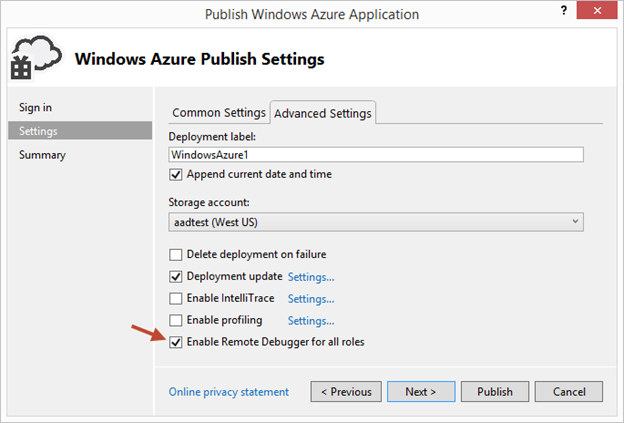
Then click the Advanced Settings tab and check the Enable Remote Debugging for all roles checkbox:

clip_image002

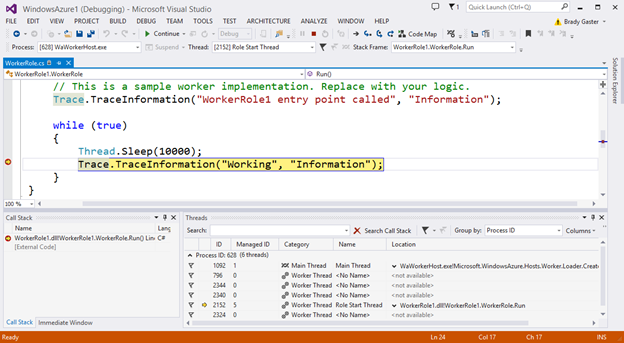
Once your cloud service is published and running live in the cloud, simply set a breakpoint in your local source code:

clip_image003

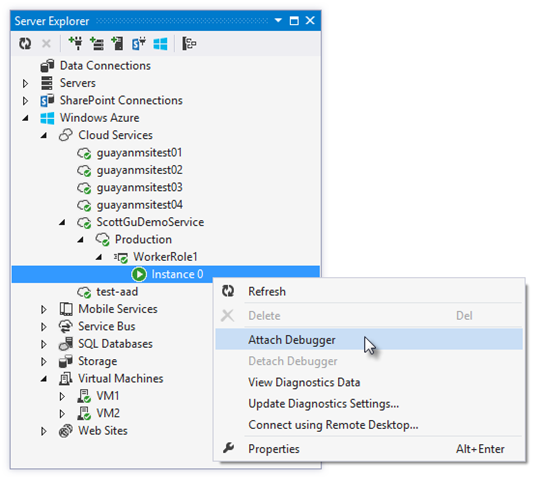
Then use Visual Studio’s Server Explorer to select the Cloud Service instance deployed in the cloud, and then use the Attach Debugger context menu on the role or to a specific VM instance of it:

clip_image004

Once the debugger attaches to the Cloud Service, and a breakpoint is hit, you’ll be able to use the rich debugging capabilities of Visual Studio to debug the cloud instance remotely, in real-time, and see exactly how your app is running in the cloud.

clip_image005

Today’s remote debugging support is super powerful, and makes it much easier to develop and test applications for the cloud.  Support for remote debugging Cloud Services is available as of today, and we’ll also enable support for remote debugging Web Sites shortly.

Windows Azure Management Libraries for .NET (Preview)- Automating PowerShell

Windows Azure Management Libraries are in Preview!

What do Azure Management Libraries provide, the control of creation, deployment and tear down resources which previously has been at a PowerShell level now will be available in the code.

Having the ability to automate the creation, deployment, and tear down of resources is a key requirement for applications running in the cloud.  It also helps immensely when running dev/test scenarios and coded UI tests against pre-production environments.

These new libraries make it easy to automate tasks using any .NET language (e.g. C#, VB, F#, etc).  Previously this automation capability was only available through the Windows Azure PowerShell Cmdlets or to developers who were willing to write their own wrappers for the Windows Azure Service Management REST API.

Modern .NET Developer Experience

We’ve worked to design easy-to-understand .NET APIs that still map well to the underlying REST endpoints, making sure to use and expose the modern .NET functionality that developers expect today:

  • Portable Class Library (PCL) support targeting applications built for any .NET Platform (no platform restriction)
  • Shipped as a set of focused NuGet packages with minimal dependencies to simplify versioning
  • Support async/await task based asynchrony (with easy sync overloads)
  • Shared infrastructure for common error handling, tracing, configuration, HTTP pipeline manipulation, etc.
  • Factored for easy testability and mocking
  • Built on top of popular libraries like HttpClient and Json.NET

Below is a list of a few of the management client classes that are shipping with today’s initial preview release:

.NET Class Name

Supports Operations for these Assets (and potentially more)

ManagementClient

Locations
Credentials
Subscriptions
Certificates

ComputeManagementClient

Hosted Services

Deployments

Virtual Machines

Virtual Machine Images & Disks

StorageManagementClient

Storage Accounts

WebSiteManagementClient

Web Sites

Web Site Publish Profiles

Usage Metrics

Repositories

VirtualNetworkManagementClient

Networks

Gateways

Automating Creating a Virtual Machine using .NET

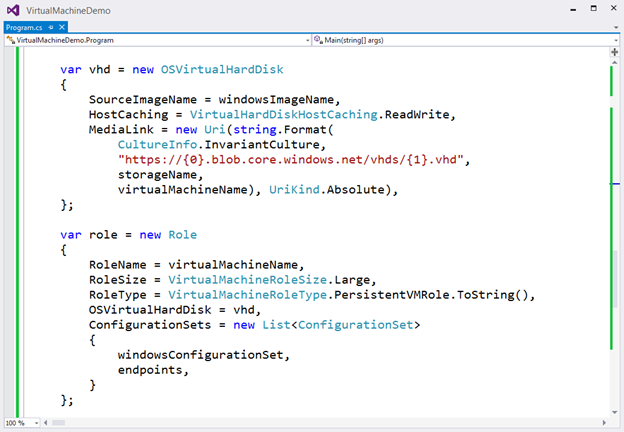
Let’s walkthrough an example of how we can use the new Windows Azure Management Libraries for .NET to fully automate creating a Virtual Machine. I’m deliberately showing a scenario with a lot of custom options configured – including VHD image gallery enumeration, attaching data drives, network endpoints + firewall rules setup - to show off the full power and richness of what the new library provides.

We’ll begin with some code that demonstrates how to enumerate through the built-in Windows images within the standard Windows Azure VM Gallery.  We’ll search for the first VM image that has the word “Windows” in it and use that as our base image to build the VM from.  We’ll then create a cloud service container in the West US region to host it within:

clip_image006

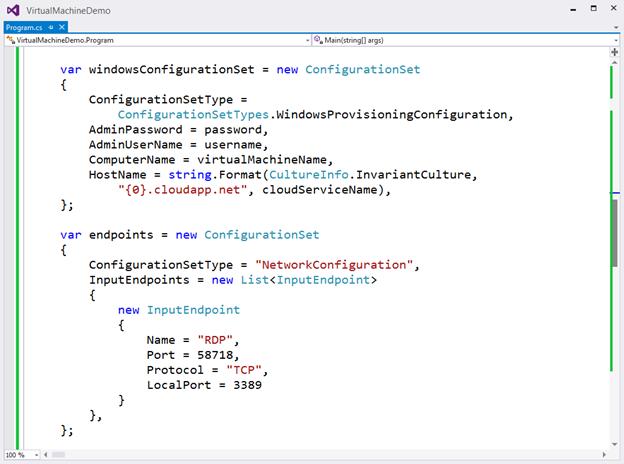
We can then customize some options on it such as setting up a computer name, admin username/password, and hostname.  We’ll also open up a remote desktop (RDP) endpoint through its security firewall:

clip_image007

We’ll then specify the VHD host and data drives that we want to mount on the Virtual Machine, and specify the size of the VM we want to run it in:

clip_image008

Once everything has been set up the call to create the virtual machine is executed asynchronously

clip_image009

In a few minutes we’ll then have a completely deployed VM running on Windows Azure with all of the settings (hard drives, VM size, machine name, username/password, network endpoints + firewall settings) fully configured and ready for us to use:

clip_image010

TopologyBlast

This new functionality will allow Windows Azure to communicate topology changes to all instances of a service at one time instead of walking upgrade domains. This feature is exposed via the topologyChangeDiscovery setting in the Service Definition (.csdef) file and the Simultaneous* events and classes in the Service Runtime library.

Windows Azure Service Bus – partition queues and topics across multiple message brokers

Service Bus employs multiple message brokers to process and store messages. Each queue or topic is assigned to one message broker. This mapping has the following drawbacks:

· The message throughput of a queue or topic is limited to the messaging load a single message broker can handle.

· If a message broker becomes temporarily unavailable or overloaded, all entities that are assigned to that message broker are unavailable or experience low throughput.

Q&A

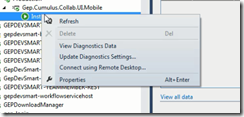
Q. Can I use Azure SDK 2.2 to debug Web Role , Worker Role using earlier SDK.

A. No, you need to have your roles migrated to SDK 2.2. For older role you can only get the diagnostic information out of Visual Studio if installed 2.2.
clip_image011

Q. What are typical issues while migrating from 1.8 to 2.2?

Worker Roles and Web Role Recycling

I have 3 worker roles and a web role in my project and I upgraded it to the new 2.2 SDK (required in VS2013). Ever since the upgrade, all of the worker roles are failing and they instantly recycle as soon as they're started.

Post can be found here- http://stackoverflow.com/questions/19717215/upgrade-to-azure-2-2-sdk-is-causing-roles-to-fail

Not able to update the Role after upgrading

I recently worked on an issue where the following error was being thrown while deploying the upgraded role to Windows Azure.  You just upgraded the SDK to 2.1 or 2.2 and you start getting the following error while deploying the role.

Link to the post http://blogs.msdn.com/b/cie/archive/2013/10/31/not-able-to-upload-role-after-upgrading-the-sdk.aspx

Q. Steps to Migrate to Azure SDK 2.2

A. Open the Azure project in Visual Studio 2012,

  1. For upgrading your project is via the Properties windows of the Cloud Project. You will see the following screenshot.
  2. clip_image013
  3. Follow through the upgrade process fix the errors,
  4. Run the Project locally to see if any errors fix the same.
  5. Check In the code post all fixes
  6. Test the same in Dev. environment to see if this breaking. There is potential chance of breaking due to dependencies.

Note: The web & worker role tend go into inconsistent state due library dependency mismatch. This will have to fixed

Generic Migration to Azure SDK 2.2- High Level Approach

The suggested approach is to start with one component, one web role and one worker role WCF Rest and see the impact in terms of issues and then decide then timelines for others. The POC will be done in 1 Sprint, the candidate are the following

  • Component – Reusable Component
  • Web Role – Portal Web
  • Worker Role – Portal Worker


Links

· Installation of Azure SDK 2.2 - http://www.windowsazure.com/en-us/downloads/archive-net-downloads/

Wednesday, 22 May 2013

Mobile Devices Application Architecture

Mobile Platforms are increasing finding there right places in the enterprises. The Mobile Platform vary from an insignificant non UI based devices to a full-fledged tablets and SMART TV. The compute and storage are a fast moving segment for mobile device capabilities, building applications for these platforms can be a daunting task for developers. Most mobile devices have connectivity in some form or the other and the applications build for devices connect with services which are hosted on premise OR cloud. Concentrating on the mobile device Architecture it would be good to have some guidance for developers what constitute a typical mobile architecture.

clip_image002

High Level Device Architecture

Since most mobile devices as of current are UI intensive the starting point is more around the UI architecture.

The High Level Mobile /Device Application Architecture includes the following components. It’s typically a layered architecture.

clip_image003

Presentation Layer

The UI architecture is heavily driven but certain patterns

  • MVC – The Model View Controller is an architectural pattern that divides an interactive applications into 3 components. The model contains the core functionality and data. View displays information to the user. Controller handles the user input. View and controller together comprise the user interface. A change propagation mechanism ensures consistency between the user interface and model. This architectural pattern came up first with Smalltalk 80 and post that a large number of UI frameworks have been built around MVC and now become a defacto standard for UI development. For more on MVC refer here.
  • Delegation- Most User Interface in mobile devices are rich from a functionality standpoint view and have delegate i.e. transfer information, data and processing to another object typically referred to as a background object. Delegation is a design pattern. For more on Delegation refer here. The delegation pattern is a design pattern in object-oriented programming where an object, instead of performing one of its stated tasks, delegates that task to an associated helper object. There is an Inversion of Responsibility in which a helper object, known as a delegate, is given the responsibility to execute a task for the delegator. The delegation pattern is one of the fundamental abstraction patterns that underlie other software patterns such as composition (also referred to as aggregation), mixins and aspects.
  • Target actions- The User Interface is divided up into View, Controller which dynamically establish relationships by telling each other which object they should target and what action or message to send to that target when an event occurs. This is especially useful when implementing graphical user interfaces, which are by nature event-driven. Most UI on devices are event driven based on the user input raise the desired event and the event handler associated with the same will executed by the event handler associated.
  • Block objects – Most device based application interact with services or other applications for data services or more. The need of having asynchronous call backs will help saving compute. The services have to modelled differently for devices that’s a whole different topic will be covered in a separately.

Management Layer

The management is crucial piece in devices ranging from memory management, state management all the way to device management. Below are some of the key components.

Memory Management-

Device have less usable memory and storage in comparison to a desktop computer, all applications built need to be very aggressive on deleting unneeded objects and be lazy about creating objects.

Foreground and Background Application Management

Applications on device have to be managed differently when in foreground and background. The operating system limits what your application can do in the background in order to improve the battery life and the user experience with the foreground application. The OS notifies your application when it moves from background to foreground which requires special handling for data loading and UI refresh. So typically from transition between these states what does one really have to take care?

  • Moving to Foreground: Respond appropriately to the state transitions that occur. Not handling these transitions properly can lead to data loss and a bad user experience.
  • Moving to Background make sure your app adjusts its behaviour appropriately. Devices which support multitasking have this option in other cases application is terminated. The elementary steps in taking a snapshot image of the current User Interface, save user data and information and free up as much memory as possible. Background application continue to stay in the memory until a low memory situation occurs and OS decides to kill your application. Practically speaking, your app should remove strong references to objects as soon as they are no longer needed. Removing strong references gives the compiler the ability to release the objects right away so that the corresponding memory can be reclaimed. However, if you want to cache some objects to improve performance, you can wait until the app transitions to the background before removing references to them.

Examples of objects that you should remove strong references to as soon as possible include:

  • Image objects
  • Large media or data files that you can load again from disk
  • Any other objects that your app does not need and can recreate easily later
  • Handling Interrupts

The devices are more complicated than one can think classic scenario handling interrupts like an incoming phone call, when an alert-based interruption occurs, such as an incoming phone call, the app moves temporarily to the inactive state so that the system can prompt the user about how to proceed. The app remains in this state until the user dismiss the alert. At this point, the app either returns to the active state or moves to the background stat. In most devices in this state the application don’t receive notification and other types of events. There needs to be some nature of application state management.

State Management

Irrespective what state the application is in foreground, background or suspended, the application’s data has to stored and restored. Even if your app supports background execution, it cannot run forever. At some point, the system might need to terminate your app to free up memory for the current foreground app. However, the user should never have to care if an app is already running or was terminated. From the user’s perspective, quitting an app should just seem like a temporary interruption. When the user returns to an app, that app should always return the user to the last point of use, so that the user can continue with whatever task was in progress. Preserving and restoring the view controllers and view is something which has to be implemented application specific. State preservation needs to considered at the following scenarios

  • Application delegate object, which manages the top level state
  • View Controller object which manages the overall state of the app’s user interface.
  • Custom View, custom data.

State preservation and restoration is an opt-in feature and requires help from your app to work. When thinking about state preservation and restoration, it helps to separate the two processes first. State preservation occurs when your app moves to the background. The restoration process uses the preserved data to reconstitute your interface. The creation of actual objects is handled by your state management.

Core Data Management

The Model in the MVC in the Presentation Layer holds references to business data which may be displayed in the views. The Models generally can end up holding a lot of data can become a major performance issue. The Models should ideally load data which is most relevant to the scenario with support for lazy loading. The responsibility of loading Core Business Data in the Business entities is handled by the Core Data Management. Core Data is generally a schema driven object graph management and persistent framework. Fundamentally, Core Data helps save the model objects, retrieve model objects from the business layer.

  • Core Data provides an infrastructure for managing all the changes to your model objects. This gives you automatic support for undo and redo, and for maintaining reciprocal relationships between objects.
  • It allows you to keep just a subset of your model objects in memory at any given time,
  • It uses a schema to describe the model objects.
  • It allows you to maintain disjoint sets of edits of your objects. This is useful if you want to, for example, allow the user to make edits in one view that may be discarded without affecting data displayed in another view.
  • It has an infrastructure for data store versioning and migration. This lets you easily upgrade an old version of the user’s file to the current version.
  • It interacts with Services or Business Level API to perform CRUD on the business entities.

Core Data Management is runs on a background thread(s).

Application Resource Management

Aside from images and media files, most devices have a lot more capability ranging from accelerometer, camera, Bluetooth, gps, gyroscope, location services, telemetry, magneto meter, microphone, telephony, Wi-Fi….. Most of these have platform based API to access the same. In certain cases there may be a requirement to manage this resources for example video telephony module. The nature of the API provided by platform provides direct access mechanism to access these resources.

Services Helper Layer

The Services Helper Layer on the device serve the purpose providing caching, api, logging or notification services. The Service Helper Layer function more as an assistance to the device hiding the complexity of the inner working thus simplifying the programming model for the developer and not having to worry about low level functions.

Caching Services

The application running on the devices does have limited memory and compute. Most UI elements, pages, data may require to be in memory while they may not be displayed. A efficient disk and memory based caching strategy needs to implemented for the application for better performance.

API Services

In the cloud world or on premise world the devices are likely to talk via services. These services are infact well defined API’s of the business. APIfying the services is a core concept on the cloud which will be covered later. A standard API is

clip_image005

The API Services will interact with the Services API and manage the lifecycle of the service call asynchronously. It will manage aspects such as format conversion, lazy loading and much more.

Logging Services

This is a generic services provides for application level and business level logging. The data collected will be sent back to the Services serves multi-purpose use.

Notification Services

This is asynchronous module which will manage application based notification and events from the services and other application

Sunday, 7 April 2013

Large-scale Implementation on Azure Platform


I have been closely reading the Azure CAT (Customer Advisory Team) which helps a lot of customer deliver large, complex projects. The Azure CAT site can be found here guidance on how to use different architectural artefacts in Azure. After some digging this what I have come to understand are some of the largest implementation on Azure Platform. This is however some amount of reverse engineering and research. Hope this is helpful to the readers.

So what has Azure handled so far from a number standpoint of view?

There can various architectures which Azure addresses but in a nutshell its enterprise ready. From a number standpoint of view this is what Azure is handle for applications where each line item below is an individual applications

  • Largest sharded SQL database – 20 TB- Sql Azure maximum container size of 150 GB, so there have been multiple containers used to resolve the size issues.Of course the querying strategy around this has to be well defined.
  • Largest number of database- 11,000
  • Most number of worker instances – 24,000- This is an on demand application which spins 24k worker role instance to perform some complex calculation and shuts down. This is more like HPC to address complex algorithms.
  • Largest Customer Application- 50 PB

So what are the largest case studies in Azure?

Florida Presidential Election 2012:

This is not the largest but it was highly mission critical. Find the complete write up here.

This was a mission critical for a couple of days with some very high volume numbers to manage.

Florida Election Presidential Election 2012 had the following metrics

  • Max peak 40k page hits / second
  • 6 million hits peaked in 1 hour
  • Caching in front DB was a big architectural success.- The very nature of the application been short lived it made sense to push as much data into the cache and have separate update strategy
    • 3 minute TTL
    • Separate Worker Role to refresh cache.

What does the architecture look like?


image

Enight Florida Presidential Election – From an architectural decomposition standpoint of view below it is the layered architectural explanation below.

Presentation Layer:

Main URL - https://enlight.elections.myflorida.com using Azure Traffic Manager with Availability , performance fail over between the Primary Site US East Coast & US North Central.

The Primary site of the application was hosted on US East Coast.

Enight Public Site: This is a set of web roles hosting voter turnout, election result Florida state wide and other real time election related data. The Application had a lot of real time data which was expected to come in from various data sources. The web role will read the data from the cache if valid if not will get the data from the database.

Enight SOE-  At a very high level the Enight SOE acts as data synchronizer between the primary and the secondary. Additionally it reads the data from the blobs and also pushes it to the secondary.

Caching Layer

Azure Dedicated Cache Roles Used. Given the frequency of reads and writes been very high in a short period of time, It was advisable to go with in memory database i.e. cache. All the entities would continue to remain in the database until 3 minutes TTL. A separate worker role to refresh the cache. The Sql Azure Database reads, writes ended up using a CQRS based patterns to manage the reads, writes – this is a guess.

Database Layer

The Storage Layer comprises of Sql Azure and Blob Storage( data coming in from various counties.

Identity & Access Management

The IDM used here is the standard provided by Azure Access Control Service. The out of box features of Azure ACS like integration with Facebook and other social media very typically used.

Azure Auto Scaling Application

Given that peak traffic could get to 40k pages hit/second. The need of a good auto scaling application must have been required to get the elastic advantage.

* Monitoring Tools most probably used were Cerebrata.

Bing Games

Bing Games- MSFT has finally got to a culture of eating its own dog food, Bing Games is one such example where the Scoring Tracking and Ranking System was entirely on Azure. Find the articles here.

For some reason case study has been removed from the MSFT site.Thanks to Google I managed to get the cached page here.

Below are the high level metrics

  • 1900 instances- app servers (various roles)
  • 398 SQL Azure database- Scale Out
  • 30 million unique users/ month
  • 200k concurrent users
  • 3 months, 7 developers.
  • 99.975% uptime in past 12 months

Why did they pick up Azure Database?

Given the database access patterns it was better to pick Sql Azure over Table Storage. This is however not a defacto standard it depends on the requirement. The choice of Sql Azure was based on the fact they had an existing application already in Sql. The testability i.e easy to pre-populate with millions of records faster.

Partition Strategy

Each user the data would remain the same database. So the scale out based on users was easier and faster. The partitioning strategy is static by nature.

Production Statistics

  • 1200 Azure database request/second spread across all partitions during peak loads.
  • 18k connections in Connection Pool and which could grow with traffic

Database

  • 90-10 read vs. writes

Glassboard.com

Glassboard.com is similar to facebook is a private social network for groups. This is a mobile only application.

The Initial Architecture

image

The Initial Architecture pretty straight forward REST based API and table, queue or blob storage. Additional components such as social collaboration and analytics. 

My personal opinion is this architecture is not quite right, below section I explain why and the glassboard folks have found & corrected the same.

The Wrong Architecture for Devices – Which otherwise would be correct in all cases……..

What started up as REST API based programming turned out a total disaster as the underlying storage was table storage. Its not that the table storage was a disaster. Its just that when we start designing the very academic way of doing thing we have an API for every call, soon to be realized the table cost for each read will start hitting your pocket. With a little fiddler exercise one can realize the same

<excerpt from Glassboard site>

To demonstrate the problem I have set up my Glassboard API instance to do no caching whatsoever. I then ran a unit test which simulates a user getting his Newsfeed, then posting a status. I highlighted each set of repeated calls in a different color.

Repeated Storage Requests

</excerpt from Glassboard site> Find the complete commentary here

Not to get alarmed the architectural change on going the feeds way i.e one call like a feed which has pretty much all the data at startup and incorporating caching helped.

Especially when getting into device based programming we need to bring in some of the client server concepts in here this helps a ton.

The solution is here.

Samsung – Worldwide TV Management

Samsung SMART TV started as a concept now a reality, the device has a base software which needed to be updated from time to time. The cloud was the perfect solution assuming these TV’s are connected to the internet. Azure or AWS became the obvious choice not knowing which way the sales would go for Samsung, betting the update and management solutions on the Platform As A A Service was a good decision. Some Key Features

  • Frequent updates with new applications and software changes for better support and compatibility.
  • Due to high sales the need of a scalable and elastic system was required.
  • Utilized 20 large size web roles with ASP.NET.
  • Have a good Web API layer for the same functionality find the developer documentation here.
  • Caching seems the one candidate which all azure application need for rescue.

Solution Architecture

image

The Architecture is fairly straightforward.

  • Firmware Download Website- Set of web roles which connects with the Smart TV via set of REST based API post authentication will check for the updates and push the updates to the device.
  • Administration Firmware Upload Website – A set of web roles which provide basic administration and reporting functionality.
  • Worker Role  which does task automation – firmware encryption and batch updates. Additionally push the logs to the Sql Azure Database. The updates goes to a blob storage and uses the Azure CDN functionality to push to edge servers.

MYOB

MYOB(Manage Your Business) is a large Australian based ISV developing Accounting software for small business. The new release AccountRight Live, lets users run their account on a PC or a cloud. Or both at once depending on their preferences.  The hybrid arrangement was not however a cunning innovation design to catapult the company and its customer into a bold and cloudy future.  Based on surveys run with the customer did MYOB decide on rolling out a hybrid strategy. Users count about 150k.  Find the link to the site here.

Based on the multi-tenancy requirement each customer required a separate database. Caching is used as standard feature, reserved CPU per database.

MYOB Solution Architecture

  • Each user installs the client software via a box offering
  • Choice to use the business and data tier either on Azure or on premise
  • The application is developed using C#/.NET using LINQ to SQL and Entity framework. Which is very bad……. LINQ is fairly single threaded process which works very well on an Intel processor with a high clock rate. On a web, worker role AMD processor with very low clock rate, the performance on Azure will be slower. Work around is run LINQ on small CPU with a single core.
  • Database on premises and Azure are kept in sync via Sync framework
  • Each customer has their own Azure SQL Database per business entity.
  • DB to be backed up nightly using DAC Import/Export services keeping 2 days rolling backup files in blob storage.

image

Identity Management used is Azure ACS (STS inbuilt) most probably with a Custom Identity Provider with option of windows live. With some guess work I see MYOB Identity Management use ADFS to integrate with corporates Active Directory as well.

A simple layered architecture.

  • User Interfaces can be a browser, Client Desktop thick client.
  • Services Layer – This includes the Collaboration Services, Authentication Service, Customer File Service, Huxley Services (Transactional Services). All services are exposed as REST API. The Client Desktop connects with the Collab Service post authentication which uses the Azure ACS receives the ACS token. The Collaboration Services validates with the Billing System and post that connects to the correct User Database depicted as User DB1… DBn.
  • Storage Services: This is basically a Sql Azure set of databases.

What I love about this architecture is the simplicity. Keep tenancy at a database perhaps may not be the most economical solution but its simple.

Caching has been used at every layer. Judging from the speeds they seem to have a set of dedicated caching servers how many is guess work again.

MYOB Implementation had some key lessons to learn – what are they

  • Cloud Platforms
    • Enable massive scalability
    • HA at lower costs
    • Expose rich cloud based API’s
  • Identity Foundation
    • Well integrated with WCF and highly customisable Scaling Database
    • Sharding is the foundation

Issues on WCF throttling had been handled with different architectural solutions. Some of the solutions are here

Key Takeaways 

Couple of Key Areas to watch out for in Azure Application

  • If Mobile is a part of the overall architecture special considerations are required, well have a separate post on the same.
  • Study Storage choice properly Tables, Sql Azure – there is no straightforward answer it varies.Every Sql Azure database has been allocated a maximum of 180 concurrent threads
  • Use Caching wherever possible. This is an architectural decision not a developer.
  • Code Right-  Profile the code as much as possible.
  • Sql Azure is a Relational Database as a Service.SQL Server is the core engine and Sql Azure is logical abstraction over the same. SQL Azure is a subset of SQL Server features. It provides tremendous scale out features.