Showing posts with label Service Bus. Show all posts

Wednesday, 6 November 2013

Azure SDK 2.2 Features & Migration


Brief Synopsis

The SDK 2.2 is not major upgrade it has brought more features around remote debugging in cloud which was a big ask till now & Windows Azure Management Libraries from a Developer per say. The Windows Azure Service Bus partition queue and topics multiple message broker will help in better availability, as each queue or topic is assigned to one message broker which is single point of failure, now with the new feature of multiple message broker assigned to a queue or topic. Please read the Q&A at the end to know the nuances with the same & the approach to move to Azure SDK 2.2 from generic project stand point of view

High Level following are the new features

  • Visual Studio 2013 Support
  • Integrated Windows Azure Sign-In support within Visual Studio
  • Remote Debugging Cloud Services with Visual Studio – Very Relevant to  Developers
  • Firewall Management support within Visual Studio for SQL Databases
  • Visual Studio 2013 RTM VM Images for MSDN Subscribers
  • Windows Azure Management Libraries for .NET – Very Relevant to  Deployment Team
  • Updated Windows Azure PowerShell Cmdlets and ScriptCenter
  • Topology Blast – Relevant to Deployment Team
  • Windows Azure Service Bus – partition queues and topics across multiple message brokers – Relevant to  Developers. All Service Bus based projects have to move ASAP.

Below covered are only the highlighted areas.

Remote Debugging Cloud Resources within Visual Studio

Today’s Windows Azure SDK 2.2 release adds support for remote debugging many types of Windows Azure resources. With live, remote debugging support from within Visual Studio, you are now able to have more visibility than ever before into how your code is operating live in Windows Azure.  Let’s walkthrough how to enable remote debugging for a Cloud Service:

Remote Debugging of Cloud Services

Note: To debug the web or worker role should be on Azure SDK 2.2

To enable remote debugging for your cloud service, select Debug as the Build Configuration on the Common Settings tab of your Cloud Service’s publish dialog wizard:

clip_image001

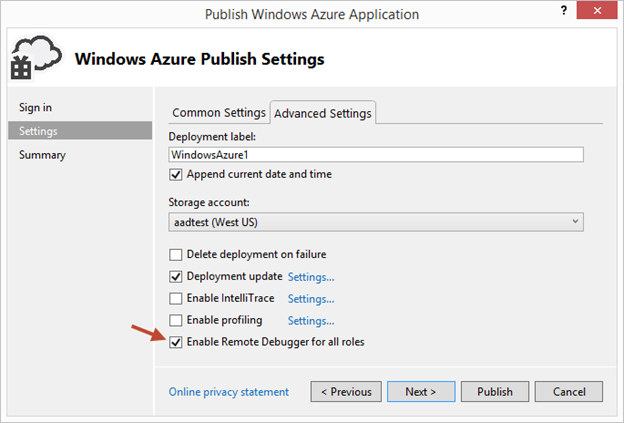
Then click the Advanced Settings tab and check the Enable Remote Debugging for all roles checkbox:
clip_image002

Once your cloud service is published and running live in the cloud, simply set a breakpoint in your local source code:

clip_image003

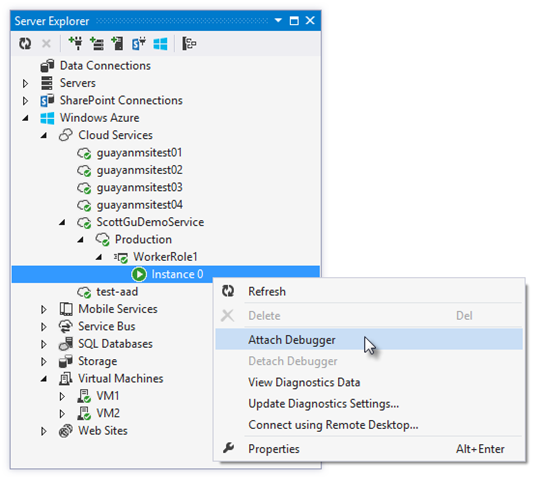
Then use Visual Studio’s Server Explorer to select the Cloud Service instance deployed in the cloud, and then use the Attach Debugger context menu on the role or to a specific VM instance of it:
clip_image004

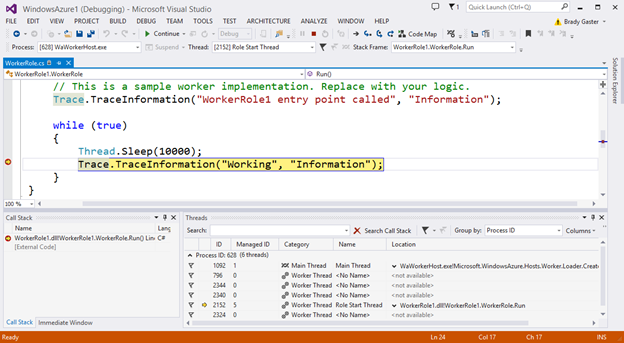
Once the debugger attaches to the Cloud Service, and a breakpoint is hit, you’ll be able to use the rich debugging capabilities of Visual Studio to debug the cloud instance remotely, in real-time, and see exactly how your app is running in the cloud.
clip_image005

Today’s remote debugging support is super powerful, and makes it much easier to develop and test applications for the cloud.  Support for remote debugging Cloud Services is available as of today, and we’ll also enable support for remote debugging Web Sites shortly.

Windows Azure Management Libraries for .NET (Preview)- Automating PowerShell

Windows Azure Management Libraries are in Preview!

What do Azure Management Libraries provide, the control of creation, deployment and tear down resources which previously has been at a PowerShell level now will be available in the code.

Having the ability to automate the creation, deployment, and tear down of resources is a key requirement for applications running in the cloud.  It also helps immensely when running dev/test scenarios and coded UI tests against pre-production environments.

These new libraries make it easy to automate tasks using any .NET language (e.g. C#, VB, F#, etc).  Previously this automation capability was only available through the Windows Azure PowerShell Cmdlets or to developers who were willing to write their own wrappers for the Windows Azure Service Management REST API.

Modern .NET Developer Experience

We’ve worked to design easy-to-understand .NET APIs that still map well to the underlying REST endpoints, making sure to use and expose the modern .NET functionality that developers expect today:

  • Portable Class Library (PCL) support targeting applications built for any .NET Platform (no platform restriction)
  • Shipped as a set of focused NuGet packages with minimal dependencies to simplify versioning
  • Support async/await task based asynchrony (with easy sync overloads)
  • Shared infrastructure for common error handling, tracing, configuration, HTTP pipeline manipulation, etc.
  • Factored for easy testability and mocking
  • Built on top of popular libraries like HttpClient and Json.NET

Below is a list of a few of the management client classes that are shipping with today’s initial preview release:

.NET Class Name

Supports Operations for these Assets (and potentially more)

ManagementClient

Locations
Credentials
Subscriptions
Certificates

ComputeManagementClient

Hosted Services

Deployments

Virtual Machines

Virtual Machine Images & Disks

StorageManagementClient

Storage Accounts

WebSiteManagementClient

Web Sites

Web Site Publish Profiles

Usage Metrics

Repositories

VirtualNetworkManagementClient

Networks

Gateways

Automating Creating a Virtual Machine using .NET

Let’s walkthrough an example of how we can use the new Windows Azure Management Libraries for .NET to fully automate creating a Virtual Machine. I’m deliberately showing a scenario with a lot of custom options configured – including VHD image gallery enumeration, attaching data drives, network endpoints + firewall rules setup - to show off the full power and richness of what the new library provides.

We’ll begin with some code that demonstrates how to enumerate through the built-in Windows images within the standard Windows Azure VM Gallery.  We’ll search for the first VM image that has the word “Windows” in it and use that as our base image to build the VM from.  We’ll then create a cloud service container in the West US region to host it within:

clip_image006

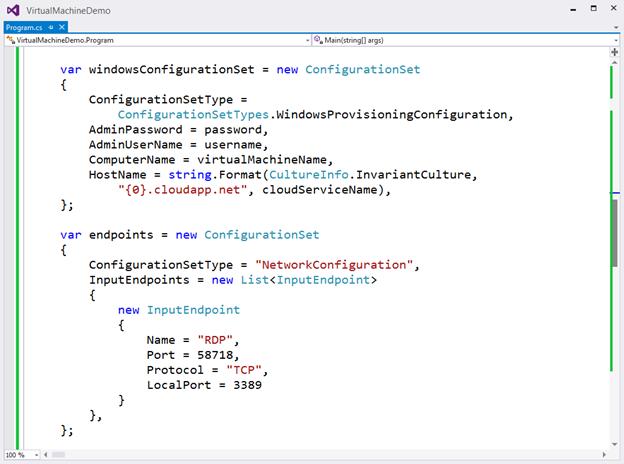
We can then customize some options on it such as setting up a computer name, admin username/password, and hostname.  We’ll also open up a remote desktop (RDP) endpoint through its security firewall:
clip_image007

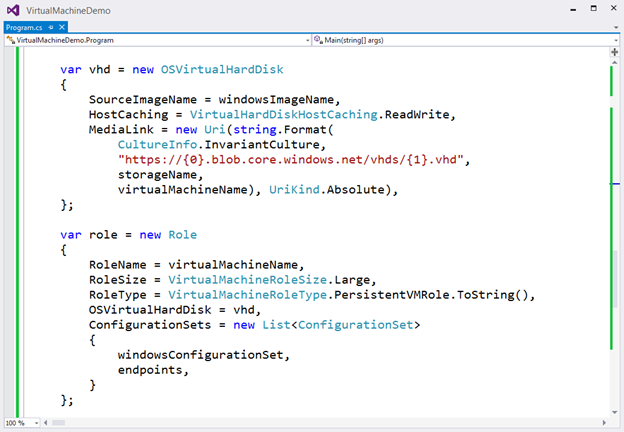
We’ll then specify the VHD host and data drives that we want to mount on the Virtual Machine, and specify the size of the VM we want to run it in:
clip_image008

Once everything has been set up the call to create the virtual machine is executed asynchronously

clip_image009

In a few minutes we’ll then have a completely deployed VM running on Windows Azure with all of the settings (hard drives, VM size, machine name, username/password, network endpoints + firewall settings) fully configured and ready for us to use:

clip_image010

TopologyBlast

This new functionality will allow Windows Azure to communicate topology changes to all instances of a service at one time instead of walking upgrade domains. This feature is exposed via the topologyChangeDiscovery setting in the Service Definition (.csdef) file and the Simultaneous* events and classes in the Service Runtime library.

Windows Azure Service Bus – partition queues and topics across multiple message brokers

Service Bus employs multiple message brokers to process and store messages. Each queue or topic is assigned to one message broker. This mapping has the following drawbacks:

· The message throughput of a queue or topic is limited to the messaging load a single message broker can handle.

· If a message broker becomes temporarily unavailable or overloaded, all entities that are assigned to that message broker are unavailable or experience low throughput.

Q&A

Q. Can I use Azure SDK 2.2 to debug Web Role , Worker Role using earlier SDK.

A. No, you need to have your roles migrated to SDK 2.2. For older role you can only get the diagnostic information out of Visual Studio if installed 2.2.

clip_image011

Q. What are typical issues while migrating from 1.8 to 2.2?

Worker Roles and Web Role Recycling

I have 3 worker roles and a web role in my project and I upgraded it to the new 2.2 SDK (required in VS2013). Ever since the upgrade, all of the worker roles are failing and they instantly recycle as soon as they're started.

Post can be found here- http://stackoverflow.com/questions/19717215/upgrade-to-azure-2-2-sdk-is-causing-roles-to-fail

Not able to update the Role after upgrading

I recently worked on an issue where the following error was being thrown while deploying the upgraded role to Windows Azure.  You just upgraded the SDK to 2.1 or 2.2 and you start getting the following error while deploying the role.

Link to the post http://blogs.msdn.com/b/cie/archive/2013/10/31/not-able-to-upload-role-after-upgrading-the-sdk.aspx

Q. Steps to Migrate to Azure SDK 2.2

A. Open the Azure project in Visual Studio 2012,

  1. For upgrading your project is via the Properties windows of the Cloud Project. You will see the following screenshot.
  2. clip_image013
  3. Follow through the upgrade process fix the errors,
  4. Run the Project locally to see if any errors fix the same.
  5. Check In the code post all fixes
  6. Test the same in Dev. environment to see if this breaking. There is potential chance of breaking due to dependencies.

Note: The web & worker role tend go into inconsistent state due library dependency mismatch. This will have to fixed

Generic Migration to Azure SDK 2.2- High Level Approach

The suggested approach is to start with one component, one web role and one worker role WCF Rest and see the impact in terms of issues and then decide then timelines for others. The POC will be done in 1 Sprint, the candidate are the following

  • Component – Reusable Component
  • Web Role – Portal Web
  • Worker Role – Portal Worker


Links

· Installation of Azure SDK 2.2 - http://www.windowsazure.com/en-us/downloads/archive-net-downloads/

Sunday, 3 March 2013

Services & Devices

We saw the telecom giants in last few years realize the true value of computing industry and with cloud a lot of there business strategies have been sent back to the white board for example sms which was one of main Value Added Service revenue for them, with innovations like WhatsApp, the dynamics have changed. Cloud brings in yet another major disruption in the devices industry. Devices are no more limited to phone or the tablet. The total number of devices which are likely going to be using the cloud in some form of other by 2020 is 50 bill.The size of data which is likely to either be stored or pass through cloud in 2 days is greater than what has be stored in the entire history of internet.


The software industry is entering another challenging zone “where applications have to be built to respond, execute, manage many different device types”. 

What are these modern applications which are to built for these devices?

The modern applications which are typically going to run on devices are the business applications and the system of engagement applications(consumer applications). Modern Application are

  • User Centric:  Applications built are targeted towards each user. As each user is unique. 
  • Social: Applications integrate with social network to give a better experience.
  • Data Centric: 2 aspects to data centricity
    • Data Exchange in terms ws* , This is more simplified the interaction based design is not scalable with the no of devices. The Data Exchange is very simplified.
    • Telemetry: Instrumenting the application more to follow.

image

What are these Devices?

Devices are far beyond the laptop, tablets etc.. They are intelligent have connectivity.

image

These devices are consuming services in the cloud. They produce data.

What are the Interface Types of Sizes?

The Interface Types and Sizes have various form factors and in reality each interface types is more likely to have its native application to really harness the power of the interface. Most interface will come with some type of sensors example camera, GPS, motion, light, connectivity. All of these sensors are an invisible form of input to the application which are not human controlled. The data produced by these sensors will further help the user experience to more rich and better focused to address the requirement in far more intelligent way. The storage for these devices is most cases will be cloud and will have a local storage as well.

image

Device need Connectivity, What are the different types?

Connectivity is of utmost importance to the device and service world, An application is no more identified by the zip code which the user belongs, its more around the lines of the current device coordinates. That changes the way in which we build are applications. Devices are getting into this area of been connected 24X7, there are geographies in the world with very basic or no connectivity and application needs to be aware of that. The styles of connectivity are

  • Device to Network
  • Device to Device to Network
  • Device to Gateway to Network

The types of connectivity can vary from none to bluetooth, wifi, 3G, 4G …

The data transfer from these devices can vary from bi-directional to one way.

Communication with these Devices what does it mean?

The device application will communicate with the services in the cloud it can via telephony, sms, notifications (device native, web sockets , service bus) , http to REST Services.

When architecting solution for Devices & Services What does one need to be aware of?

Devices

  • Each device is a connected device, Its almost connected always.Application have to built with taking into consideration the connectivity aspect how much/minimum the device is going to be connected. Also need to consider change of connectivity modes from a 3G to wi-fi i.e maintaining state of the application.
  • Each device is a cache – device loss/ recreation is a non event- Do not end up storing data on the device is not replicated on the cloud to address recoverability. Windows Surface and IPAD both do a pretty go job there.
  • Device state (apps & users) is stored in the cloud.
  • App & User state is transparently accessible from any device.
  • Devices may not have a user interface or even user example sensors.

Connectivity

  • Win 8 network guidance is fairly good one can look into the same
  • Identity: This is of paramount importance. The Identity Strategy for devices has to be well thought, a lot of this exist today. Devices have identity & services or individuals can be authorized to interact with/from the device.
  • Integration
    • Data
    • Notification
    • Integration Patterns

Services

  • Services are designed with Cloud focus.  
  • RESTFul API’s is a standard.
  • Services default to delivering data using a standard protocol(OData).
  • Social enabled services may end using open protocols (Open Graph).
  • User identity to be built will be using open protocols (OAuth).
  • Services are data- centric and/or insight-enabled


What does Application Maturity Model for Services & Devices look like?

The Application Maturity Model for S&D is high level not casted in stone,

image

  • A Level 0 app is which runs on the Device and stores its state in a blob. The blob storage could be google drive or skydrive
  • At Level 1, Application that runs on a device and uses services in various fashion via RESTFul API’s, HTTP’s , Azure Mobile Services. Data can exchanged between apps and services using OData, OAuth. If the number of devices connecting to the services are too many service bus is the standard option available to access services.
  • Social: Application should like, share , follow – social patterns. The Open Graph API can used to for the same purpose.
  • Insight Enabled Apps: Applications which build a lot assistance behaviour for example “are you trying get the latest news items for Redmond”. Telemetry emitting events

Can Azure help you build S&D(Services & Devices) Application?

Azure provides pretty much all the building blocks for the Services and Devices Application. The native application on Device is something which out of this scope.

Is Azure Fail Safe?

image

Cloud is an evolving platform while the industry embraces there bound to challenges as the platform has to change address the changing customer dynamics, With this there are times when see downtime and over reactive press around the same. Some of this can be taken care at the architecture level.

  • Software into Services:  All the services that we build in cloud or else where are going to consumed by devices and will have a certain SLA. A good way to test your services in cloud is use chaos monkey(AWS , Azure), this helps test the software into production.
  • Services and not Servers: Services will be hosted one or more the virtual instance which are running on the Servers. We now scale out at a services level for example “We need 25 instances of the Credit Rating Service to manage the load”, we don't talk in terms of servers any more.
  • Decomposition by workload- Thinking about the application in terms of workloads help you partition them better. For example “In e commerce application you know the auction of high end category will attract a lot of users and hence you may want to partition it to run separately”. One can engineer the SLA around these partition to meet the end user requirements.
  • Modelled by Lifecycle: Lifecycle in terms of time. Depending the peak scenarios in the lifecycle one can decide when to do maintenance of certain components.
  • Utilize Scale Units: Design the application for null capacity. Scale Unit ideally become the minimum growth unit as the business on the same grows.
  • Design for Operations: Services need to be intelligent, they have to be designed for operations.

More on REST Guidance…

  • Expose services as plain HTTP/JSON API’s
  • Use OData conventions for description , wire formats and interaction.
  • Use a well defined structure of URLs to designate the service and tenants within an API namespace.
  • Expose a consistent set of core constructs: collections, resources, actions.
  • Unified versioning scheme that provides clear path to stability.
  • Offer a common authentication scheme across API’s.

There is more to WCF Rest Guidance which can be found at the Microsoft sites. WCF is not a mandate REST its one of the implementation option and same can achieve the same.  MSFT is desperately pushing OData & OAuth not quite sure as to why only time will tell.

Looking more deeper OData this what looks like who is investing into it, seems like there is a big community supporting a Microsoft originated standard.

image

Any Reference Material?

Bits

(nightly builds also available)

References

How much of social features should an application build in?

From an application standpoint of view the Graph API is pretty will have separate post of the same later. The Open Graph Protocol is seeing lot of acceptance in most business application. Social is more enterprise today.

What has MSFT done in the devices?

Starting with Windows 8 and a whole lot of features around the same.Additionally in the cloud is Windows Azure Mobile Services, its a consumer oriented system which does the following implicitly

  • Identity Management: Authentication and Authorization, not in line with Azure ACS, its in terms of
  • Notification – These are Push notification to devices , a rich integration around PNS (Platform Notification Services).
  • Data Services:  Exposing data to devices directly without much coding.
  • Server Logic:
  • Logging :
  • Scale:

Scalability around Devices?

The number of devices which likely to communicate with the Services are going to be probably very high. The need to have a service bus is a must there.

What is Notification Hub?

The Hub concept of SignalR framework combined with the service bus is what we call a Notification Hub.

Notification Hub delivers notification through third-party systems ex Windows Notification, Apple Push Notification, Google Cloud Message.

What is ideally used here is Push Notification with service bus.


image


Closing Notes

Diversity of devices is large and ever-growing,Devices have different interface types, sizes, sensors, storage, communication and connectivity considerations.Native vs. HTML5 vs. Hybrid – know the trade-offs.Device and OS types - understand the deltas and options Telemetry is important and should be implemented

I will have a deeper developer post on Services & Devices in the coming days.


Tuesday, 28 August 2012

Windows Azure Queues–The Complete Works


My last post had concentrated on Service Bus Queues, I do get a lot of questions from the customer when to use Azure Queues vs. Service Bus Queues. This post I try to establish the decision which help one make better choices between the two.

Digging deeper into Azure Queues: Windows Azure Queue the expectation is it will be lower cost alternative to the Service Bus Queue’s. In principle Windows Azure Queue going ahead referred to as WAQ

  • Are asynchronous reliable delivery messaging construct.
  • Highly available , durable and performance efficient. The performance numbers to which the WAQ can manage is area of some research.
  • Ideally they are process At Least Once.
  • REST based interface support.
  • WAQ doesn’t have a limit on the number of messages stored in queue.
  • TTL for WAQ is 1 week , post that they will be garbage collected.
  • Meta data support in form name value pair exists
  • Maximum message size is 64KB
  • Message inside WAQ can be put in binary when read back it comes as XML
  • No guaranty on sequencing of the message
  • No support for duplicate messages identification.
  • Parameters of WAQ include
    • MessageID: GUID
    • Visibility Timeout: Default is 30 seconds maximum is 2 hours, Ideally use for read and process and then issue a delete.
    • PopReceipt:  On reading the queue there is visibility timeout associated with it, the receiver reads the messages tries to complete some processing and then may decide to issue a delete. The message which is read has a PopReceipt associated with it.  PopReceipt is used while issuing a delete it goes with the MessageId.

      PopReceipt, is

      • Property of CloudQueueMessage
      • Set every time a message is popped from the queue (GetMessage or GetMessages)
      • Used to identify the last consumer to pop the message
      • A valid pop receipt is required to delete a message
      • An exception is thrown if an invalid pop receipt is passed
      • PopReceipt is used in conjuction with the message id to issue a Delete of a message , for which a visibility timeout is set. We have the following scenarios

        A Delete is issued within the visibility timeout the Delete the message is deleted from the queue, the assumption here is the message has been read and processing required has been done term it the happy path.

        A Delete is issued post expiry of the visibility time, this assumed to be exception flow “ ex: the receiver process has crashed” and message is available in queue for re-processing. This failure recovery process rarely happens, and it is there for your protection. But it can lead to a message being picked up more than once. Each message has a property, DequeueCount, that tells you how many times this message has been picked up for processing. For example above, when receiver A first received the message, the dequeuecount would be 0. When receiver B picked up the message, after server A’s tardiness, the dequeuecount would be 1. This becomes a strategy to detect problem or poison message and route it to a log,repair and resubmit process.

      • Poison message is a message that is somehow continually failing to be processed correctly. This is usually caused by some data in the contents that causes the processing code to fail. Since the processing fails, the messages timeout expires and it reappears on the queue. The repair and resubmit process is sometimes a queue that is managed by a system management software. There is a need to check for and set a threshold for this dequeuecount for messages.
    • MessageTTL : This specifies the time-to-live interval for the message, in seconds. The maximum time-to-live allowed is 7 days. If this parameter is omitted, the default time-to-live is 7 days. If a message is not deleted from a queue within its time-to-live, then it will be garbage collected and deleted by the storage sytem.

Notes: It is important to note that all queue names must be lower case. The CreateIfNotExist() method will see if the queue really does exist in Windows Azure, and if it doesn’t it will create it for you.


Comparison of Azure Queues with Service Queues

A good post which covers that can be found here  -http://preps2.wordpress.com/2011/09/17/comparison-of-windows-azure-storage-queues-and-service-bus-queues/


Design Consideration for Azure Queues

The messages are pushed into the queues the receiver will read the message process & delete. The general technique for reading messages from a queue used is Polling. The use of a classic queue listener with a polling mechanism may not be the optimal choice when using Windows Azure queues because the Windows Azure pricing model measures storage transactions in terms of application requests performed against the queue, regardless of if the queue is empty or not.  If the number of messages increase in the queue “load leveling” will kick in and more receivers roles will spin off. These receivers will continue to run and accrue cost.

The costing of a single queue listener using polling mechanism

Assuming a hypothetical situation there is a single queue listener constantly polling for messages in the queue. The business transaction data arrives at regular intervals. However, let’s assume

  • The solution is busy processing workload just 25% of the time during a standard 8-hour business day.
  • That results in 6 hours (8 hours * 75%) of “idle time” when there may not be any transactions coming through the system.
  • Furthermore, the solution will not receive any data at all during the 16 non-business hours every day.

Total Idle time= 22 hours, there is dequeue work i.e GetMessage() called from Polling function that amounts

22 hrs X 60 min X 60 transaction/min – assuming polling at 1 second= 79,200 transaction/day

Cost of 100,000 transactions = $0.01

The storage transactions generated by a single dequeue thread in the above scenario will add approximately  = 79,200 / 100,000 * $0.01 * 30 days = $0.238/ month for 1 queue listener in polling mode.

Architects will not plan for a single queue listener for the entire application and chances are number queue listeners will be high & there are going to different queues for different requirements.  I’m assuming a total 200 queues used in an application with polling

200 queues X $0.238 $45. 720 per month - is the cost incurred when the solution was not performing any computations at all, just checking on the queues to see if any work items are available


Addressing The Polling Hell

To address the polling hell following techniques can be used

  • Back off polling, a method to lessen the number of transactions in your queue and therefore reduce the bandwidth used.  A good implementation can be found here http://www.wadewegner.com/2012/04/simple-capped-exponential-back-off-for-queues/
  • Triggering (push-based model): A listener subscribes to an event that is triggered (either by the publisher itself or by a queue service manager) whenever a message arrives on a queue. The listener in turn can initiate message processing thus not having to poll the queue in order to determine whether or not any new work is available. The implementation specifics of a Push Based Model is made easier with introduction of internal IP addresses for roles. An internal endpoint in the Windows Azure roles is essentially the internal IP address automatically assigned to a role instance by the Windows Azure fabric. This IP address along with a dynamically allocated port creates an endpoint that is only accessible from within a hosting datacenter with some further visibility restrictions. Once registered in the service configuration, the internal endpoint can be used for spinning off a WCF service host in order to make a communication contract accessible by the other role instances. A Publish Subscriber implementation based on this straightforward. The limitations of this approach are.
      • Internal endpoints must be defined ahead of time – these are registered in the service definition and locked down at design time; In case the endpoints where dynamic a small registry can be implemented for the same purpose.
      • The discoverability of internal endpoints is limited to a given deployment – the role environment doesn’t have explicit knowledge of all other internal endpoints exposed by other Azure hosted services;
      • Internal endpoints are not reachable across hosted service deployments – this could render itself as a limiting factor when developing a cloud application that needs to exchange data with other cloud services deployed in a separate hosted service environment even if it’s affinitized to the same datacenter;
      • Internal endpoints are only visible within the same datacenter environment – a complex cloud solution that takes advantage of a true geo-distributed deployment model cannot rely on internal endpoints for cross-datacenter communication;
      • The event relay via internal endpoints cannot scale as the number of participants grows – the internal endpoints are only useful when the number of participating role instances is limited and with underlying messaging pattern still being a point-to-point connection, the role instances cannot take advantage of the multicast messaging via internal endpoints.

 Note: Given that application is not a large scale application spreading across geo location the pub sub model can still be implemented using the above approach. The limitation hit hard in large scale geo distributed applications. In case we are to look at a large scale geo distributed application the idea would be go for service bus.

  • Look at Service Bus Queues as alternative after a complete cost analysis as the Pub Sub implementation on Service Bus is out of box.

Dynamic Scaling

Dynamic scaling is the technical capability of a given solution to adapt to fluctuating workloads by increasing and reducing working capacity and processing power at runtime. The Windows Azure platform natively supports dynamic scaling through the provisioning of a distributed computing infrastructure on which compute hours can be purchased as needed.

It is important to differentiate between the following 2 types of dynamic scaling on the Windows Azure platform:

  • Role instance scaling refers to adding and removing additional web or worker role instances to handle the point-in-time workload. This often includes changing the instance count in the service configuration. Increasing the instance count will cause Windows Azure runtime to start new instances whereas decreasing the instance count will in turn cause it to shut down running instances. It takes 10 minutes to add a new instance.
  • Process (thread) scaling refers to maintaining sufficient capacity in terms of processing threads in a given role instance by tuning the number of threads up and down depending on the current workload.

Dynamic scaling in a queue-based messaging solution would attract a combination of the following general recommendations:

  • Monitor key performance indicators including CPU utilization, queue depth, response times and message processing latency.
  • Dynamically increase or decrease the number of role instances to cope with the spikes in workload, either predictable or unpredictable.
  • Programmatically expand and trim down the number of processing threads to adapt to variable load conditions handled by a given role instance.
  • Partition and process fine-grained workloads concurrently using the Task Parallel Library in the .NET Framework 4.
  • Maintain a viable capacity in solutions with highly volatile workload in anticipation of sudden spikes to be able to handle them without the overhead of setting up additional instances.


Note: To implement a dynamic scaling capability, consider the use of the Microsoft Enterprise Library Autoscaling Application Block that enables automatic scaling behavior in the solutions running on Windows Azure. The Autoscaling Application Block provides all of the functionality needed to define and monitor autoscaling in a Windows Azure application. It covers the latency impact, storage transaction costs and dynamic scale requirements.


Additional Consideration for Queues

HTTP 503 Server Busy on Queue Operations

At present, the scalability target for a single Windows Azure queue is “constrained” at 500 transactions/sec. If an application attempts to exceed this target, for example, through performing queue operations from multiple role instance running hundreds of dequeue threads, it may result in HTTP 503 “Server Busy” response from the storage service. I have found Transient Fault Handling Application Block pretty handy in retry mechanism - http://msdn.microsoft.com/en-us/library/hh680905(v=pandp.50).aspx


Important References

Saturday, 25 August 2012

Windows Azure Service Bus- Messaging Features


The Service Bus is single most important component be it an Enterprise Integration scenario or a cloud (which by the way happens to be mass scale integration of massive number of applications). The expectation from Service Bus in the cloud are very many, when compared to an Enterprise scenario the Enterprise Service Bus does cater to a bare minimum of the following features

  • Messaging Services: 
  • Management Services
  • Security Services
  • Metadata Services
  • Mediation Services
  • Interface Service

ESB is a messaging expert not to get into history of Traditional EAI, EAI broker, MOM architecture. Messaging is a feature which has seen significant improvement in past 2 decades in ESB. This post I’m specifically concentrating on Windows Azure Service Bus – Messaging capabilities and compare it with what is the standard ESB implementation. Before dwelling into the details of the Azure Service Bus Messaging setting the context on Messaging features on a standard ESB.


ESB – Messaging features – What to expect


The Message: A message is typically composed of 3 basic parts: the header, the properties and the message payload. The header is used by the messaging system and application developer to provide information such as the destination, reply to destination, message type & message expiration time. Properties section is generally a name-value pair. These properties are essentially a part of the message payload or body that get promoted to a special section of the message so that filtering can be applied to the message by consumer or specialized routers. The format of the message payload can vary across messaging implementation example plain text, binary or xml.

ESB is a messaging expert so that it can manage whatever type of messaging you can throw at it.  The types of messaging which can potentially be exchanged in mid sized organization between different business and support application can be very many and cloud scale can be a very different playground. Obvious to the fact there will a standard set of messaging which will be supported by an ESB below are the following

  • Point to point Messaging :  P2P messages can also be marked as persistent or non-persistent
  • Point to point request/response: Request/ Response Messaging Pattern for most ESB is synchronous , asynchronous in nature. Applications and services in fire and forget mode which allows an application to go about its business once a message is asynchronously delivered. A variant of this is the Reply Forward Pattern where by response of the message is send to another destination. 
  • Broadcast message
  • Broadcast request/response
  • Publish subscribe: Pub Sub is self explanatory a common misconception regarding Pub Sub is lightweight compared to point to point. A pub sub message can be delivered just as reliably as a point to point message can. A message delivered on a point to point queue can be delivered with little additional overhead if it is not marked persistent. A reliable pub sub message is delivered using a combination of persistent message and durable subscriptions. When an application register to receiving message of a specific topic it can specify that the subscription is durable. A durable subscription will survive is the subscribing client fails. This means that if that intended receiver of a message becomes unavailable for any reason, the message server will continue to store the messages on behalf of the receiver until the receiver becomes available again.

image

  • Store and forward: ESB provides message queuing and guaranteed delivery semantics which ensure that “unavailable” application will get their data queued and delivered at a later time. The message delivery semantics can cover a range of options from exactly-once delivery to at-least once to at most once delivery. Message when marked as persistent will utilize store and forward mechanism.

image

In a ESB the concept of store and forward should be capable of being repeated across multiple servers that are chained together.  In this scenario each message server uses store and forward and message acknowledgements to get the message to the next server in the chain. Each server to server handoff maintains minimum reliability and the QoS that are specified by the sender.  It would be interesting to understand how Azure really manages this internally. MSFT has not given out the details on the same.  This is were the idea of dynamic routing  comes into play.

Transacted Messages  an important aspect of messaging in simpler words “transactional messaging”. ESB is predominantly built around “loose coupled architecture”, introducing an idea of producers and consumers of message participate in one global transaction is defeating the purpose of purpose of loosely coupled architecture.  What is effective in the ESB scenario is local transaction. The local transaction is in context of an individual sender or an individual receiver where multiple operations are grouped as a single transaction. An example is the grouping together of multiple messages in all or nothing fashion. The transaction follows the convention of separating send and receive operations.  From a sender’s perspective the message are held by the message server until a commit command is issued in which case the messages are sent to the receiver. In case of a rollback the messages are discarded.

image

There are specific situation where sending or receiving of a local transaction with the update of another transactional resource, such as a database or transactional completion of workflow code. This typically involves an underlying transaction manager that takes care of coordinating the prepare commit or rollback operation, each resource participating in the transaction. ESB in general provides interfaces for accomplishing this, allowing a message producer or a consumer to participate in a transaction with any other resource that is compliant with the XOpen/ XA two phased commit transactional protocol. This ideally becomes a distributed transaction.

Having covered enough on standard ESB messaging dwelling into what Azure Service Bus has to offer is next.

Azure Service Bus Messaging

Azure Service Bus consist of a bare minimum of following features. The focus of this post is Service Bus Messaging

image


On July 16, 2012 Microsoft released the beta of Microsoft Service Bus 1.0 for Windows Server. This release has been tightly kept under wraps for several months and my team was fortunate enough to have the opportunity to evaluate the early bits and help shape this release. A separate blog post on the same will out soon.


The service bus server component mentioned above is clear replacement to MSMQ.


Azure Service Bus supports the following Messaging Patterns, not getting too overwhelmed with earlier discussion of messaging types , there is a direct comparison of the same towards the end of this post.

At a high level Azure Service supports the following types of Messaging Patterns

  • Relayed Messaging:  Message Session Relay Protocol used in the computer networking world is a protocol for transmitting a series of related messages in the context of a communications session. MSRP messages can also be transmitted by using intermediaries. Relay Messaging Pattern is similar in many ways to MSRP . Service Bus in Windows Azure provides a highly load balanced relay service that supports a variety of transport protocols and WS standards. This includes SOAP, WS-* and even REST.  The relay service supports the following messaging types


  • One way messaging
  • Request/ Response
  • Point to Point
  • Publish / Subscribe scenarios
  • Bidirectional socket communication for increased point to point efficiency.


In a relay messaging pattern an on premise service connects to the relay service  through an outbound port and creates a bidirectional socket for communication tied to a particular rendezvous address. The client can then communicate to the on premise service by sending messages to the relay service targeting the rendezvous address. The relay service will relay messages to the on premise service through the bidirectional socket already in place. The client does not need a direct connection to the on premise service nor is it required to know where the service resides and the on premise service does not need any inbound ports open on the firewall. To support this at a code level the .NET framework WCF supports relay bindings.  Relay Service require a server and client components to be online at the same time. So essentially the persistent and durable messaging is not something which the relay can outright support in its vanilla form. Looking the Jan 2012 release of Azure “it supported only relay messaging” which in my personal opinion was “half baked ESB messaging”. HTTP style communications in which the requests may not be typically long lived, the clients that connect only occasionally , such as browsers, mobile applications don’t fit the bill for relay messaging.

Does relay messaging  only support synchronous behavior is something which needs more discussion?

July 2012 MSFT decided correct the mistake with introduction of brokered messaging.


Brokered Messaging

Brokered message is the asynchronous option for messaging or temporal decoupled. Producers(senders) and consumers(receivers) do not have to be online at the same time. The messaging infrastructure reliably stores messages until the consuming party is ready to receive. This allows the components of distributed applications to be disconnected, and connect whenever desired and download the messages. The core components of Service Bus brokered infrastructure are Queues, Topics, Subscription. These components enable new asynchronous messaging scenarios such s

  • Temporal decoupling
  • Publish/Subscribe.

Brokered Messaging essentially filled the gap for persistent durable messaging.

Service Bus Queues

Service Bus Queues are decoupled messaging construct. In the service bus they have the following characteristics

FIFO- delivery of messages to one of more consumers in a sequenced order.

Load leveling is a perceived benefit which is standard benefits of using a queue. Since the sender and receivers are decoupled the message sending and consumption strategies can be many offline receive. Fan out receivers in case of messages in the queue are too many. 

Note: Rolling out more receivers instances on Windows Azure will take the order to 10 minutes.

At a feature level Queue has the following functionality

Receive and Delete- allows the options for the receivers to receive and message and later issue a delete.

PeekLock- receive operation is two stage which makes it possible to support application that cannot tolerate missing messages. When Service Bus receives the request it finds the next message to be consumed, locks it to prevent other consumer from receiving it and then returns it to the application. After the application is finishes processing the message it completes the second stage of receive process by calling Complete on the received message, this will mark the message as being consumed. In cases where the application is unable process the message it can call abandon the Service Bus will unlock the message and make it available to be received by other applications. Usually a timeout is associated with PeekLock beyond which the Service Bus unlocks the message.

In case of  message being read and no Complete issued the Service Bus considers this as Abandon situation. Going back the standard implementation of Store and Forward it supports all At Least Once.

If the scenario cannot tolerate duplicate processing, then additional logic is required in the application to detect duplicates which can be achieved based upon the MessageId property of the message which will remain constant across delivery attempts. This is known as Exactly Once processing.


Topics & Subscription

A deliberate move to support Publish Subscribe in more structured manner topics had been introduced.  In normal queue based communication we see a single sender and a single receivers, Topics and subscription provide one to many communication in a pure pub sub manner. Useful for scaling to very large numbers recipients, each published message is made available to each subscription registered within the topic. Messages are sent to a topic and delivered to one or more associated subscription depending on the filter rules that can be set on a per subscription basis. The subscription can use additional filters to restrict that they want to receive. Message are sent to topic the same manner as the queue apparently received from subscription.

image


While the topics receives all the messages , each subscription picks a subset of the messages based on the subscription need. There is still a requirement filter the messages coming down to the subscription. The volumes of the messages can be large so filters ideally give you another chance to apply a where cause and have more targeted messaging. The filter expression is where clause on one of the properties and based on Sql 92 standards example given below

namespaceManager.CreateSubscription(("Dashboard", new SqlFilter("StoreName = 'Store1'");


image


Important notes


  • Filters are SQL 92 expressions , Correlation filter & Tagging Filter
  • Support for 2000 rules per subscription.
  • Each matched rule yields a message copy

What is additional overhead of having subscription and filter from a compute standpoint is something which one needs to understand?


Partitioning is one more targeted messaging construct which allows an additional rule to the filter by which the incoming message can be logically sub divided.


Example below


image


Composite Patterns of Messaging on Service Bus

CQRS have written about this in one of earlier post , In relation to messaging it makes perfect sense what they call it in the Messaging World is “Update Read Separation”.


  • · Reads on partitioned stores
  • · All writes through messages
  • · Distribution via fan-out
  • · Trades timeliness and instant feedback for robustness and scale


Diagnostics and Statistics


In the cloud world diagnostics and statistics is pretty much at a reset with new tools and new challenges. If one were to use messaging in service bus “diagnostic” deserve a special mention where the messaging can be some assistance.


The strategy for this could be to have


  • Flow diagnostics events from backend services to the diagnostic queues.
  • Vary the TTL by the severity, verbose errors short lived, fatal error reports long lived.
  • Filter by severity or needs of different audience

image


Correlation Pattern


If there is need to set the reply paths between a sender and receiver.  A sender needs to receive back a response on a different queue. The Sender sends in a correlation id with the Queue Name (Response Queue) where it wishes to receive the response. The receivers queue which receives the message gets picked up by an application which in turn post processing sends a responds to senders correlated information queue.


3 correlation models supported in Service Bus are


  • Message Correlation
  • Subscription Correlation
  • Session Correlation

image


N to 1 Correlation : This is a scenario where multiple Senders will send in the same correlation id or queue. What this ideally means multiple senders and the response to that needs to go back to a single response queue.


N to M Correlation : This is a scenario where multiple Senders will send in the different correlation id or queue. What this ideally means multiple senders and the response to that needs to go back to a multiple response queue.


Correlation in Service Bus


Message Correlation (Queues)


  • Originator sets Message or CorrelationId, Receiver copies to the reply
  • Reply sent to Originator owned Queue indicated by ReplyTo
  • Originator receives and dispatches on CorrelationId

Subscription Correlation (Topics)


  • Originator sets Message or CorrelationId, Receiver copies to the reply
  • Originator has Subscription on shared reply Topic  w/ rule covering Id
  • Originator receives and dispatches on CorrelationId

Session Correlation


  • Originator sets some SessionId, on outbound session
  • Receivers reuses SessionId for reply session
  • Originator filters on known SessionId using session receiver.


Additional features


  • Local Transaction support exists in Service Bus Messaging
  • Message Scheduling
  • Dead Lettering
  • Duplicate Detection
  • Prefetching


Summary


In principle the Service Bus Messaging supports pretty much all messaging type via relay or brokered messaging. In addition to it has lot more. Next Post comparing Azure Queues to Azure Service Bus Queue.


Codebase for All Supported Messaging on Services Bus can be found at my github here – still working - https://github.com/ajayso/Azure-Service-Bus---Messaging-Samples.git