Saturday, 16 March 2013

Failsafe Computing in Cloud


Origins of the Cloud Computing Platform are closely linked to Service Oriented Architecture. In the cloud we think of everything as Service. These services have SLO’s ( Service Level Objective) very similar to SLA’s.

Why Failsafe Computing in Cloud?

With more and more organization increasing adopting the cloud platform, the perils of the same are many. We have seen amazon go down a couple of times in the 2012,2013 http://www.slashgear.com/amazon-com-is-down-its-not-just-you-update-back-in-business-31267671/ & Azure Outage http://www.zdnet.com/microsofts-december-azure-outage-what-went-wrong-7000010021/. The need for Failsafe Computing in Cloud is Now.

Failsafe Computing in Cloud is not an after thought like any other architecture discipline its one of the non functional requirement which has found its rightful place.

Any application build for cloud is structured around services. These services have workload associated with them. Services can be as generic as Sales Force Automation or Retail as an overarching services which can comprise of many other services to make it happen. The workload is a more broader concept example below.

image

What Failsafe Services really mean?

We architect the cloud platform on the guidelines of SOA, We define Service as basic unit of deployment of course it starts from conceptual architecture. For example a retail service is an independent functionality in the cloud going about doing its regular business. We’d expect this service to have defined SLO. The high level attributes of FailSafe Services are

  • Software into Service: In the cloud platform everything is in term of Services. The delivery of cloud projects are in terms of services with defined SLO’s (availability …..)
  • Services not Servers: In the cloud world we have our services deployed on logical vm and have the option of scale out. We no more think in terms of Servers.
  • Decomposition by Workload:Cloud computing provides a layer of abstraction where the physical infrastructure, and even the appearance of physical infrastructure, has less of an impact on the overall application architecture. So instead of an application being required to run on a server, it can be decomposed into a set of loosely coupled services that have the freedom to run in the most appropriate fashion. This is the foundation of the workload model because what may be considered an appropriate way to run for one part of an application may be wildly different for another, hence the need to separate out the different parts of an application so that they can be dealt with separately. An example for workload is “Consider an example of an e-commerce application and the two distinct features of catalogue search and order placement. Even though these features are used by the same user (consumer) their underlying requirements differ. Ordering requires more data rigour and security, whereas search needs to optimally scale. A search being slightly incorrect is tolerable, whereas an incorrect order is not. In this example, the single use case of searching for and ordering a product can be decomposed into two different workloads, and a third if we count the back-end integration with the order fulfilment process.”
  • Utilize Scale Units: Design by Scale Units is around how to define a capacity block for the Service. The model of the capacity of the block addresses unit of scalability, availability for that services. One may argue that adding more vm promotes elastic but on the contrary a scale unit could be a set of vm which can added or removed on the fly.
  • Design for Operations:Every services which runs on cloud has to satisfy some operational asks”. For example all services have to emit a basic level of telemetry like logging on health, issues, exception.

What does a service comprise of?

A service can comprise a number of web or worker role or persistent vm roles and storage (tables, queues, blob or sql azure) and is dependent on other services as well. The services can have inter or intra service dependencies.

image

What are the SLA’s around services availability?

The 9’s around services are dependent on the cloud platform which 99.9, but there is strong dependence on the code which one writes in those services, for example dependency on external services. Below is what Azure Platform provides as a SLA.

image


What has throttling got to do with Services?

The services hosting in the cloud have to fulfil a certain request and run on the resources provided to it, there are chances when these resources run into been scarce or unavailable. One may end up using queues and also setting the Maximum number of messages beyond which it may not accept new messages. Throttling is a standard pattern noticed on shared resources. Throttling is an area which needs to be dealt at the time of architecture for ex: If Service A throttles after 5k request/sec use multiple accounts in your architecture. Another classical example is Facebook maintains a 99.99% avail but it has lot more constraints in the fine print like if you pound the site with over x request/second we will throttle you.

More on Decomposition by Workload?

Taking off where the earlier question on workload.

Decomposition is essentially an Architectural Pattern [POSA].

When architecting for the cloud, we don't create all of these decomposed services just because the platform allows it. After all, it does increase the complexity and require more effort to build. In the context of cloud computing, this architectural pattern has, amongst others, the following benefits:

  • Availability — well-separated services create fault isolation zones, so that a failure of one part of the application will not bring everything down.
  • Increased scalability — where parts of the application that require high scalability are not held back by those that do not.
  • Continuous release and maintainability — different parts of the application can be upgraded without application-wide downtime.
  • Operational responsiveness — operators can monitor, plan and respond better to different events.

The workload model requires that features be decomposed into discrete workloads that are identifiable, well named, and can be referenced. These workloads form the basis of the services that will deliver the required functionality. The workloads are also used in other ALM models to establish the architectural boundaries of services as they apply to specific models.

Decomposing Workloads

There are no easy rules for decomposing workloads which is why it should only be tackled by an experienced architect. An architect with little cloud computing experience will probably err on the side of not enough decomposition. The challenge is identifying the workloads for your particular application. Some are obvious, while others less so, and too much decomposition can create unnecessary complexity. Workloads can be decomposed by use case, features, data models, releases, security, and so on.

As the architect works through the functionality, some key workloads may become clear early on. For example:

  • Separating the front-end workloads (where an immediate request response is required) can be easily distinguished from back-end workloads (where processing can be offloaded to an asynchronous process).
  • Scheduled jobs, such as ETL, need to be kicked off at a particular time of day.
  • Integration with legacy systems.
  • Low load internal administrative features, such as account administration.

Indicators of differing workloads

Determining how to decompose workloads is the responsibility of the architect, and experienced architects should take to it quite easily. The following indicators of differing workloads are only a guide, as the particular application and environment may have differing indicators.

Feature roll-out

The separation of features into sets that are rolled-out over time are often indicators of separate workloads. For example, an e-commerce application may have the viewing of product browsing history in the first release, with viewing of product recommendations based on browsing history in a subsequent release. This indicates that product recommendations can be in a separate workload to simple browsing history.

Use case

A single user, in a single session, may access different features that appear seamless to the user but are separate use cases. The separate use cases may indicate separate workloads. For example, the primary use case on Twitter of viewing your timeline and tweeting is separate from the searching use case. Searching is a separate workload, which is implemented on Twitter as a completely separate service.

User wait times

Some features require that the service provides a quick response, while others have a longer time that the user is prepared to wait. For example, a user expects that items can be removed from a shopping basket immediately, but are prepared to wait for order confirmations to be e-mailed through. This difference in wait time indicates that there are separate workloads for basket features and order confirmation.

Model differences

The importance of workload decomposition in the design phase is because all other models that need to be developed in design (such as the data model, security model, operational model, and so on) are influenced by the various workloads. Using our e-commerce example, without identifying search and ordering as separate workloads, we would get stuck when developing the security model as we would either end up with too much security for search (which is essentially public data, and has low security) by lumping it together with the higher security requirements for orders, or the reverse, where we are exposed to hacking because orders are insecure.

In the process of working through the models, a clue that workloads are incorrectly defined is when a model doesn't seem to fit cleanly with the workload. This may indicate that there are two workloads that need to be separated out. Whilst it is better to clearly define the workloads early on, it is possible that some will emerge later in the design, or indeed as requirements change during development. The problem, of course, is that when new workloads are identified they need to be reviewed against models that have already been developed, as at least one model would have changed.

Below are some examples where a difference in a model indicates the possibility that the feature is composed of two different workloads:

  • Availability model — When developing the availability model, if one feature has higher availability requirements than another, then it may indicate that there are separate workloads. For example, the Twitter API (as used by all Twitter clients) needs to be far more available than search.

image

  • Lifecycle model — The lifecycle model may show that a particular feature is subject to spiky traffic or high load. In order to be able to scale that feature, it should be in a separate workload to those that have flatter usage patterns. For example, hotel holiday bookings may be spiky because of promotions, seasons or other influences, but the reviewing of hotels by guests may be a lot flatter. So, hotel reviews may be in a separate workload.

image

  • Data model — The data model separates data into schemas that may be based on workloads, so getting the workload model and the data model aligned is important. Features that use different data stores indicate possible workload separation. For example, the product catalogue may be in a search optimised data store, such as SOLR, whereas the rest of the application stores data in SQL. This may indicate that search is a distinct and separate workload.
  • Security model — Features or data that have different security requirements can indicate separate workloads. For example, in question and answer applications the reading of questions may be public, but asking and answering questions requires a login. This may indicate that viewing and editing are separate workloads.
  • Integration model — Different integration points often require separate workloads. While some integration may require immediate data, such as a stock availability lookup and will be in the same workload as other functionality, the overnight updating of stock on-hand may be a separate workload.
  • Deployment model — Some functionality may be subject to frequent changes while others remain static, indicating the possibility of separate workloads. For example, the consumer-facing part of an application may update frequently as features are added and defects fixed, whereas the admin user interface stays unchanged for longer periods. The need to deploy one set of functionality without having to worry about others can be helped by separating the workloads.

Implementing workloads as services

Workloads are a logical construct, and the decision about what workloads to put into what services remains an implementation decision. Ultimately, many workloads will be grouped into the single services, but this should not impact the logical separation of the workloads. For example, the web application service may contain many front-end workloads because they work better together as a single service. Another example is the common pattern to have a single worker role processing messages from multiple queues, resulting in a number of workloads being handled by a single role.

The decision to group workloads together should happen late in the development cycle, after most of the ALM models have been completed, as the differences across models may be significant enough to warrant separate implemented services.

Identified workloads

The primary output of the workload model is a list of workloads, with some of their characteristics, so that they can be used and referenced in other ALM models. For each identified workload:

  1. Name the workload.
  2. Provide a contextual description of the workload. Bias the description towards the business requirement so that all stakeholders can understand it.
  3. Briefly highlight relevant technical aspects of the workload that may influence the model. For example, the workload may have special latency requirements, or need to interface with an external system. These aspects should be quick and easy to read through for all workloads when developing the models.


How do we look at failure points?

Most applications today by design handle failure points very inefficiently, what does this mean for example “one could go to an internet site referring back to e-commerce example trying to place an order and bang gets error message failed to connect to x order service with some cryptic stack trace.Most of errors written today are not meant for operations folks its for the developer. A failure point is place in the code which has an external dependency example opening a database connection, access a configuration file, so the typical error message the operation team would be expecting “this <action> open of this <artefact> database failed  or did not work due this probable <reason> a timeout”. The other classical case the try and catch block where an exception gets thrown from the lowest most level to the highest level which itself is expensive without proper messaging.


image

Failure Mode Analysis(FMA)

A predictable root cause if the outage that occurs at a Failure Point. Failure Mode is the various condition can experienced on a Failure Point.

Failure Point is an external condition most of the time, failure modes identify the root cause of an outage of a failure point. The art which the developer needs to be vary of here “how much of the failure can be fixed by a simple retry or reported out”. The retry go far beyond just database connection it can service opening, connecting to the service bus etc…”.

Failure Mode Example

image

Failure Mode Modelling is as important as Threat Modelling and should be part of the overall project lifecycle.

What is a Scale Unit in Cloud World?

Unit of Scale is associated with a service, a workload and is the null unit of deployment in case of a scale up or down.  A Unit of Scale has the following

  • Workloads – Messaging, Collaboration, Productivity.
  • Resources- 4 – Web Roles ( 8 CPU)
  • Storage : 100 GB Database, 10 GB Blob Storage
  • Demands it can meet: 10k Active Users, 1K Concurrent Users, < 2 seconds response time.

image


Fault and Upgrade Domains.

The architecture or design is cloud strongest as its weakest component. A failed component can’t take down service. Make sure there are dual domain or “minimum of 2 instances”. Upgrade Domain is another areas. Both these areas are an inherent part of Windows Azure more information can be found here.

 What are consideration one needs to give in Applications?

Following are the recommendations

  • Default to asynchronous
  • Handle Transient Faults
  • Circuit Breaker Pattern:  Services in cloud architecture generally have an avail of 99.99% ,  with 2 instances the avail can be increased further and adding up geo we can achieve much more.Throttling in case overhauling client calls or other failure condition requires the clients to write the code in such as manner where by retries to the service can happen in a safe manner i.e when the service is up. Developing enterprise-level applications, we often need to call external services and resources.  One method of attempting to overcome a service failure is to queue requests and retry periodically. This allows us to continue processing requests until the service becomes available again. However, if a service is experiencing problems, hammering it with retry attempts will not help the service to recover, especially if it is under increased load. Such a pounding can cause even more damage and interruption to services. If we know there could potentially be a problem with a service, we can help take some of the strain by implementing a Circuit Breaker pattern on the client application.
  • Automate All the Things

Embrace Open Standards – This is bit of Prescriptive Guidance which can help

  • OData – Use OData as standard data protocol
  • OAuth- Identity standards
  • Open Graph-

image

These standards are discussed in a Fail Safe because there is no need to reinvent the wheel around data, identity and social arena as this promotes easy interoperability.

Data Decomposition

In the cloud world its key to understood reading and writing from the single storage has its limitation, there is no defined limit on the number of concurrent connection to sql azure but there is high chance too many connection can lead to throttle. Most architect tend to give too much importance on the application and service layer from a scale unit stand point of view but kind of forget database also many need some kind of partitioning i.e horizontal, vertical etc..

Apply functional composition to database layer too.

  • Don’t force partitioning for the sake of partitioning this will impact manageability.
  • Partition where when required to reduce dependency, independent management and scale,

Reduce logic in SQL Database

  • CRUD is acceptable.

Latency Shifts

Latency is cuts across 2 areas internal server to server OR device to service.  Latency has to be built into design.


References

1.http://www.windowsazure.com/en-us/develop/net/architecture/


Monday, 11 March 2013

Enterprise PaaS is Finally There….


2,000 applications in .NET and Java built, supported by a team of 430 development teams initially spread over 4 datacenters have been moved to PaaS, sounds very exciting , this is not Azure, AWS, Force.com or Cloud Foundry, its Enterprise Private PaaS and this is currently deployed at JPMC.

700% improvement in developer productivity and 50 day reduction in time-to-market for new applications. These numbers may sound very pleasing take it with a pinch of salt.

The Enterprise PaaS in discussion is at JPMC and the stack is Apprenda.

From the documentation of Apprenda, its apparent Apprenda provides a private PaaS with a lot of similarity from an architecture standpoint of view to a Public PaaS something like an Azure. You can find all the details on Apprenda here. Additionally they provide an evaluation edition of the stack which can installed and played with. It does have some learning lessons for the Public PaaS platform for sure.

Links to

1. JPMC adoption to Private PaaS.

2. Apprenda.

Sunday, 3 March 2013

Services & Devices

We saw the telecom giants in last few years realize the true value of computing industry and with cloud a lot of there business strategies have been sent back to the white board for example sms which was one of main Value Added Service revenue for them, with innovations like WhatsApp, the dynamics have changed. Cloud brings in yet another major disruption in the devices industry. Devices are no more limited to phone or the tablet. The total number of devices which are likely going to be using the cloud in some form of other by 2020 is 50 bill.The size of data which is likely to either be stored or pass through cloud in 2 days is greater than what has be stored in the entire history of internet.


The software industry is entering another challenging zone “where applications have to be built to respond, execute, manage many different device types”. 

What are these modern applications which are to built for these devices?

The modern applications which are typically going to run on devices are the business applications and the system of engagement applications(consumer applications). Modern Application are

  • User Centric:  Applications built are targeted towards each user. As each user is unique. 
  • Social: Applications integrate with social network to give a better experience.
  • Data Centric: 2 aspects to data centricity
    • Data Exchange in terms ws* , This is more simplified the interaction based design is not scalable with the no of devices. The Data Exchange is very simplified.
    • Telemetry: Instrumenting the application more to follow.

image

What are these Devices?

Devices are far beyond the laptop, tablets etc.. They are intelligent have connectivity.

image

These devices are consuming services in the cloud. They produce data.

What are the Interface Types of Sizes?

The Interface Types and Sizes have various form factors and in reality each interface types is more likely to have its native application to really harness the power of the interface. Most interface will come with some type of sensors example camera, GPS, motion, light, connectivity. All of these sensors are an invisible form of input to the application which are not human controlled. The data produced by these sensors will further help the user experience to more rich and better focused to address the requirement in far more intelligent way. The storage for these devices is most cases will be cloud and will have a local storage as well.

image

Device need Connectivity, What are the different types?

Connectivity is of utmost importance to the device and service world, An application is no more identified by the zip code which the user belongs, its more around the lines of the current device coordinates. That changes the way in which we build are applications. Devices are getting into this area of been connected 24X7, there are geographies in the world with very basic or no connectivity and application needs to be aware of that. The styles of connectivity are

  • Device to Network
  • Device to Device to Network
  • Device to Gateway to Network

The types of connectivity can vary from none to bluetooth, wifi, 3G, 4G …

The data transfer from these devices can vary from bi-directional to one way.

Communication with these Devices what does it mean?

The device application will communicate with the services in the cloud it can via telephony, sms, notifications (device native, web sockets , service bus) , http to REST Services.

When architecting solution for Devices & Services What does one need to be aware of?

Devices

  • Each device is a connected device, Its almost connected always.Application have to built with taking into consideration the connectivity aspect how much/minimum the device is going to be connected. Also need to consider change of connectivity modes from a 3G to wi-fi i.e maintaining state of the application.
  • Each device is a cache – device loss/ recreation is a non event- Do not end up storing data on the device is not replicated on the cloud to address recoverability. Windows Surface and IPAD both do a pretty go job there.
  • Device state (apps & users) is stored in the cloud.
  • App & User state is transparently accessible from any device.
  • Devices may not have a user interface or even user example sensors.

Connectivity

  • Win 8 network guidance is fairly good one can look into the same
  • Identity: This is of paramount importance. The Identity Strategy for devices has to be well thought, a lot of this exist today. Devices have identity & services or individuals can be authorized to interact with/from the device.
  • Integration
    • Data
    • Notification
    • Integration Patterns

Services

  • Services are designed with Cloud focus.  
  • RESTFul API’s is a standard.
  • Services default to delivering data using a standard protocol(OData).
  • Social enabled services may end using open protocols (Open Graph).
  • User identity to be built will be using open protocols (OAuth).
  • Services are data- centric and/or insight-enabled


What does Application Maturity Model for Services & Devices look like?

The Application Maturity Model for S&D is high level not casted in stone,

image

  • A Level 0 app is which runs on the Device and stores its state in a blob. The blob storage could be google drive or skydrive
  • At Level 1, Application that runs on a device and uses services in various fashion via RESTFul API’s, HTTP’s , Azure Mobile Services. Data can exchanged between apps and services using OData, OAuth. If the number of devices connecting to the services are too many service bus is the standard option available to access services.
  • Social: Application should like, share , follow – social patterns. The Open Graph API can used to for the same purpose.
  • Insight Enabled Apps: Applications which build a lot assistance behaviour for example “are you trying get the latest news items for Redmond”. Telemetry emitting events

Can Azure help you build S&D(Services & Devices) Application?

Azure provides pretty much all the building blocks for the Services and Devices Application. The native application on Device is something which out of this scope.

Is Azure Fail Safe?

image

Cloud is an evolving platform while the industry embraces there bound to challenges as the platform has to change address the changing customer dynamics, With this there are times when see downtime and over reactive press around the same. Some of this can be taken care at the architecture level.

  • Software into Services:  All the services that we build in cloud or else where are going to consumed by devices and will have a certain SLA. A good way to test your services in cloud is use chaos monkey(AWS , Azure), this helps test the software into production.
  • Services and not Servers: Services will be hosted one or more the virtual instance which are running on the Servers. We now scale out at a services level for example “We need 25 instances of the Credit Rating Service to manage the load”, we don't talk in terms of servers any more.
  • Decomposition by workload- Thinking about the application in terms of workloads help you partition them better. For example “In e commerce application you know the auction of high end category will attract a lot of users and hence you may want to partition it to run separately”. One can engineer the SLA around these partition to meet the end user requirements.
  • Modelled by Lifecycle: Lifecycle in terms of time. Depending the peak scenarios in the lifecycle one can decide when to do maintenance of certain components.
  • Utilize Scale Units: Design the application for null capacity. Scale Unit ideally become the minimum growth unit as the business on the same grows.
  • Design for Operations: Services need to be intelligent, they have to be designed for operations.

More on REST Guidance…

  • Expose services as plain HTTP/JSON API’s
  • Use OData conventions for description , wire formats and interaction.
  • Use a well defined structure of URLs to designate the service and tenants within an API namespace.
  • Expose a consistent set of core constructs: collections, resources, actions.
  • Unified versioning scheme that provides clear path to stability.
  • Offer a common authentication scheme across API’s.

There is more to WCF Rest Guidance which can be found at the Microsoft sites. WCF is not a mandate REST its one of the implementation option and same can achieve the same.  MSFT is desperately pushing OData & OAuth not quite sure as to why only time will tell.

Looking more deeper OData this what looks like who is investing into it, seems like there is a big community supporting a Microsoft originated standard.

image

Any Reference Material?

Bits

(nightly builds also available)

References

How much of social features should an application build in?

From an application standpoint of view the Graph API is pretty will have separate post of the same later. The Open Graph Protocol is seeing lot of acceptance in most business application. Social is more enterprise today.

What has MSFT done in the devices?

Starting with Windows 8 and a whole lot of features around the same.Additionally in the cloud is Windows Azure Mobile Services, its a consumer oriented system which does the following implicitly

  • Identity Management: Authentication and Authorization, not in line with Azure ACS, its in terms of
  • Notification – These are Push notification to devices , a rich integration around PNS (Platform Notification Services).
  • Data Services:  Exposing data to devices directly without much coding.
  • Server Logic:
  • Logging :
  • Scale:

Scalability around Devices?

The number of devices which likely to communicate with the Services are going to be probably very high. The need to have a service bus is a must there.

What is Notification Hub?

The Hub concept of SignalR framework combined with the service bus is what we call a Notification Hub.

Notification Hub delivers notification through third-party systems ex Windows Notification, Apple Push Notification, Google Cloud Message.

What is ideally used here is Push Notification with service bus.


image


Closing Notes

Diversity of devices is large and ever-growing,Devices have different interface types, sizes, sensors, storage, communication and connectivity considerations.Native vs. HTML5 vs. Hybrid – know the trade-offs.Device and OS types - understand the deltas and options Telemetry is important and should be implemented

I will have a deeper developer post on Services & Devices in the coming days.


Saturday, 16 February 2013

Azure Scheduler Service- To be…..


In a business application there are lot of features which need to be executed on a scheduled basis may be one time or recurrent. The need of a scheduler service on cloud is imperative.I realized the need of a scheduler service some what on the lines of Windows Scheduler is bare metal. We started with a little bit of R&D and found the Quartz framework was suitable for the job. After some hunting around I’d get to understand MSFT has to / finally planning on bringing  out Azure Scheduler Services. In this post I talk about what may MSFT plan to bring out in the coming months around Azure Scheduler Services. Azure Scheduler Service is indeed a CRON service running on Azure. A lot of place I have thought from an architecture stand point as I have walk down this part with Quartz.

What is Azure Scheduler Service- A Platform service that allows users a way to schedule an action or recurring action in relation to any other service in cloud example “Call my check order delivered service every 30 mins, or check if my worker roles are responding every few minutes or Check if the third party gateway service is running.”

Where does it fit in the overall Azure Platform?

As always an important feature like scheduler services can apply to multiple artefacts on azure the website, web role, queues, mobile services. So one would expected a more integrated experience out of the Azure Management Portal.

Azure Scheduler Services are likely to be configured directly from the portal and a API interface for the same also will be provided. From a high level features point of view

  • Can schedule a job one time or recurring
  • Can execute actions such as “invoking a service in/out of Azure platform”. Reliable by nature will multiple retry policy. Security will be inbuilt and well integrated with ACS.
  • Every scheduler will have an  custom exception path. This will be  in the form of logging, email or notification.
  • Overall scheduler lifecycle management will be provided
  • Archival of schedule events.

What can / probably the Portal Scheduler experience look like?

From a portal experience one can expect setting the following parameters

  • Action Details
    • HTTP Method to call , if it is SSL and the method POST or GET.
    • URL Name
    • If Secure then header details
  • On Exception
    • Send Notification to via email, url, sms etc..
  • Scheduler Interface will be fairly straightforward
    • Date, Time, Time Zone
    • Single to Recurring & Recurrence Pattern
    • Recur Until i.e no of times or occurrence or a date

What does a Job Involve?

Quite sure the Job definition will JSON based.

  • Action Details-Action that is invoked on each occurrence and describe 
    • Type  of service invocation. The service endpoint can be HTTP/S
    • Richer experience support such as Send Mail
    • Post to a Queue(Azure or SB Queue)
    • Custom Code execution.

example of an Action Detail, JSON based

“action”{ “type”: “http”, “request”

                {

                    “uri”: “http://bill.cloudapp.net/GetCatalog/Simple”,

                     “method”: “GET”,

                    “header”:

                    {

                         “Content – Type”; “xml”

                   },

                  “secureHeader “:

                    {

                             “acs-auth-manager”: “<billapp>”


                    }

                 “body”:{

                  }

          }

} 

  • Recurrence Schedule: This is likely to be very similar to the Outlook Appointment with a starttime, frequency unit, period, prescribed schedule, completion rule
  • Exception Handler:  This is the action that gets invoked when the primary handler fails. It involves the following
    • Exception handler endpoint
    • Send a user notification via email, sms or azure.
    • Custom Code

This is end point which is expected to be more reliable. The exception handling is exponential by nature.

  • Metadata – This will be more likely a query services which will allow to query on the collection on the scheduled jobs. The query can be on
    • State of a Job (“Running, Stalled, Completed”)
    • Attributes: Set of name value pair which identifies the job

Example:

“state”: “completed”

“metadata”:

{

         “app”: “Shoe Catalogs”

}

Can the Scheduler be paused, stopped , changed?

The Jobs will have options to be stopped , paused, resume, deleted and changed.

Does the job have transient fault handling capabilities?

Given the very nature of cloud transient fault handling is a must.It’s likely to have a retry count.

What is current already there on the Azure Platform?

  As of today there Mobile Services which have scheduled scripts. The Azure Scheduler Services is actually supporting this in the back end. The Mobile Services Scheduled Scripts involve polling third party services on a time based for push notification and much more. This will be reused across the platform.

What can we see in coming months on Scheduler Services?

  • Integrated Experience- As an architect I tend to think of features have an integrated experiences across the azure portal. The Mobile Service Scheduled scripts is already a party of preview, we are likely to see similar jobs in websites, web role most likely to integrated experience.
  • Rich Actions:The actions needs to get richer in terms running custom code, or on an recurring basis please go recycle my vm, or clean up my cache or execute a query against sql azure.
  • Multi Action: We often see that an action has 1:1 relationship with the job. There may be a need to run the actions against multiple targets example: Run my sql query against 5 database located across the globe.
  • Sequenced Actions:  An action may involve multiple calls to execute the job. For example the service endpoint may require to get some data from some other service and then execute the service endpoint.

Is there API for the Scheduler Services?

API will be required.

What is lower time of the frequency?

The lowest time frequency is likely to be 10 seconds.

Does this integrated with Azure Workflow Manager ?

Yes it will integrate with Workflow Manager via service endpoint.

When can one see Azure Scheduler Service expected to be in preview?

The preview most likely be available mid year 2k13 or earlier in preview.

Does Amazon have the scheduler services?

No.

Saturday, 12 January 2013

What does it take get an Enterprise Solution in Cloud–Webinar Series


Enterprise Grade Application in cloud especially for Platform as a Service is in thing. It can difficult trying to get various parts of the architecture on the cloud. There will be a 10 part session starting from Feb 12th 2013 below is the link in case interested parties want to attend , the session will be recorded.

An Enterprise Grade Solution is likely to have the following bare metal components

Decomposing your enterprise architecture into cloud. PaaS is feature loaded in terms of Web, Worker & VM Role where to use what, how does one handle multi-tenancy, how does on look into geo deployment scenarios

Storage Strategies: Cloud provides a host of storage strategies starting from unstructured blobs, tables, queues to structured relational. Not to forget the Big Data. A good extensible data access strategy baked in with CQRS and other goods is important.

Service Oriented All the way: The cloud world all the components are loosely coupled. How to architect around SOA principles.

Monitoring and Troubleshooting:With loosely coupled comes the need to have a very robust monitoring and troubleshooting strategy for all the components on cloud.

Failure Resistant Architecture: The cloud is full of known and unknown probable failure risk. What is the strategy and failure resistant architecture “how much do we bake into the components and architecture in general”.

User Management: This includes a whole load of things authentication, authorization , personalization , socialization ….

Search: PaaS does not provide an enterprise wide search, what should search strategy be.

Workflow Engine: A key component “business processes are likely to change a good workflow engine (BPM) in cloud is essential.

Service Bus: Cloud comes baked in with reasonable good building blocks to promote SOA , service bus is the key , how to make efficient use across the architecture.

Collaboration: An enterprise solution in cloud has many solution areas which need a collaborative tool which provides IM, Chat and Document Management capability.

Audit Trail: The applications on cloud are no different than on premise functionally speaking, A robust strategy for audit trail of the components is very pleasing.

Security Strategy: The subject needs no introduction.

Analysis and Intelligence: With all that transactional data one has need to have analysis build in as core of the platform. It cannot be an after thought.

Meeting Details- What does it take get an Enterprise Solution in Cloud–Webinar Series

This meeting recurs every 1 week(s) on Tuesday from 10:00 PM to 11:00 PM (UTC+05:30) Chennai, Kolkata, Mumbai, New Delhi starting on 2/12/2013 and ending on 4/12/2013 (Add to Calendar)
You can choose to hear the audio for this meeting either through your computer speakers or by dialing the following conference call information with your phone:
Conference Call : Toll Number: 213-416-1560 | Presenter Access Code: 272 3483

Please click here to join this meeting

Link not working? Copy the following URL into your browser
Connect

Sunday, 2 December 2012

Architecting Database Applications on Windows Azure


90% of application developed on premise or on cloud are likely to have a database of some nature. The database of choice could be very many ranging from blobs , tables, big data i.e No SQL to SQL Azure.

In the last decade we have seen most database tend to relational in nature its only in last 2 years we have had an adventures of No SQL databases. In the post I go around the areas which needs special consideration for SQL Azure. Below are some the few.

  • SQL Azure is not Microsoft SQL Server, on the contrary its a managed version of SQL Server.The SQL database is a multi tenanted system  in which many database instances are hosted on a Single SQL Server running on a physical server or node. That is the very reason to expect a very different performance characteristics what one would expect from pure SQL Server 
  • Every instance of SQL Database in Azure has one primary and 2 secondary replica. SQL Database uses quorum commit in which a commit is deemed successful as soon as primary and secondary replica have completed the commit. One of the many reason why a write will be slower.
  • Security in SQL Azure
    • Use secure connections via using TDS protocol secure encrypted connecting on port 1433.
    • Handle authentication and authorization separately-   SQL Database provides security administration to create logins and users in a way similar to SQL Server. Security administration for the database level is almost the same as in SQL Server. However, the server level administration is different because SQL Database is assembled from distinct physical machines. Therefore, SQL Database uses the master database for server level administration in order to manage the users and logins.
    • To manage network access, use the SQL Database service firewall that handles the network access control. You can configure firewall rules that grant or deny access to specific IP or range of IPs. The firewall can be indication of further latency

  • Connection Timeouts -SQL Database offers high availability (HA) out of the box by maintaining three replicas spread out on different nodes in the datacenter and considering a transaction to be complete as soon as two of the three replicas have been updated. In addition, a fault detection mechanism will automatically launch one of the database copies if needed: when a fault is detected, the primary replica is substituted with the second replica. However, this can trigger a short-term configuration modification in the SQL Database management and result in a short connection timeout (up to 30 seconds) to the database.
  • Back up Issues - HA is also enforced in the scope of the datacenter itself; there is no data redundancy across geographic locations. This means that any major datacenter fault can cause a permanent loss of data.
  • To protect your data, be sure to back up the SQL Database instance to Windows Azure storage in a different datacenter. To reduce data transfer costs, you can choose a datacenter in the same region.To mitigate the risk of this connection timeout, it is a best practice to implement an application retry policy for reconnecting to the database. To reduce the overall reconnection time, consider a back-off reconnection strategy that increases the amount of time for each connection attempt. There is snapshot recovery of SQL Database as of current, with the acquisition of Stor Simple this can be possible.

  • Use of CQRS or EF: With the slow writes and requiring fast reads. CQRS can be considered as it segregates the reads from writes given the uncanny love for EF. A short prototype can help one decide following areas are to be watched out for
    • Preventing exceptions resulting from closed connections in the connection poolFirst, the EF uses ADO.Net to handle its database connections. Because creating database connections can be time-consuming, a connection pool is used, which can lead to an issue. Specifically, SQL Database and the cloud environment can cause a database connection to be closed for various reasons, such as a network problem or resource shortage. But even though the connection was closed, it still remains in the connection pool, and the EF ObjectContext will try to grab the closed connection from the pool, resulting in an exception. To mitigate this issue, use a retry policy for the entity connection as offered by the Transient Fault Handling Application Block so that multiple attempts can occur in order to accomplish the command.
    • Early loading:  EF offers early and lazy loading both developers are not aware how queries are fired to the database which can result in performance degradation. Lazy loading may add to the problem as the reads can also be potentially slow if the data is spread across separate tables because multiple round trips will be required to traverse each object. This problem can be eliminated by using eager loading, which enables joining information in separate tables (connected by foreign key) in a single query.
    • Avoid LINQ query which uses distribution transactions.
  • Handling connection failuresSQL Database is a distributed system which applications access over a network in a Windows Azure datacenter. Connections across this network are subject to failures that can lead to the connections being killed.
  • Specifically, when there is a failure in either a data node or the SQL Server instance it hosts, SQL Database moves activity off of that node or instance. Each primary replica it hosts is demoted and an associated secondary replica is promoted. As part of this process, connections to the now demoted primary server are killed. However, it can take several seconds for the information about the new primary replica to propagate through SQL Database, so it is essential that applications handle this transient failure appropriately.

    In addition SQL Database is a multitenant system in which each data node hosts many instances. Connections to these instances compete for the resources provided by the data node. In times of high load, SQL Database can throttle connections that are consuming a lot of resources. This throttling represents another transient failure that applications need to handle appropriately.

    • Designing applications to handle connection failures-The first step in handling connection failures is to determine whether the failure is transient. If it is, the application should wait a brief time for the transient problem to be resolved and then retry the operation until it succeeds. Use of Transient Application Block is a must here.
  • Throttling: The physical resource on which the SQL Database is hosted is shared among many applications. MSFT does not provide any way to reserve a guaranteed level of resource availability. Instead SQL databases throttles connection to instances that consume too many resources. SQL Database consider resource use as a 10 second interval referred to as throttling sleep interval. Instances that make use of many resources in these intervals may be throttled for one or more of the sleep interval until resource level reaches acceptable levels. Two types of throttling soft and hard depending how severely resource usage limits are exceeded. Figuring out throttling issues is if transient connection failures are high.
  • No chatty applications. Use Windows Azure caching techniques to avoid chatty database calls.
  • Monitoring Limitations: SQL Database has fewer monitoring options that SQL Server-Various monitoring methods available in SQL Server, such as audit login, running traces and performance counters, are not supported in SQL Database. However, one monitoring option, Dynamic Management Views (DMVs), is supported, although not to the same extent as in SQL Server.
  • Backup and Restore-SQL Database provides fault tolerance internally by using triplet copies of each data committed. However, even the strongest database box won’t prevent data corruption due to hardware malfunctions, internal application faults or human errors. Therefore, the DBA for any application needs to be concerned with database backup and restore. We recommend the following practices.
  • First consider scheduling a backup task every day to create recent restore points.

    Second, consider setting the backup target to Azure storage by creating and exporting a BACPAC file from the SQL Database to Windows Azure blob storage; you can either use the Windows Azure portal or an API command (check out sqldacexamples for more information). Be sure to make the link specific. If you do choose to back up to Windows Azure storage, make sure that the storage account is located at a different datacenter (but on the same region to minimize data transfer rates) to prevent loss in the event of a major datacenter failure.

    Third, consider using Microsoft SQL Data Sync to sync data between SQL Database instances (copy redundancy) or to sync a SQL Database instance to an on-premises Microsoft SQL Server database (be aware that SQL Data Sync currently does not provide versioning). Finally it’s worth mentioning that if you are planning on a major application upgrade, you should manually back up your databases to prevent an unexpected regression.

    SQL Database provides fault tolerance internally by using triplet copies of each data committed. However, even the strongest database box won’t prevent data corruption. Therefore, the DBA for any application needs to be concerned with database backup and restore.

  • Scaling out the database-SQL Database instance size is limited and performance is not guaranteed
  • SQL Database is a multi-tenanted system in which the physical resources are shared among many tenants. This resource sharing affects both the maximum instance size supported by SQL Database and the performance characteristics of each instance. Microsoft currently limits the instance size to 150 GB and does not guarantee a specific performance level.

    Using sharding to scale out the database with SQL Database Federations

    The solution to both the database size problem and the performance problem is to scale the database horizontally into more than one database instance using a technique known as sharding.

    SQL Database Federations is the managed sharing feature of SQL Database. A federated database comprises a root database to which all connections are made and one or more federations. Each federation comprises one or more SQL Database instances to which federated data is distributed depending on the value of a federation key that must be present in every federated table. A restriction is that the federation key must be present in each clustered or unique index in the federated tables. The only distribution algorithm currently supported is range, with the federation key restricted to one of a small number of data types.

    SQL Database Federations provides explicit support to split a federation instance in two and ensure that the federated data is allocated to the correct database in a transactionally consistent manner. SQL Federations also provides support to merge two instances, but this causes the data in one of the instances to be lost.

    An application using a federated database connects to the root database and specifies the USE FEDERATION statement to indicate which instance the connection should be routed to. This provides the benefit of connection pooling on both the client and the server.

    SQL Federations provides the ability to scale out a SQL Database application to a far larger aggregate size than can be provided by a single instance. Since each individual instance has the same performance characteristics, SQL Federations allows an application to scale out performance by using many instances.

    The solution to both the database size problem and the performance problem is to scale the database horizontally into more than one database instance using a technique known as sharding.

  • Synchronizing Data- Where should the SQL Database instance be located? Windows Azure is a global cloud service available in eight datacenters on three continents. A website can be hosted in multiple Windows Azure datacenters, and Windows Azure Traffic Manager can be configured to allow users to access the closest datacenter. The question therefore arises of where to locate the SQL Database instance to store application data. Which datacenter should it be in?
  • There is an increasing interest in hybrid solutions, in which part of the application remains on-premises and part is migrated to Windows Azure. Again, the problem arises of how to handle data. Should it be stored on premises and a VPN set up to allow cloud services hosted in Windows Azure to access it? Or should it be stored in the cloud?

    Using Microsoft SQL Data Sync

    Microsoft SQL Data Sync provides a solution for both of these situations. It can be used to configure bi-directional data synchronization between two SQL Database instances, or between a Microsoft SQL Server database and a SQL Database instance. It uses a hub-and-spoke topology in which the hub must be a SQL Database instance.

    Consequently, Microsoft SQL Data Sync can be used together with Windows Azure Traffic Manager to create truly global applications where both the cloud service and the SQL Database instance are local to each datacenter. This minimizes application latency, which improves the user experience.

    Similarly, Microsoft SQL Data Sync can be configured to synchronize data between an on-premises SQL Server database and a SQL Database instance. This removes the need to privilege one location over the other, and again improves application performance by keeping the database close to the application.

Monday, 26 November 2012

Narwhal- Big Data for US Election


Codename Narwhal is Obama secret data integration project which started 9 months has paid off. The team of data scientists , developers, and digital advertising experts, putting there heads together to really get big data to help the team make better decision.

4Gb/s, 10k requests per second, 2,000 nodes, 3 datacenters, 180TB and 8.5 billion requests. Design, deploy, dismantle in 583 days to elect the President…

Key Take Away

While the entire platform is built on Amazon, its a greatly proven architecture, a lot of the application were build around the start up strategy “the open source culture” and the “idea of core Platform Services in the form of Narwhal Services” has made the overall picture very simple.

Background

At a very high level Narwhal integrated data across multiple applications

  • Facebook,
  • National list of voters and lot more data from the swing state.
  • Swing state data : As a standard sales principle the 60% of customer who are on the fence are to be targeted well.
  • Public voting records
  • Responses coming directly from the voters
  • Tracking voters across the web
  • Serving ads to public with targeted messages on the campaign sites
  • Analysing what does a voter read online
  • Obama supporter on Facebook – cross sell sending emails to a supported about there friends in the swing states encouraging them to vote.

The starting of the data architecture was the database of registered voters from Democratic National Committee & keeping it up to date. Playing around with this data in terms of adding voter data mix seeing the trends.

Data collection has been highly private and running analysis this data to decide next probable strategies.

High Level Analytics

If we look into the Analytics -The Obama campaign had a list of every registered voter in the battleground states. The job of the campaign’s much-heralded data scientists was to use the information they had amassed to determine which voters the campaign should target— and what each voter needed to hear.

What did the data help them in

Deep Targeting of voters

Race wise targeting example Latino community using diversity

The data scientist really came down to the following Individual estimates for each swing state voter’s behaviour.

  • These four numbers were included in the campaign’s voter database, and each score, typically on a scale of 1 to 100, predicted a different element of how that voter was likely to behave.
  • Two of the numbers calculated voters’ likelihood of supporting Obama, and of actually showing up to the polls. These estimates had been used in 2008. But the analysts also used data about individual voters to make new, more complicated predictions.
  • If a voter supported Obama, but didn’t vote regularly, how likely was he or she to respond to the campaign’s reminders to get to the polls?

The final estimate was the one that had proved most elusive to earlier campaigns—and that may be most influential in the future.

Micro targeting another numerical scoring mechanism is been used widely so more data on the same is here

The Complete Architecture


image

The central piece or key application block is Amazon's cloud computing services for computing and storage power. At its peak, the IT infrastructure for the Obama campaign took up "a significant amount of resources in AWS's Northern Virginia data center,".

Narwhal Services

The key architectural decision marking in an ambiguous architecture situation is to get the core perfect. The Obama team build the core Narwhal a set of services that acted as an interface to a shared data stores for all application. Moreover the service layer was REST based which allowed building applications in any development language and platform making it possible to quickly develop new applications and to integrate existing ones into the campaign's system. Those apps include sophisticated analytics programs like Dreamcatcher, a tool developed to "microtarget" voters based on sentiments within text. And there's Dashboard, the "virtual field office" application that helped volunteers communicate and collaborate.

With introduction of Narwhal Services Layer this gave the option decoupling all application and allow each application scale up individually and at the same time allow to share data across all application. Given the nature of the business and the need to build the application on the fly it was important to build something like a Narwhal Services Layers

Platform Agnostic Development

With all services exposed as REST Based the option for developers to build an application in any language and platform.


The team

The idea of recruiting people who already knew the territory, snapping up both local talent  and people from out of town with Internet bona fides—veterans from companies like Google, Facebook, Twitter, and TripIt.

"All these guys have had experience working in startups and experience in scaling apps from nothing to huge in really tight situations like we were in the campaign,".

The need to hire  engineers who understand APIs—engineers that spend a lot of time on the Internet building platforms.


The Technical Stack

Narwhal. Written in Python, the API side of Narwhal exposes data elements through standard HTTP requests. While it was designed to work on top of any data store, the Obama tech team relied on Amazon's MySQL-based Relational Database Service (RDS). The "snapshot" capability of RDS allowed images of databases to be dumped into Simple Storage Service (S3) instances without having to run backups.

Even with the rapidly growing sets of shared data, the Obama tech team was able to stick with RDS for the entire campaign—though it required some finesse.

They were some limitations with RDS but they were largely self-inflicted . They were able to work around those and stretch how far we were able to take RDS. If the campaign had been longer, it would have definitely had to migrate to big EC2 boxes with MySQL on them instead."

The team also tested Amazon's DynamoDB "NoSQL" database when it was introduced. While it didn't replace the SQL-based RDS service as Narwhal's data store, it was pressed into service for some of the other parts of the campaign's infrastructure. In particular, it was used in conjunction with the campaign's social networking "get-out-the-vote" efforts.

The integration element of Narwhal was built largely using programs that run off Amazon's Simple Queue Service (SQS). It pulled in streams of data from NGP VAN's and Blue State Digital's applications, polling data providers, and many more, and handed them off to worker applications—which in turn stuffed the data into SQS queues for processing and conversion from the vendors' APIs. Another element of Narwhal that used SQS was its e-mail infrastructure for applications, using worker applications to process e-mails, storing them in S3 to pass them in bulk from one stage of handling to another.

Initially, Narwhal development was shared across all the engineers. As the team grew near the beginning of 2012, however, Narwhal development was broken into two groups—an API team that developed the interfaces required for the applications being developed in-house by the campaign, and an integration team that handled connecting the data streams from vendors' applications.


The applications

As the team supporting Narwhal grew, the pace of application development accelerated as well, with more applications being put in the hands of the field force. Perhaps the most visible of those applications to the people on the front lines were Dashboard and Call Tool.

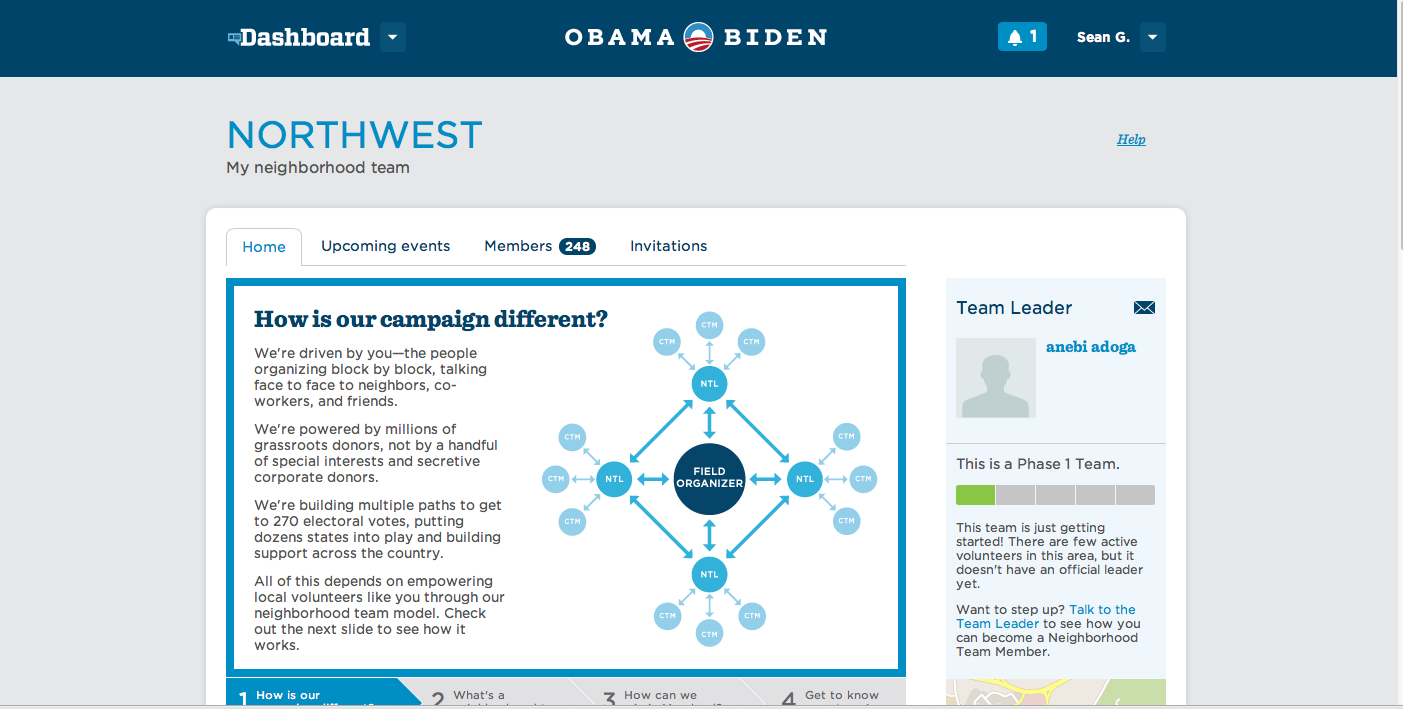
Written in Rails, Dashboard was launched in early 2012. "It's a little unconventional in that it never talks to a database directly—just to Narwhal through the API," Ecker said. "We set out to build this online field office so that it would let people organize into groups and teams in local neighbourhoods, and have message boards and join constituency groups."

An Obama campaign video demonstrating how to use Dashboard.

Enlarge / The Dashboard Web application, still live, helped automate the recruitment and outreach to would-be Obama campaign volunteers.

Dashboard didn't replace real-world field offices; rather, it was designed to overcome the problems posed by the absence of a common tool set in the 2008 election, making it easier for volunteers to be recruited and connected with people in their area. It also handled some of the metrics of running a field organization by tracking activities such as canvassing, voter registration, and phone calls to voters.

The Obama campaign couldn't mandate Dashboard's use. But the developer team evolved the program as it developed relationships with people in the field, and Dashboard use started to pick up steam. Part of what drove adoption of Dashboard was its heavy social networking element, which made it a sort of Facebook for Obama supporters.

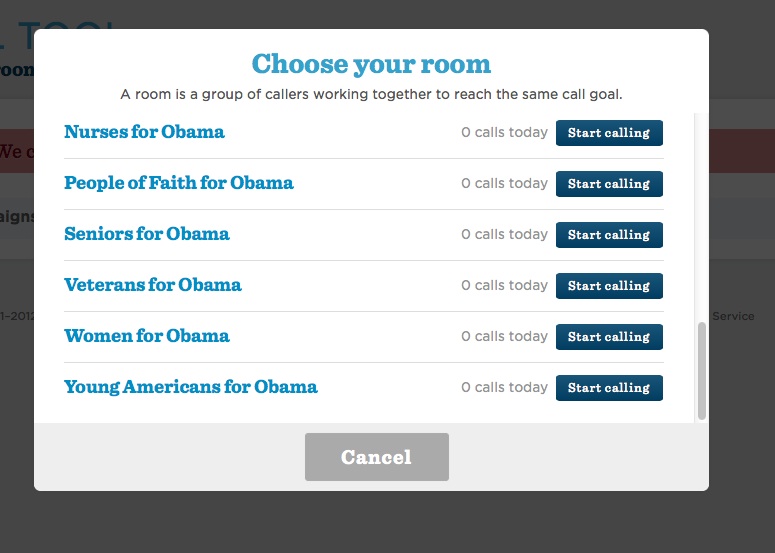
Enlarge / Call Tool offered supporters a way to join in on specific affinity-group calling programs.

Call Tool was the Obama campaign's tool to drive its get-out-the-vote (GOTV) and other voter contact efforts. It allowed volunteers anywhere to join a call campaign, presenting a random person's phone number and a script with prompts to follow. Call Tool also allowed for users to enter notes about calls that could be processed by "collaborative filtering" on the back end—identifying if a number was bad, or if the person at that number spoke only Spanish, for instance—to ensure that future calls were handled properly.

Both Call Tool and Dashboard—as well as nearly all of the other volunteer-facing applications coded by the Obama campaign's IT team—integrated with another application called Identity. Identity was a single-sign-on application that tracked volunteer activity across various activities and allowed for all sorts of campaign metrics, such as tracking the number of calls made with Call Tool and displaying them in Dashboard as part of group "leaderboards." The leaderboards were developed to "gamify" activities like calling, allowing for what Ecker called "friendly competition" within groups or regions.

All of the data collected through various volunteer interactions and other outreach found its way into Narwhal's data store, where it could be mined for other purposes. Much of the data was streamed into Dreamcatcher and into a Vertica columnar database cluster used by the analytics team for deep dives into the data.

A good comparison http://communities-dominate.blogs.com/brands/2012/11/orca-meets-narwhal-how-the-obama-ground-game-crushed-romney-a-look-behind-the-math.html

Solving real business problems with Cloud………………. Just the beginning

Friday, 16 November 2012

StorSimple Likely to address Gaps in Azure Storage


image

Cloud Integrated storage primarily for backup, archival and disaster recovery story sounds an interesting proposition for MSTF.  Looking for an pure applicability standpoint If one takes a closer look at enterprise grade application which is deployed on the cloud the following areas which are data concerns to the customer

  • Backup of structured and unstructured data
  • Archival Strategy and Implementation with Quick Retrieval of archived data.
  • Virtual Machine Backup and Restoration
  • Disaster Recovery.
  • Snapshot Recover for data
  • Stringent Data Security
  • Applications level backup and recoveries, windows file shares, SharePoint libraries and version control.

If I take a good closer look at Windows Azure what we have in the name of DR is maintaining 3 copies of the data across the data center which kind addresses the availability aspect, the Archival Strategy is totally missed out, Snapshot recovery to a specific point in time is not possible.

Application level snapshot with version control is non existent.  StorSimple does bring a unique value proposition for addressing storage in complete scheme of things for both on premise and cloud.

It would be interesting to see how does the Azure Storage end up harnessing the benefits of StorSimple to fill in the gaps of its storage strategy.  Moreover relooking into the Sql Azure storage to utilize StorSimple for backup / restore , snapshot restore, archival would be good. It would be long before these features start showing up into Sql Azure, I’m hoping it comes by end of next year as of current Sql Azure has no backup/ restore or archival features.

In addition of Azure , Office 365 can also end up leverage StorSimple.

They are quite a few gaps in the storage strategy of Windows Azure as current.

The complete article can be found here http://blogs.msdn.com/b/windowsazure/archive/2012/11/15/microsoft-acquires-storsimple.aspx.

Wednesday, 7 November 2012

Solving Azure Storage latency issues via FNS


The Azure Storage access has been plagued with latency issues until MSFT decided to change the network design to FNS.FNS(Flat Network Storage) is a good way to solve the networking issues which arise due to a hierarchical network structure. Azure embracing FNS as Gen 2 storage SKU is a very welcome move. The isolation of compute and storage network is very much required. Having a separate durable network which allows to read , write azure storage at faster speed. This non functional requirement has always been a must required for Azure, the earlier speeds were very slow.

Moreover application plumbing code of managing the latency if the slower reads, write will get some relief.

The patterns are changing and framework codebase are likely to change as well.The scalability numbers of azure storage have to be tested based on the documentation following are the numbers

Within a storage account, all of the objects are grouped into partitions as described here. Therefore, it is important to understand the performance targets of a single partition for our storage abstractions, which are (the below Queue and Table throughputs were achieved using an object size of 1KB):

  • Single Queue– all of the messages in a queue are accessed via a single queue partition. A single queue is targeted to be able to process:
    • Up to 2,000 messages per second
  • Single Table Partition– a table partition are all of the entities in a table with the same partition key value, and usually tables have many partitions. The throughput target for a single table partition is:
    • Up to 2,000 entities per second
    • Note, this is for a single partition, and not a single table. Therefore, a table with good partitioning, can process up to the 20,000 entities/second, which is the overall account target described above.
  • Single Blob– the partition key for blobs is the “container name + blob name”, therefore we can partition blobs down to a single blob per partition to spread out blob access across our servers. The target throughput of a single blob is:
    • Up to 60 Bytes/sec

Some of the definite goods of FNS

  • The flat network design in order to provide very high bandwidth network connectivity for storage clients. This new network design and resulting bandwidth improvements allows us to support Windows Azure Virtual Machines, where we store VM persistent disks as durable network attached blobs in Windows Azure Storage. Additionally, the new network design enables scenarios such as MapReduce and HPC that can require significant bandwidth between compute and storage.
  • Segregation of customer VM based compute from storage from a networking standpoint makes it easier to provide for multi tenancy.

The FNS design does call for a new network design and a software load balancer on the contrary the 10GBps network speed for storage node network solves many of the design challenges at the application level.

The changes to new storage hardware and to a high bandwidth network comprise the significant improvements in our second generation storage (Gen 2), when compared to our first generation (Gen 1) hardware, as outlined below:

image

Above are my thoughts The original article can be found here - http://blogs.msdn.com/b/windowsazure/archive/2012/11/02/windows-azure-s-flat-network-storage-and-2012-scalability-targets.aspx