Monday, 27 March 2017

Parallelization of R code using Azure Infrastructure


Working on large data sets, exploring which machine learning algorithm fits the bill is a daunting task. Moreover these ML algorithm can run into hours and days in certain cases. There is always a need of having compute resources available on the fly. R in principle is single threaded by nature.  To support parallel constructs like parallel for , apply functions we have the parallel package in R, which supports multi core and cluster based parallel execution.  The cluster supports both PSOCK and FORK implementation.

doAzureParallel R package is a lightweight R package built on top of Azure Batch Service (job scheduler service) that allows use of Azure compute resources from the R session. doAzureParallel supports the foreach parallel construct.

Getting started with doAzureParallel

Below video will walk you through on the basics of doAzureParallel.


 doAzureParallel does not have parallel constructs for apply function, If one did require to use them they can use the parallel package on the node on the cluster and get the best of parallel apply functions. With parallelism comes a degree of complexity of memory management and caching and understand how can FORK help for same. The below video explains  how to use parallel package and take the parallel execution of the code down to a core level.

Running Parallel constructs along with DoAzureParallel


Parallelization to MLR algorithms

DoAzureParallel in its current form supports foreach , it needs to graduate to support parallel apply functions. Taking the discussion to the next level it would be lovely if doAzureParallel would support mlr (classification, regression) set of algorithm to run in parallel.  The current set of algorithm like parallelmap, batchjobs and mlr solve the problem of running the Mlr algorithms . It’s pretty easy to see how a larger model, more iterations or a different choice of methods could result in unacceptably long run-times. One could use multi-core or socket level parallelism, but ideally taking advantage of as much computing resource is better choice,.

Apparently the batchjobs package doesnt support azure batch service.

ParallelMap is now directly integrated into mlr, and this makes scaling to parallel back-ends seamless. Our choice of back-end is parameterized so we can write algorithms once and choose the parallel back-end depending on the resources we have available when we run the model. To illustrate this, we re-run the same model, but instead of running the model on a single node, we run it on a clustered environment running OpenLava, an open-source Platform LSF compatible workload manager now supported by BatchJobs.

Below video explains how to use parallemap, mlr in a mult-core scenario along with doAzureParallel.


Demo codebase can be found here - https://github.com/ajayso/DoAzureParallel


Saturday, 4 March 2017

Azure Data Factory–DE glossed


Having worked on the Apache stack for sometime, I decided to look at Azure Big Data stack.  My starting point is data ingest.For most big data projects the journey starts out with data ingest, clean, transform and have it ready for analysis. Azure Data factory is MSFT Azure offering for cloud based data integration service that automates the movement and transformation of data. At a very basic level below is a representation of data lifecycle in big data projects

image


Azure Data Factory has the following constructs

- Linked Services have the define where the data has to be sourced from/to.

- Pipeline and Activities – Pipelines are a logical group of activities that performs the job of moving data from/ to.

- DataSets – Linked services interfaces the Data Factory to the external data sources. Datasets are a representation of the data store.

image

Linked Services provides for the interfaces to external sources, currently the support is limited to Azure, Databases, File based, Salesforce, OData a complete list can be found here.

From a customization stand point of view one can create custom activities. I have the linked service limited.  On the contrary Apache NiFi seems to have a better in multiple ways

- Intuitive UI - NiFi designer.Dataflows can become quite complex. Being able to visualize those flows and express them visually can help greatly to reduce that complexity and to identify areas that need to be simplified. NiFi enables not only the visual establishment of dataflows but it does so in real-time. Rather than being design and deploy it is much more like molding clay.

-  Better support for external sources linked services in Azure Data Factory a compared to processors in NiFi, have seen NiFi comes out better , list can be found here.

- NiFi is highly fault tolerent

- Superior Exception Handling – finer details here.

Saturday, 28 January 2017

Real-time Financial Stocks Analysis Architecture


In the prior 2 posts, the focus was more on using machine learning techniques like regression to predict gold buy / sell signals. While the models that we built ,give an idea on how to get to a final buy and sell signal for gold with the assumption data is clean and always available. Without relevant clean data, the model predictions would be of zero relevance to the business.

In every big data analysis project which heavily rely on real time data, a lot is dependent on the underlying software architecture which is responsible to deliver the data in an edible form for the models. In this post I have attempted to put together high  level architecture of a real time stock analysis platform. This is a high level architecture of XTrade platform is current in production for one of the customers.


Additionally I have a starters kit available at https://github.com/ajayso/XeusTrade.git which comprises of templates for all the components.

A Brief on XTrade - Day trading can be risky business, human analysis of real time data without intelligent insights can be detrimental. XTrade is real time stock technical analysis platform which ingest real time stock feed , industry data and news and analyse to provide predictions, correlations (weak and strong) called quants. XTrade interfaces with trading systems to execute the actions or provide these actionable insights to an average trader or analysts.

image

The architectures for most real-time system are in line with the lambda architecture. This post will focus on the speed (real-time processing) area of the lambda architecture.

image


Getting the Data In ……

Data comes in from multiple sources and can be varying formats and segregating relevant data needs a specialized software. XTrade had multiple data sources below are some of the more relevant ones.

  • Stock feeds
  • Industry feeds
  • News data
  • Other relevant data

The requirement is to pull data feeds from the data sources at a specified frequency( in minutes). Stale data management (dont pull stale data) and transformation to standard format in this case json is something which Apache NiFi provides for absolute ease. Apache NiFi is basic architectural building block for data ingest , transformation. NiFi has many processors with the options of writing your own processors in java.

Apache NiFi is an enterprise integration and dataflow automation tool that allows a user to send, receive, route, transform, and sort data, as needed, in an automated and configurable way. Similar tools exist, but NiFi is different because of its user-friendly drag-and-drop graphical user interface and the ease with which it can be customized on the fly for specific needs. Think of creating a simple flow chart of what you want to do with your data; that is how easy it is to create a dataflow in NIFi. It is also highly scalable and can run on something as simple as a laptop or clustered across many high-performance servers.

Below is example of XTrade Nifi data flows,

image

In the starter kit the NiFi folder has 2 templates which can be reused, these are data sources for individual stocks and news.

Implementation Details: The data flow will pull the feeds and process them, post which these need to put into a messaging systems, In this case we have used Apache Kafka. JSON is the standard data format used within this architecture.One has the option of persisting these data feeds to hdfs or any other persisted data store. Apache NiFI runs on a cluster and highly fault tolerant.

Messaging …..

The requirement of having low latency  reliable messaging system is really important. Apache Kafka -is used for building real-time data pipelines and streaming apps. It is horizontally scalable, fault-tolerant, wicked fast, and runs in production in thousands of companies.

Apache Kafka is been used as basic architecture building block for messaging in the architecture. Below is the high level representation of Kafka implementation for XTrade

image

Implementation Details:  Brokers are segregated based on the following

  • Individual Stocks: Since XTrade handles prediction and data insight for individual registered stocks from the customers, the decision to have separate broker for the same was taken to handle future scale out requirements.
  • Broker(Industry) messaging system for industry stock prices and news.
  • Broker(misc,) messaging exposure and risk management data coming in from customer systems and other public data sources.

Core Analysis and Data Decision Making…..

Fast processing of the data streams coming from the messaging layer can really help cut down latency of the overall lifecyle. Stream processing and calling analysis model in R, spark and send back the prediction and data insights in matter on minutes is key here. A platform which has the flexibility of supporting multiple programming languages was the need of the hour.

Apache Storm is a free and open source distributed real-time computation system. Storm makes it easy to reliably process unbounded streams of data, doing for real-time processing what Hadoop did for batch processing. Storm is simple, can be used with any programming language, and is a lot of fun to use!

Storm has many use cases: real-time analytics, online machine learning, continuous computation, distributed RPC, ETL, and more. Storm is fast: a benchmark clocked it at over a million tuples processed per second per node. It is scalable, fault-tolerant, guarantees your data will be processed, and is easy to set up and operate.

Implementation Details:  Stock and Industry data coming in from the Kafka is fetched by Storm with a Kafka Spout and further processes news and stock analysis calling R , Spark model which will emit the prediction back to Kafka topic (Broker Results), In the next post I will detail out he Spark, R model for stock technical analysis. The prediction are also written to Cassandra.

A ready skeletal code for Storm (eclipse project) written in java can be found here.

image

Storm architecture for XTrade


Putting it all together….

The entire solution can deployed to aws / azure ,  Managing the clusters across this distributed environment is a daunting task.

Apache Mesos looked to be a good option for the same. Apache Mesos is a centralised fault-tolerant cluster manager. It’s designed for distributed computing environments to provide resource isolation and management across a cluster of slave nodes. It schedules CPU and memory resources across the cluster in much the same way the Linux Kernel schedules local resources. Mesos support for Hadoop, NiFi, Kafka , Storm and Cassandra exists.


Wednesday, 28 December 2016

Machine Learning Basics–Regression…Part II


Financial investments in the capital markets in the form of equity, options or commodities one often looks at ways to maximize the profits. Most start with the rudimentary ways as tips from analyst and eventually start digging deeper below the surface to understand technical indicators. The technical indicators at a level 100 does make a lot of sense. Taking these technical indicator and pushing the boundaries of analysis with multi year data OR real time quant trading data one can find many new opportunities to make money. Of course a full fledged equity market prediction needs multiple data sources both historical and real time.

Historical data with some real-time market data with machine learning can help in coming up with reasonable prediction accuracy.

Code on github can be found here https://github.com/ajayso/ML-Regression-Analysis.

Generalized Linear Models

In the earlier post we covered linear regression(LR),  In LR

1. We assumed that y data points have a normal distribution.

2. The mean of the y data points lies on the line.


image

Linear regression assumes a normal distribution of the data and go with a line where mean of the y data points lies on that line, However in certain situation we may desire to go with different types of data distribution example Binomial, Poisson , Hypergeometric  etc..

A Briefer on data distribution

A brief on data distribution can be found here

When delving into broader set of data distribution we resort to a support for different types data distribution models. The next is to generalize the above model this can be done generalize the distribution that’s the y , the functions of the explanatory variables – x and finally how to link explanatory variables to the mean of the distribution, this is the basic idea of Generalized Linear Models.

The generalized linear models (GLMs) are a broad class of models that include linear regression, ANOVA, Poisson regression, log-linear models etc. The table below provides a good summary of GLMs

image


Predicting Buy/Sell for Gold

Code Example for GLM

Problem Statement

Given historical price data up to and including a given day, the idea to play around with the gold price (historical) with primary technical indicators can help you fix of gold price the following day will increase or decrease relative to the current day’s price fix. The predictions are based primarily on technical indicators calculated from historical price data for gold as well as for a variety of financial variables.

Feature Definition

The price data alone provides limited insights into the future price movement. The idea here is to identify the right feature set that best captures the movement of the gold prices and provides information not about the past and current movements but should be in a position to predict the future movement with a reasonably good accuracy.

Technical Indicators

Trendlines

Trend does provide vital information hence the current trend is vital for the accuracy of the prediction of the future prices. Trends can provide information of the continued price movement and more importantly it can prove useful for trend reversal (uptrend or downtrend). However, the gold prices cannot depend on the trend alone attributing to the fluctuations which are driven by multiple other variables or factors, unearthing these can be differentiator for a good model. Trend can be one of the variable in addition to many others to get a high accuracy for the prediction model.

The simple linear regression with least squares cost function will help to fit the trend line over last n days. The equation of the same is as indicated below.

y = -0.0394777790495269 * x + 1881.30223607803

y is the gold price, x is rate of change here.

The R implementation we have a user defined function written called slope

Rate of Change

Momentum measures the difference between the price on day x and price n days before.

ROC is calculated as - ROCn(x) = P(x) – P(x-n)/ P(x-n)

ROC can indicate the trend if > 0 it’s an uptrend < 0 it’s a downtrend. ROC over a period gives a more definite in witnessing a weak or a trend reversal.

Calculating ROC in R we use the TTR package which gives reasonable good functions for ROC.

Ratios

Ratio between ROC calculated over different time intervals particularly

(ROCn/ ROCm where m < n) it lends insight on how the change in price is changing over time.

The R implementation we have a user defined function written called ratios.

Stochastic Oscillator

It is used to determine the overbought or oversold levels of a stock or commodity, Overbought means the means the price is increased significantly over a short period and may be artificially high, this means the underlying asset is overvalued and the market will soon adjust bringing the price back down.  For a better understanding on stochastic oscillator refer here.

The stochastic oscillator assumes that in uptrends, prices will close near the upper end of the recent price range and downtrend will close near the lower end. Adapting this to use the daily price fix rather than close prices.

Calculating the oscillator as follows on a day x over an n day period as follows.

Ln = lowest price over past n days

Hn= highest price over past n days

P(x) = price on day x

%K = (P(x) – Ln)/ (Hn – Ln) x 100%

If %K is less than 20% generate a buy signal and sell if greater than 80%.

The R implementation we have a user defined function written called Stochastic_Oscillator.

Basic Feature Selection

The final list of feature we have is

  • Slope
  • ROC
  • Ratios of ROC
  • Oscillator  for period of 14 – We use oscillator  function to determine the Buy ,Sell and stored in BuySellFlag
Gaussian Regression

Using the set of features selected above, the first algorithm generalized liner model GLM in R can be found here. We pick the data from 2014 onwards,  The technical indicators alone may not be enough. But however for the example we are using the same. Considering Gaussian distribution is more or less normal distribution and more over we are predicting the Buy , Sell and Hold on gold based on the daily price and indicators input. We could not use logistic regression as we have more then 2 outcomes here.

The Gaussian Regression on GLM gives an accuracy of 15.78% which is not acceptable.

So further digging we decided to use Multinomial logistics regression, which is a linear regression analysis to conduct when the dependent variable is nominal with more than two levels. Thus it is an extension of logistic regression.

The multinomial logistics regression gives an accuracy of 90.131% which is reasonably acceptable. 

In conclusion we can predict the gold buy , sell or hold signal daily at 90% accuracy ratio.

However this may not be enough in case one decides to take the accuracy up further we need to include more data

Intermarket Variables

Gold prices, and commodity prices in general, may also be related to other financial variables. For instance, gold prices are commonly thought to be related to stock prices; interest rates; the value of the dollar; and other factors. Therefore, I wanted to explore whether these other variables could be effective inputs to the prediction of gold prices. I collected the following data over the same time period as the gold price fix data, from early 2007 to late 2013:

  • USStockIndices: Dow Jones Industrial Average (DJI); S&P 500 (GSPC); NASDAQ Composite (IXIC)
  • WorldStockIndices: Ibovespa (BVSP); CAC 40 (FCHI); FTSE 100 (FTSE); DAX (GDAXI); S&P/TSX Composite (GSPTSE); Hang Seng Index (HSI); KOSPI Composite (KS11); Euronext 100 (N100); Nikkei 225
  • (N225); Shanghai Composite (SSEC); SMI (SSMI)
  • COMEX Futures: Gold futures; Silver futures; Copper futures; Oil futures
  • FOREX Rates: EUR-USD (Euro); GBP-USD (British Pound); USD-JPY (Japanese yen); USD-CNY (Chinese yuan)
  • Bond Rates: US 5-year bond yield; US 10-year bond yield; Eurobund futures
  • Dollar Index: Measures relative value of US dollar

The variables which are high effective in prediction of Buy Sell of gold are (Correlation Coefficients)

1. Gold Futures

0.72

2. Silver Futures

0.50

3. Copper Futures

0.27

4. EUR-USD

0.24

One can add these features to the dataset the accuracy will improve further.

Deploying this code to a fully function Gold Buy/Sell prediction

FYI this is full functional code , one can deploy this code on R Server write the integration code / bot which can get the real-time data of gold and call the predicted output from the model to get the buy/ sell/ hold signal. Preferable deploy to azure bot service and use azure ml to host algorithm.

Wednesday, 7 December 2016

Machine Learning Basics–Regression Analysis–Part 1


Data is all around us, its happening, At the simplest form data is a set of variables (of course with values). While working on a database on any domain , once we have a relatively  okay understanding of the entities and we start to look for relationships within the entity or the variable. We do stumble upon and have a gut feeling which tells a variable y is dependent on a variable x OR a set of variables (x1,,x2…xn).

To a certain degree we can predict the new value of y based on x. We see there is a clear relationship between y and x.  The process of estimating relationships among variables is termed as Regression Analysis.  Here the focus is between  a dependent variable and one of more independent variables ( called the predictors).


There are various types of Regression Analysis example Linear, Logistic, Polynomial….  each of them are used for a specific purpose.

Regression Analysis requires a prior knowledge on the dataset and in order to estimate the forecasted value of the dependent variable. There is a need of having a dataset with defined outcomes of the dependent variable which will be used to train the algorithm.  Regression set of algorithm are a part of supervised learning.


Different Type of Regression

Linear Regression – The relationship between the dependent and independent variables is such that the nature of the regression  line is linear.

Linear Regression establishes a relationship between dependent variable (Y) and one or more independent variables (X) using a best fit straight line (also known as regression line).The  best fit straight line is generally achieved with Least Square Method. It is most commonly used for fitting a regression line. It calculates the best fit line for the observed data by minimizing the sum of squares  of the vertical deviations from each data points to the line.

Example on Linear Regressions.

As an example for Linear Regression we are taking the

Gold and Silver Price Correlation

The basic plot of the same can be seen below. The data and code for the same can be found here. The data consists of last 1 year data, If one needs the complete data for last 10 years you can download the same from many of the free data sources or refer to http://www.macrotrends.net/2517/gold-prices-vs-silver-prices-historical-chart.

image

For trying out linear regression the code is pretty straightforward

install.packages("Quandl")
library(Quandl)
install.packages("devtools")
library(devtools)
install_github("quandl/quandl-r")


goldprices =  Quandl("LBMA/GOLD")
silverprices = Quandl("LBMA/SILVER")

goldpricesshortterm = goldprices[1:730,]
silverpricesshortterm = silverprices[1:730,]

shtsilver = data.frame(silverpricesshortterm,goldpricesshortterm)
sfit = lm(shtsilver$USD..AM.~shtsilver$USD)
summary(sfit)

Used Quandl for gold and silver price data.  Have applied Linear Regression Model to last 2 years of data.


Interpreting the results of lm

image

The summary of the lm result what we look for

1. Residuals are essentially the difference between the actual observed response , We look for a symmetrical distribution across these points on the mean value zero (0). In this case we see a symmetrical distribution

2. The t-statistic values are relatively far away from zero and are large relative to the standard error, which could indicate a relationship exists. In general, t-values are also used to compute p-values

3.In our example, the RSquared we get is 0.8028. Or roughly 80% of the variance found in the response variable (gold prices) can be explained by the predictor variable (silver price)


Friday, 18 July 2014

Azure Machine Learning–K Means Clustering…


imageimage

Machine Learning (ML) has been around almost over 5 decades now. In the last couple of years with the cloud computing and big data been the dominant colours in the IT Industry, ML has found a unique space in the Big Data problem.

A Brief on Azure ML

Azure ML is Machine Learning is simpler Microsoft offering from quick and easy ML advent. Its definitely a good starting point to get to use to the Machine Learning. As one may start using this more often will realize the Azure ML is limiting in terms of choices of Algorithms , data manipulation operations & ability to run as part to run with bigger scheme of things.

Most folks will start with Azure ML and figure out that there are multiple places where the constructs are limiting, so as a good citizen MSFT went and added the ExecuteR where one could program on R Studio for test and development, eventually for larger dataset, code port or intelligent copy to ExecuteR. A good video on how to use ExecuteR in Azure ML can be found here http://channel9.msdn.com/Blogs/Windows-Azure/R-in-Azure-ML-Studio

K-Means Clustering in Azure ML Video-

The data analysis starts of with initial task of having to classify data.  There are various algorithm which one may employ to classify data. The single most simplest and widely used algorithm is the K-Means Clustering. This session talks about K-Means Clustering and how to do the same using Azure ML.

The session take away from Azure ML is great not without R.


Files

Presentation Shared Here-https://drive.google.com/file/d/0B5lmX16jC3ZEcEprM2F0aW9FOVU/edit?usp=sharing

DataSets & Demo Here

RScripts - https://drive.google.com/file/d/0B5lmX16jC3ZES1c5MEdiamFCN0E/edit?usp=sharing

DataSets- https://drive.google.com/file/d/0B5lmX16jC3ZEY2R0T3R3WDU3NzQ/edit?usp=sharing


Tuesday, 13 May 2014

Azure API Management


image


The Apiphany buy out of Microsoft sometime around Mid Oct 2013 is made it into the Azure Stack as API Management in a very short while.
Here is complete  You Tube - video on Azure API Management.

API is no more an after thought for most architectures, its right there in front staring right into architects face. API Facade can make or break any architectures from improving integration, developer productivity to high business returns. There are many platforms in the market for API’s. 
Azure API Management is direct port of APIPhany into Azure. In this post we will explore the Azure API Management and towards the end a comparison with the leading API platforms.
The Azure API has managed to pull through a lot of features into Azure in very short period of time
API Management Administrators Portal
The starting point for any API Management platform is a good enough Administrator Portal.  The Administrator Portal is essentially the place where one can manage the API.  Below is the snapshot of the same.
image
The Administrator Portal for API Management covers the following  at a high level.
  • Dashboard – Quick Snapshot view of the all the API’s and there health graphs, products, applications
  • API –  Managing API’s there associated operations, settings etc..
  • Products- This essentially is a container of API’s and the access management around the same.
  • Policies – This is a key feature for API’s.  The consumer’s of API are initially developers and in production its going to be the applications. There many generic constructs which are required by the API for example
    • Quota Management: Number of times a consumer can call the API’s
    • Format Changes: One may need to change parameter/output value before invoking/return value from the actual API or probably change the format ex json,xml
    • Allow cross domain calls
    • CORS
    • Data Changes – Replace certain values inbound/outbound.
    • Restrict caller IP’s
    • Store to Cache
There are additional constructs which can be applied. 
Note: Most good API platforms have ability to add workflow constructs to inbound and outbound flow of the API’s. For every call made to the api , one would want to call other services based on the data. As of current there are no workflow constructs in Azure API , one can expect the same.
  •  Analytics:  The core objective for any API platform is the health management of the API, Analytics includes the health management information, graphs etc..
image
  • Developers: Considering a decent population of the API consumers are going to be developers, the management around the same is important. This is fairly basic as of current.
  • Security: Support for 3rd party identity for developer sign –up.
  • Developer Portal: This is content management piece of the API portal which includes the API’s, documentation around the same, the products and issue reporting.
In a nut shell the Azure API Management is much awaited piece in the Azure stack and off to a flying start.

Thursday, 17 April 2014

Azure RMS (Rights Management Service)


With growing need data protection and compliance, Data security is always a key concern for any organization. Documents carry sensitive data. The data availability on multiple devices is critical to the business, and equally important is securing this data. Data at rest and transit both need to secure.

Almost a decade ago MSFT released it Rights Management Service for Windows 2003, later came AD RMS with 2008, 2012. In the past 1 year we have seen Azure take up the brigade of RMS , assuming there is Azure Active Directory.

With buzz around HIPAA compliance and Azure, still no clear directive on whether Azure is fully compliant

What most customers want is to implement a robust security solution to protect the organization’s data available in file servers, desktops via rights protecting the data, and make this data available via secure access. The data security and data-access control will help in enabling sharing of sensitive data in a secure and HIPAA compliant manner, and ensure confidentiality, integrity and authorized access to its data.

Microsoft Azure cloud service based Rights Management (RMS is the answer. This solution concept uses Azure Rights Management Service (RMS) as the basic building block for securing data and documents / files. The devices used for data access may or may not be connected to the organization network. (Devices are assumed to be organization locked and HIPAA compliant).

image

Azure RMS will serve as a basic building block for encryption / decryption of documents / files with-in the client’s organization. Windows Server 2012 File Classification Infrastructure (FCI) will assist in automating the process of applying rights to documents. Most of the files to be accessed within the organization will be stored on the Windows File Server which has File Classification Infrastructure Service installed.

Azure RMS protection comes with 3 basic type content protection

  • Native RMS Microsoft formats– Office files
  • Non MSFT formats- Native PDF, Image files (bmp, jpeg…) txt. These will work only with P-Viewer tool for consumption and FoxIT for PDF.  One can write additional plugins if required.
  • Container level protections-  P-file container which imposed encryption/ decryption at a container level. The important point to note is once the files is out the container its unencrypted and has no rights management and is not secured. Container can have any files types.

Windows Server File classification Infrastructure (FCI) feature will identify sensitive files and encrypt them with RMS. FCI crawls file shares for files meeting certain criteria and tag them based on the results. Tags will be stored in the file attributes and persist even after moving files to another NTFS storage. Once files are tagged, they will be automatically applicable for "RMS Encryption" based on certain tags with RMS templates.

The RMS templates will be defined are organization-wide. With FCI one can perform different actions on files you identify as sensitive. One of them is to use the in-box RMS protection capability and there can be custom tasks for supporting other types of files trough two options:

· Putting files in encrypted container using Rights Protected Folder Explorer (RPFe)

· Triggering specific RMS protectors for certain types of files, such as PDF, CAD or images, supported with partner solutions

RPEe as a better option for protecting other file types. File Classification Infrastructure (FCI) provides insight into the data by automating classification processes. Rights Protected Folder Explorer (RPFe) is a Windows based application that allows you to protect files and folders.

A Rights Protected Folder is similar to a file folder in that it contains files and folders. However, a Rights Protected Folder controls access to the files that it contains, no matter where the Rights Protected Folder is located. By using Rights Protected Folder Explorer, one can securely store or send files to authorized users and control which users will be able to access those files while they are in the Rights Protected Folder.

Have implemented Azure RMS for more than 2 customers. So far so good.

Thursday, 3 April 2014

Global Azure boot camp Mumbai 29th March 2014


GWAB

Speaking at Global Azure Boot Camp 29/3 @ Mumbai has been quite a delight. Giving back to community plays a vital role in fuelling growth.

Covered topics around Cloud Computing  The Next Paradigm , Big Data & Large-scale Implementation on Azure. Find the presentation on the links below.

Cloud computing, Windows Azure has gained a general acceptance among the Microsoft and non-Microsoft participants. The drive around Open Source is seemingly building up around Azure.  The delighter to the sessions were the eagerness to know more about Big Data or HDInsight. Hadoop continues to be a bit of crystal ball gazing for most participant, a promising one. The twinkle in eyes of most to know more around the stack can/will be done in the coming session.

Most business user and software folks get asked the questions around the biggest implementation on Azure Platform. This is more of indicator to endorse there thought process.

Would like to make a special mention of Ajay Khankojhe from Synergetics the event was conducted wonderfully.

Presentations

1. Large-scale Implementation on Windows Azure

2. Cloud Computing – The Next Paradigm

3. Big Data Basics

Wednesday, 6 November 2013

Azure SDK 2.2 Features & Migration


Brief Synopsis

The SDK 2.2 is not major upgrade it has brought more features around remote debugging in cloud which was a big ask till now & Windows Azure Management Libraries from a Developer per say. The Windows Azure Service Bus partition queue and topics multiple message broker will help in better availability, as each queue or topic is assigned to one message broker which is single point of failure, now with the new feature of multiple message broker assigned to a queue or topic. Please read the Q&A at the end to know the nuances with the same & the approach to move to Azure SDK 2.2 from generic project stand point of view

High Level following are the new features

  • Visual Studio 2013 Support
  • Integrated Windows Azure Sign-In support within Visual Studio
  • Remote Debugging Cloud Services with Visual Studio – Very Relevant to  Developers
  • Firewall Management support within Visual Studio for SQL Databases
  • Visual Studio 2013 RTM VM Images for MSDN Subscribers
  • Windows Azure Management Libraries for .NET – Very Relevant to  Deployment Team
  • Updated Windows Azure PowerShell Cmdlets and ScriptCenter
  • Topology Blast – Relevant to Deployment Team
  • Windows Azure Service Bus – partition queues and topics across multiple message brokers – Relevant to  Developers. All Service Bus based projects have to move ASAP.

Below covered are only the highlighted areas.

Remote Debugging Cloud Resources within Visual Studio

Today’s Windows Azure SDK 2.2 release adds support for remote debugging many types of Windows Azure resources. With live, remote debugging support from within Visual Studio, you are now able to have more visibility than ever before into how your code is operating live in Windows Azure.  Let’s walkthrough how to enable remote debugging for a Cloud Service:

Remote Debugging of Cloud Services

Note: To debug the web or worker role should be on Azure SDK 2.2

To enable remote debugging for your cloud service, select Debug as the Build Configuration on the Common Settings tab of your Cloud Service’s publish dialog wizard:

clip_image001

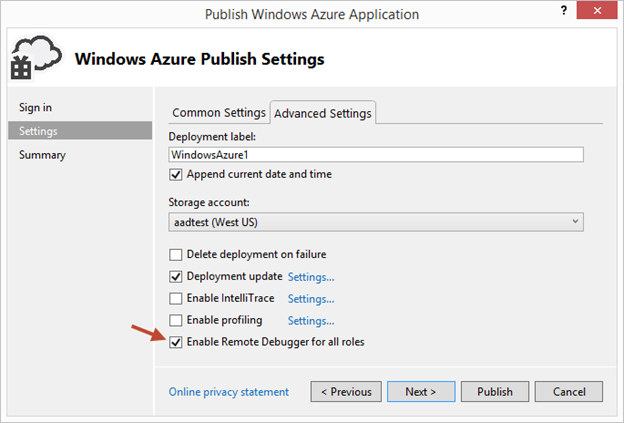
Then click the Advanced Settings tab and check the Enable Remote Debugging for all roles checkbox:

clip_image002

Once your cloud service is published and running live in the cloud, simply set a breakpoint in your local source code:

clip_image003

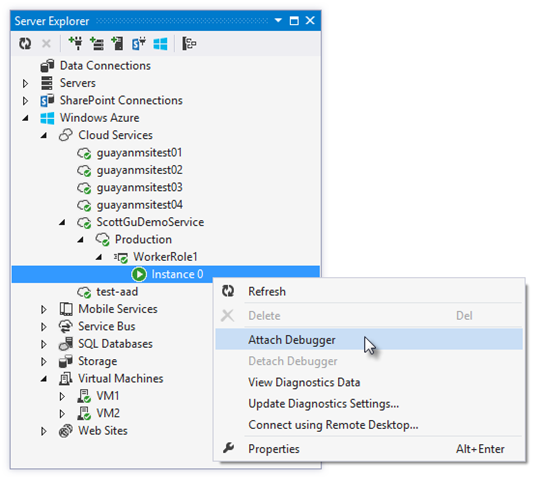
Then use Visual Studio’s Server Explorer to select the Cloud Service instance deployed in the cloud, and then use the Attach Debugger context menu on the role or to a specific VM instance of it:

clip_image004

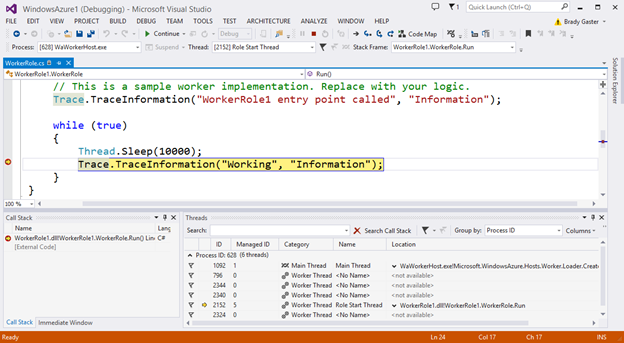
Once the debugger attaches to the Cloud Service, and a breakpoint is hit, you’ll be able to use the rich debugging capabilities of Visual Studio to debug the cloud instance remotely, in real-time, and see exactly how your app is running in the cloud.

clip_image005

Today’s remote debugging support is super powerful, and makes it much easier to develop and test applications for the cloud.  Support for remote debugging Cloud Services is available as of today, and we’ll also enable support for remote debugging Web Sites shortly.

Windows Azure Management Libraries for .NET (Preview)- Automating PowerShell

Windows Azure Management Libraries are in Preview!

What do Azure Management Libraries provide, the control of creation, deployment and tear down resources which previously has been at a PowerShell level now will be available in the code.

Having the ability to automate the creation, deployment, and tear down of resources is a key requirement for applications running in the cloud.  It also helps immensely when running dev/test scenarios and coded UI tests against pre-production environments.

These new libraries make it easy to automate tasks using any .NET language (e.g. C#, VB, F#, etc).  Previously this automation capability was only available through the Windows Azure PowerShell Cmdlets or to developers who were willing to write their own wrappers for the Windows Azure Service Management REST API.

Modern .NET Developer Experience

We’ve worked to design easy-to-understand .NET APIs that still map well to the underlying REST endpoints, making sure to use and expose the modern .NET functionality that developers expect today:

  • Portable Class Library (PCL) support targeting applications built for any .NET Platform (no platform restriction)
  • Shipped as a set of focused NuGet packages with minimal dependencies to simplify versioning
  • Support async/await task based asynchrony (with easy sync overloads)
  • Shared infrastructure for common error handling, tracing, configuration, HTTP pipeline manipulation, etc.
  • Factored for easy testability and mocking
  • Built on top of popular libraries like HttpClient and Json.NET

Below is a list of a few of the management client classes that are shipping with today’s initial preview release:

.NET Class Name

Supports Operations for these Assets (and potentially more)

ManagementClient

Locations
Credentials
Subscriptions
Certificates

ComputeManagementClient

Hosted Services

Deployments

Virtual Machines

Virtual Machine Images & Disks

StorageManagementClient

Storage Accounts

WebSiteManagementClient

Web Sites

Web Site Publish Profiles

Usage Metrics

Repositories

VirtualNetworkManagementClient

Networks

Gateways

Automating Creating a Virtual Machine using .NET

Let’s walkthrough an example of how we can use the new Windows Azure Management Libraries for .NET to fully automate creating a Virtual Machine. I’m deliberately showing a scenario with a lot of custom options configured – including VHD image gallery enumeration, attaching data drives, network endpoints + firewall rules setup - to show off the full power and richness of what the new library provides.

We’ll begin with some code that demonstrates how to enumerate through the built-in Windows images within the standard Windows Azure VM Gallery.  We’ll search for the first VM image that has the word “Windows” in it and use that as our base image to build the VM from.  We’ll then create a cloud service container in the West US region to host it within:

clip_image006

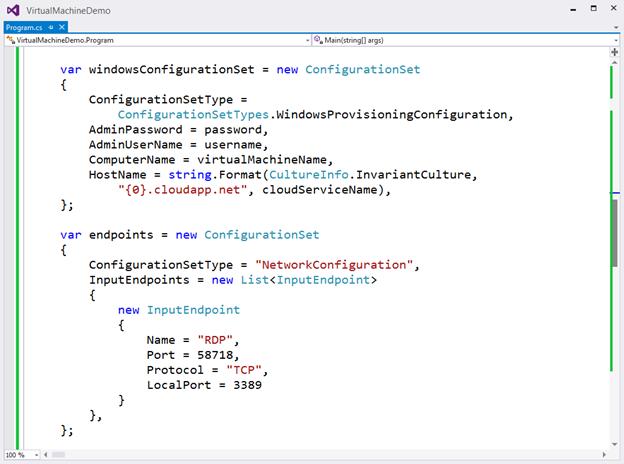
We can then customize some options on it such as setting up a computer name, admin username/password, and hostname.  We’ll also open up a remote desktop (RDP) endpoint through its security firewall:

clip_image007

We’ll then specify the VHD host and data drives that we want to mount on the Virtual Machine, and specify the size of the VM we want to run it in:

clip_image008

Once everything has been set up the call to create the virtual machine is executed asynchronously

clip_image009

In a few minutes we’ll then have a completely deployed VM running on Windows Azure with all of the settings (hard drives, VM size, machine name, username/password, network endpoints + firewall settings) fully configured and ready for us to use:

clip_image010

TopologyBlast

This new functionality will allow Windows Azure to communicate topology changes to all instances of a service at one time instead of walking upgrade domains. This feature is exposed via the topologyChangeDiscovery setting in the Service Definition (.csdef) file and the Simultaneous* events and classes in the Service Runtime library.

Windows Azure Service Bus – partition queues and topics across multiple message brokers

Service Bus employs multiple message brokers to process and store messages. Each queue or topic is assigned to one message broker. This mapping has the following drawbacks:

· The message throughput of a queue or topic is limited to the messaging load a single message broker can handle.

· If a message broker becomes temporarily unavailable or overloaded, all entities that are assigned to that message broker are unavailable or experience low throughput.

Q&A

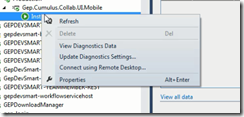
Q. Can I use Azure SDK 2.2 to debug Web Role , Worker Role using earlier SDK.

A. No, you need to have your roles migrated to SDK 2.2. For older role you can only get the diagnostic information out of Visual Studio if installed 2.2.
clip_image011

Q. What are typical issues while migrating from 1.8 to 2.2?

Worker Roles and Web Role Recycling

I have 3 worker roles and a web role in my project and I upgraded it to the new 2.2 SDK (required in VS2013). Ever since the upgrade, all of the worker roles are failing and they instantly recycle as soon as they're started.

Post can be found here- http://stackoverflow.com/questions/19717215/upgrade-to-azure-2-2-sdk-is-causing-roles-to-fail

Not able to update the Role after upgrading

I recently worked on an issue where the following error was being thrown while deploying the upgraded role to Windows Azure.  You just upgraded the SDK to 2.1 or 2.2 and you start getting the following error while deploying the role.

Link to the post http://blogs.msdn.com/b/cie/archive/2013/10/31/not-able-to-upload-role-after-upgrading-the-sdk.aspx

Q. Steps to Migrate to Azure SDK 2.2

A. Open the Azure project in Visual Studio 2012,

  1. For upgrading your project is via the Properties windows of the Cloud Project. You will see the following screenshot.
  2. clip_image013
  3. Follow through the upgrade process fix the errors,
  4. Run the Project locally to see if any errors fix the same.
  5. Check In the code post all fixes
  6. Test the same in Dev. environment to see if this breaking. There is potential chance of breaking due to dependencies.

Note: The web & worker role tend go into inconsistent state due library dependency mismatch. This will have to fixed

Generic Migration to Azure SDK 2.2- High Level Approach

The suggested approach is to start with one component, one web role and one worker role WCF Rest and see the impact in terms of issues and then decide then timelines for others. The POC will be done in 1 Sprint, the candidate are the following

  • Component – Reusable Component
  • Web Role – Portal Web
  • Worker Role – Portal Worker


Links

· Installation of Azure SDK 2.2 - http://www.windowsazure.com/en-us/downloads/archive-net-downloads/

Wednesday, 2 October 2013

Cloud–Azure Downtime --A Reality and It Hurts….

Cloud is a technological innovations which has been accepted in the main stream . The cloud platform is constantly evolving, still in its infancy still. The platform will take sometime to get matured. The non functional the ilaties is something which needs a lot more data, understanding and most of them come a very one sided T&C with fine print “Conditions Apply”.

Cloud downtime is a tricky topic and needs a lot more understanding. Its only when we run into a real situation do we start reading the fine print.

Microsoft Azure Compute ran into hot waters 27 Sep 2013 6:34 AM UTC North Central US datacenters. The documentation mentions Partial Performance Degradations & “The repair steps have been successfully executed and validated. Full Compute functionality has been restored in the affected North Central US sub-region. We apologize for any inconvenience this has caused our customers.”.

What does the Cloud Services SLA read as on the Microsoft site

Cloud Services, Virtual Machines and Virtual Network

  • For Cloud Services, we guarantee that when you deploy two or more role instances in different fault and upgrade domains, your Internet facing roles will have external connectivity at least 99.95% of the time.
  • For all Internet facing Virtual Machines that have two or more instances deployed in the same Availability Set, we guarantee you will have external connectivity at least 99.95% of the time.
  • For Virtual Network, we guarantee a 99.9% Virtual Network Gateway availability

What is the SLA around Fault Domain?

We all tend to think the Fault Domain will just be God sent, but in all actuality, Fault Domain is a set of computer on some rack and same data center is also liable to go down.  If the entire data center goes down there is no fail over.  Moreover even if the down time is unplanned and over the documented limits there is no region wise fail over.

<Correction> Fault Domain don't exists across data center as pointed out by Wood  - Thanks</Correction>

For more documentation on Fault Domain refer here.

Can one find which are fault domain instances for their instances?

No apparently MSFT doesn't indicate where the fault domain for the instances ,at least on the management portal. However Windows Azure SDK provides some properties you can use to query fault domain and upgrade domain information. RoleInstance class has property called FaultDomain that you can read to find out in which fault domain your role instance is running. There is a catch though – querying FaultDomain property will return either 1 (one) or 2 (two). This is because you are entitled for only 2 fault domains for your application. If your application is deployed across more fault domains you will not be able to determine this using the FaultDomain property.

Can one really rely on the Fault Domain?

My take is given the limited documentation and Fault Domain is more of abstract term which features in the SLA and T&C . The recent increase in compute & sql reporting downtime

  • Sept 27 – 2013 – North Central US , 4:36 AM, 5:15 AM, 6:34 AM.
  • Sept 28-2013 -Compute : Partial Performance Degradation [North Central US]
    • 28 Sep 2013 5:15 PM UTC
    • 28 Sep 2013 5:00 PM UTC
    • 28 Sep 2013 4:20 PM UTC
    • 28 Sep 2013 3:20 PM UTC
  • Sept 29 -Compute, Storage and SQL Reporting : Performance Degradation [Southeast Asia]
    • 29 Sep 2013 4:44 PM UTC
    • 29 Sep 2013 4:07 PM UTC
    • 29 Sep 2013 2:07 PM UTC
    • 29 Sep 2013 1:07 PM UTC

The string of episodes around Compute - did impact a lot of customers in multiple region and most of them I presume had fault domain (min 2 instances), still this resulted in disruption of service. My take if downtime can result in business loss then don’t depend on fault domains look for alternatives.

What alternatives does the customer have in case they don’t want to rely on Fault Domains?

Azure does provide Traffic Manager – which is CTP , this can be used please evaluate a fully working POC before using this as an option.

Traffic Manager allows you to load balance incoming traffic across multiple hosted Windows Azure services whether they’re running in the same datacenter or across different datacenters around the world. By effectively managing traffic, you can ensure high performance, availability and resiliency of your applications. Traffic Manager provides you a choice of three load balancing methods: performance, failover, or round robin.

Use Traffic Manager to:

Ensure high availability for your applications

Traffic Manager enables you to improve the availability of your critical applications by monitoring your hosted services in Windows Azure and providing automatic failover capabilities when a service goes down.

Run responsive applications

Windows Azure allows you to run services in datacenters located around the globe. By serving end-users with the hosted service that is closest to them in terms of network latency, Traffic Manager can improve the responsiveness of your applications and content delivery times.

Note: The customer pays for the extra set of instances running in a different data centre. The data synchronization methods have to build over and above Azure Sync. The deployment from the customer development environment has to deploy to both production and fail over simultaneously. The customer will entail additional costs.

What are dates around Traffic Manager GA?

No dates are announced in public from MSFT, The assumption is early March 2014.

What does the SLA for Compute mention?

Find the Compute SLA here. The important part of the document SLA Exclusions

a. SLA Exclusions

i. This SLA and any applicable Service Levels do not apply to any performance or availability issues:

1. Due to factors outside Microsoft’s reasonable control (for example, a network or device failure at the Customer site or between the Customer and our data center).<Important> Does a Natural Disaster classify beyond reasonable control </important>

2. That resulted from Customer’s or third party hardware or software. This includes VPN devices that have not been tested and found to be compatible by Microsoft. The list of compatible VPN devices is available at http://msdn.microsoft.com/en-us/library/windowsazure/jj156075.aspx.

3. When Customer uses versions of operating systems in either Virtual Machines or Cloud Services that have not been tested and found to be compatible by Microsoft. The Virtual Machines list of compatible Microsoft software and Windows versions is available at http://support.microsoft.com/kb/2721672. The Virtual Machines list of compatible Linux software and versions is available at http://support.microsoft.com/kb/2805216. The Cloud Services list of compatible operating systems is available at http://msdn.microsoft.com/en-us/library/ee924680.aspx.

4. That resulted from actions or inactions of Customer or third parties;

5. Caused by Customer’s use of the Service after Microsoft advised Customer to modify its use of the Service, if Customer did not modify its use as advised;

6. During Previews (e.g., technical previews, betas, as determined by Microsoft);

Or

7. Attributable to the acts or omissions of Customer or Customer’s employees, agents, contractors, or vendors, or anyone gaining access to Microsoft’s Service by means of Customer’s passwords or equipment.

This is lot of legal jargons but My 2 cents is if your business cannot afford a downtime please read the SLA’s and considering cloud is evolving, we can only get better on the SLA’s. The customer will have to look for options other than MSFT.

Additional Notes

How to find out the Fault Domain? -http://msdn.microsoft.com/en-us/library/microsoft.windowsazure.serviceruntime.roleinstance.faultdomain.aspx

Microsoft Azure Real-time Service Status http://www.windowsazure.com/en-us/support/service-dashboard/